Mod Menu Needed by Command Keys 3.3.0-beta.1+26.2-pre-2
requiredMatching file found Matched file: 20.0.0-alpha.1

Modrinth · Minecraft mod
A powerful command macro mod.
Quick answer
Command Keys 3.3.0-beta.1+26.2-pre-2 targets 26.2-pre-2, 26.2-pre-3, 26.2-pre-4 with Fabric. It must be installed on the client. Do not install it on the dedicated server. 1 required mod needs a matching file.
Where it goes
It must be installed on the client. Do not install it on the dedicated server.
This file is marked client-only.
3.3.0-beta.1+26.2-pre-2 on 26.2-pre-2 Fabric. Every mod below is checked against that same setup.
Install Mod Menu, Fabric API, Text Placeholder API first, but 1 required mod has no matching file for this setup. Do not mix loader builds to force a match. 2 come through another mod in the chain.
2 extra mods were pulled in by other dependencies. Indented rows show who needs each one. We only count dependency files that match this setup. A file for another loader does not fill the gap.
Before you install it
Built for Command Keys 3.3.0-beta.1+26.2-pre-2 on 26.2-pre-2 Fabric. Pick another file and the loader, install side or required mods may change.
Use 3.3.0-beta.1+26.2-pre-2. It targets 26.2-pre-2, 26.2-pre-3, 26.2-pre-4 with Fabric; another release may have different loader, side or dependency requirements.
Install Mod Menu, Fabric API, Text Placeholder API first, but 1 required mod has no matching file for this setup. Do not mix loader builds to force a match. 2 come through another mod in the chain.
It must be installed on the client. Do not install it on the dedicated server.
Use the “Get this file” button beside 3.3.0-beta.1+26.2-pre-2. It opens that exact file at the source.
About this project

A powerful command macro mod.
 |
 |
 |
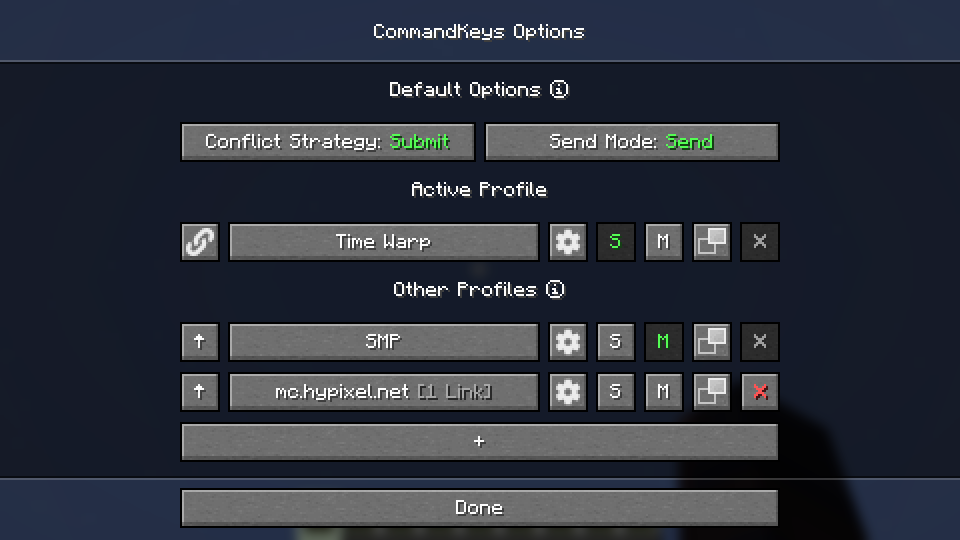
S and M buttons to make a profile the default for singleplayer or multiplayer.K) in-game.Submit: The macro will be ignored, the Minecraft keybind will function normally.Assert: The macro and the Minecraft keybind will both function.Veto: The macro will function, the Minecraft keybind will be cancelled (if possible).Avoid: The macro will not work in-game, but you can still activate it by pressing the keyW,K then W to activate it.Send: All commands for the macro will be sent. You can configure delays between commands.Type: The first command will be typed into the chat box, but not sent.Edit: A GUI will be shown to allow you to enter a replacement for the %edit% placeholder, thenCycle: The commands will be cycled through, with one command sent each time you press the key.Cycle mode, if you need more than one command to be sent for a single key-press, enter/tick freeze,,/say Stopped).Random: A message will be chosen at random and sent each time the key is pressed.Repeat: Like Send, but the macro will be repeated (delay is configurable) until you press theSimple Placeholders
%lastsent%: The most recently-sent message or command in history, if any.%lastcmd%: The most recently-sent command in history, if any.%clipboard%: The contents of the clipboard, if any.%myname%: Minecraft username.%pmsender%: The name of the sender of the most recently-received private message, if any. (%pos%: The integer coordinates of the player (x y z).%x%: The integer X coordinate of the player. Also available for Y and Z.%lpos%: The integer coordinates of the block the player is looking at, if any. Also provides%lx%, %ly%,%lz%.Regex Placeholders
%#(.*)%: Regex Group 1 from the most recently-received message matching the regex following#, if any. Note: regex pattern must have at least 1 capturing group.%clipboard#(.*)%: The contents of the clipboard, if any, verified to match a regex pattern#. This can be used to prevent unintentional exposure of clipboard contents. E.g. use%clipboard#^-?\d+ -?\d+ -?\d+$% to only send the clipboard contents if it's formatted like a%pos([FBLR])(\d+)%: %pos% but offset some number of blocks in a direction relative to the%posL20% to get the%x([+-]\d+)%: %x% but offset some number of blocks. E.g. use %x-10% to get the X%lpos([FBLR])(\d+)%: As per pos above but for the block the player is looking at, if any.%lx([+-]\d+)%: As per x above but for the block the player is looking at, if any.Fabric: Fabric API, ModMenu
NeoForge: None
If you encounter issues, please report on Discord or GitHub.
Project description from Modrinth.
Pick your setup
Choose the version and loader you play, then open the matching release.
Check the dependencies, then try the file in a copied instance before changing a world you care about.
Recent files
commandkeys-fabric-3.3.0-beta.1+26.2-pre-2.jar
31 May 2026
Looking for an older file? The official Modrinth project page is in Resources.
 mod
modBetter Crafts: Dirt Path is a data pack that allows you to craft dirt path [1.16.x - 26.2]
 mod
modBetter Crafts: Nautilus Shell is a data pack that allows you to craft nautilus shell [1.16.x - 26.2]
 mod
modBetter Crafts: Hopper is a data pack that allows you to craft hopper (with barrel) [1.16.x - 26.2]










