Minecraft version
Back to mods 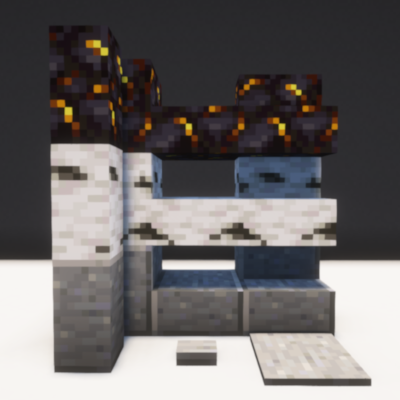
CurseForge · Minecraft mod
Block Shapes
Add New Blocks
Choose a version Pick your version below, then grab the matching file.
Quick answer
Which Block Shapes release should I use?
beta file blockshapes-0.5.jar
Game version 1.20.1
Loader Forge
Block Shapes blockshapes-0.5.jar targets 1.20.1 with Forge. The project page does not say whether this file belongs on the client, dedicated server, or both. No extra mods listed for this file.
Where it goes
Is Block Shapes required on the client, server, or both?
The project page does not say whether this file belongs on the client, dedicated server, or both.
Client Source doesn’t say
Dedicated server Source doesn’t say
Loader for this release Forge
Required install it here Optional supported, not mandatory Not supported do not install here Source doesn’t say do not assume
The source does not explicitly classify this release as client-only or server-only.
What else does Block Shapes blockshapes-0.5.jar need?
blockshapes-0.5.jar. Change the file and its required mods may change too.
This file does not list any required mods. Do not add a library just because a different file uses it.
This file does not list any required or optional mods.
Before you install it
Add Block Shapes without breaking your instance.
Built for Block Shapes blockshapes-0.5.jar. Pick another file and the loader, install side or required mods may change.
- 01
Stick to this file
Use blockshapes-0.5.jar. It targets 1.20.1 with Forge; another release may have different loader, side or dependency requirements.
- 02
Bring the mods it needs
This file does not list any required mods. Do not add a library just because a different file uses it.
- 03
Put it on the correct side
The project page does not say whether this file belongs on the client, dedicated server, or both.
- 04
Pick the file you checked
Use the “Get this file” button beside blockshapes-0.5.jar. It opens that exact file at the source.
About this project
What does Block Shapes add?
Block Shapes adds Slabs, Stairs and Walls that Mojang forgets to implement in the game:
Deepslate (slab, stairs & wall)
Calcite (slab, stairs & wall)
Tuff (slab, stairs & wall)
Dripstone Block (slab, stairs & wall)
Amethyst Block (slab, stairs & wall)
Obsidian (slab, stairs & wall)
Snow Block (slab, stairs & wall)
Netherrack (slab, stairs & wall)
Basalt (slab, stairs & wall)
Polished Basalt (slab, stairs, wall, button & pressure plate)
Smooth Basalt (slab, stairs & wall)
Packed Mud (slab, stairs & wall)
End Stone (slab, stairs & wall)
Quartz Brick (slab, stairs & wall)
Terracota (slab, stairs & wall)
Bone Block (slab, stairs & wall)
Crying Obsidian (slab, stairs & wall)
Gilded Blackstone (slab, stairs & wall)
Cut Sandstone (stairs & wall)
Smooth Stone (stairs & wall)
Cut Red Sandstone (stairs & wall)
Stone (wall)
Polished Granite (wall, button & pressure plate)
Polished Diorite (wall, button & pressure plate)
Polished Andesite (wall, button & pressure plate)
Smooth Quartz (wall)
Smooth Red Sandstone (wall)
Smooth Sandstone (wall)
Purpur Block (wall)
Quartz (wall)
Prismarine brick (wall)
Dark prismarine (wall)
Polished Deepslate (button & pressure plate)
Logs & Stems (slab & stairs)
Stripped Logs & Stems (slab & stairs)
Woods & Hyphaes (slab, stairs & wall)
Stripped Woods & Hyphaes (slab, stairs & wall)
Wools (slab & stairs)
Terracottas (slab, stairs & wall)
Concretes (slab, stairs & wall)
Made with the purpose of making sense of the blocks with their respective shapes, I'm not going to make types like pumpkin wall or watermelon slab :D
PS: The textures are used from the game package, so if you use a different texture they will adapt.
Questions:
- Why no log fences?
I didn't add it since I made a mod with that name.
- Do you plan to add ore blocks (like diamond block) to the mod?
yes, but in another project
- No cut copper blocks?
it's very complicated for me to do that, I just learned that wood/wool blocks can be burned and used as fuel.
Project description from CurseForge.
Pick your setup
Block Shapes by Minecraft version and loader
Choose the version and loader you play, then open the matching release.
Minecraft version
1.19.2
1 loader buildMinecraft version
1.18.2
1 loader buildCheck the dependencies, then try the file in a copied instance before changing a world you care about.
Recent files
Block Shapes versions and loaders
blockshapes-0.5.jar
5 Aug 2024
Client Source doesn’t say Server Source doesn’t say Dependencies No extras listed Listed on Release listing
Check the 1.20.1 · Forge setup 1.20.1Forge beta
blockshapes-0.4.jar
22 Apr 2024
Client Source doesn’t say Server Source doesn’t say Dependencies No extras listed Listed on Release listing
Check the 1.19.2 · Forge setup 1.19.2Forge beta
blockshapes-0.3.jar
13 Dec 2023
Client Source doesn’t say Server Source doesn’t say Dependencies No extras listed Listed on Release listing
Check the 1.19.2 · Forge setup 1.19.2Forge alpha
blockshapes-0.2.jar
5 Sept 2022
Client Source doesn’t say Server Source doesn’t say Dependencies No extras listed Listed on Release listing
Check the 1.18.2 · Forge setup 1.18.2Forge beta
blockshapes-0.1.jar
29 Aug 2022
Client Source doesn’t say Server Source doesn’t say Dependencies No extras listed Listed on Release listing
Check the 1.18.2 · Forge setup 1.18.2Forge beta
Looking for an older file? The official CurseForge project page is in Resources.
 mod
mod CurseForge + Modrinth · Minecraft
Room For Two
Lets you share a bed with a villager or another player.
 mod
mod CurseForge · Minecraft
Epic Fight:BK's Armaments
Adds elden ring movesets and weapons
 mod
mod CurseForge + Modrinth · Minecraft
CustomHitboxLib
A powerful Forge 1.20.1, NeoForge 1.21.1 library that adds true multipart hitboxes to any entity! Override vanilla's single-square limitation and create complex bosses with precise collision using simple JSON Datapacks or the developer API.