Minecraft version
Back to mods 
CurseForge · Minecraft mod
Auto Elytra Flight (Forge/NeoForge)
Controls your elytra flight to gain altitude without using fireworks
Choose a version Pick your version below, then grab the matching file.
Quick answer
Which Auto Elytra Flight (Forge/NeoForge) release matches 1.20?
beta file AutoElytraFlight-1.20-1.0.0-beta.1
Game version 1.20
Loader Forge
Auto Elytra Flight (Forge/NeoForge) AutoElytraFlight-1.20-1.0.0-beta.1 targets 1.20 with Forge. The project page does not say whether this file belongs on the client, dedicated server, or both. No extra mods listed for this file.
Where it goes
Is Auto Elytra Flight (Forge/NeoForge) required on the client, server, or both?
The project page does not say whether this file belongs on the client, dedicated server, or both.
Client Source doesn’t say
Dedicated server Source doesn’t say
Loader for this release Forge
Required install it here Optional supported, not mandatory Not supported do not install here Source doesn’t say do not assume
The source does not explicitly classify this release as client-only or server-only.
What else does Auto Elytra Flight (Forge/NeoForge) AutoElytraFlight-1.20-1.0.0-beta.1 need?
AutoElytraFlight-1.20-1.0.0-beta.1 on 1.20. Every mod below is checked against that same setup.
This file does not list any required mods. Do not add a library just because a different file uses it.
This file does not list any required or optional mods.
Before you install it
Add Auto Elytra Flight (Forge/NeoForge) without breaking your instance.
Built for Auto Elytra Flight (Forge/NeoForge) AutoElytraFlight-1.20-1.0.0-beta.1 on 1.20. Pick another file and the loader, install side or required mods may change.
- 01
Stick to this file
Use AutoElytraFlight-1.20-1.0.0-beta.1. It targets 1.20 with Forge; another release may have different loader, side or dependency requirements.
- 02
Bring the mods it needs
This file does not list any required mods. Do not add a library just because a different file uses it.
- 03
Put it on the correct side
The project page does not say whether this file belongs on the client, dedicated server, or both.
- 04
Pick the file you checked
Use the “Get this file” button beside AutoElytraFlight-1.20-1.0.0-beta.1. It opens that exact file at the source.
About this project
What does Auto Elytra Flight (Forge/NeoForge) add?
This is a Forge Port of Elytra Auto Flight
When flying with the elytra wings and this mod, you can press the assigned (default "R") key to enable "Auto Flight". The auto-flight will modify your pitch (the up-down direction you are looking) to cycle between going down and gaining speed, and going up and gaining alitude. If you start from a high enough point, you will gain about 10 blocks of altitude per "cycle", and can thus fly for as long as your elytra wings have durability.
Pressing R when not flying with the wings will open the settings screen.
When flying, the mod will display a real time graph of your flight profile : 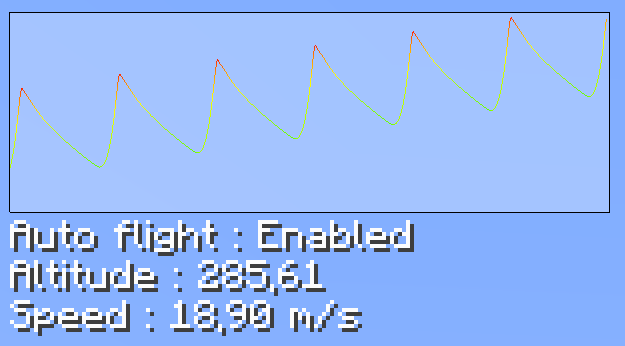
Project description from CurseForge.
Pick your setup
Auto Elytra Flight (Forge/NeoForge) by Minecraft version and loader
Choose the version and loader you play, then open the matching release.
Minecraft version
1.21.1
1 loader buildMinecraft version
1.21
1 loader buildMinecraft version
1.20.6
1 loader buildMinecraft version
1.20.4
1 loader buildMinecraft version
1.20.1
1 loader buildMinecraft version
1.20
1 loader buildMinecraft version
1.19.4
2 loader buildsMinecraft version
1.19.2
1 loader buildMinecraft version
1.18.2
1 loader buildCheck the dependencies, then try the file in a copied instance before changing a world you care about.
Recent files
Auto Elytra Flight (Forge/NeoForge) versions and loaders
AutoElytraFlight-1.20-1.0.0-beta.1
AutoElytraFlight-1.20-1.0.0-beta.1.jar
8 Jun 2023
Client Source doesn’t say Server Source doesn’t say Dependencies No extras listed Listed on Release listing
Check the 1.20 · Forge setup 1.20Forge beta
Looking for an older file? The official CurseForge project page is in Resources.
 mod
CurseForge · Minecraft
No Trade Cycling, Just Pick
Stop rerolling villagers. Press Pick trade and select any 2 trades its profession can offer (max-level enchanted books included). Fast trade and saves time.
 mod
CurseForge · Minecraft
Entity Culling Fabric/Forge
Using async path-tracing to hide BlockEntities/Entities that are not visible
 mod
CurseForge · Minecraft
Corail Tombstone
Keeps safe your inventory items in graves on death with many features for better survivability and exploration, in a medieval fantasy atmosphere related to the decorative graves & the haunting souls