Minecraft version
Back to mods 
CurseForge · Minecraft mod
Autologin | Login Plugins
Auto login so you don't have to enter your password anymore
Choose a version Pick your version below, then grab the matching file.
Quick answer
Which Autologin | Login Plugins release should I use?
Latest stable file Autologin-V1.2.jar
Game version 1.7.10
Loader Forge
Autologin | Login Plugins Autologin-V1.2.jar targets 1.7.10 with Forge. The project page does not say whether this file belongs on the client, dedicated server, or both. No extra mods listed for this file.
Where it goes
Is Autologin | Login Plugins required on the client, server, or both?
The project page does not say whether this file belongs on the client, dedicated server, or both.
Client Source doesn’t say
Dedicated server Source doesn’t say
Loader for this release Forge
Required install it here Optional supported, not mandatory Not supported do not install here Source doesn’t say do not assume
The source does not explicitly classify this release as client-only or server-only.
What else does Autologin | Login Plugins Autologin-V1.2.jar need?
Autologin-V1.2.jar. Change the file and its required mods may change too.
This file does not list any required mods. Do not add a library just because a different file uses it.
This file does not list any required or optional mods.
Before you install it
Add Autologin | Login Plugins without breaking your instance.
Built for Autologin | Login Plugins Autologin-V1.2.jar. Pick another file and the loader, install side or required mods may change.
- 01
Stick to this file
Use Autologin-V1.2.jar. It targets 1.7.10 with Forge; another release may have different loader, side or dependency requirements.
- 02
Bring the mods it needs
This file does not list any required mods. Do not add a library just because a different file uses it.
- 03
Put it on the correct side
The project page does not say whether this file belongs on the client, dedicated server, or both.
- 04
Pick the file you checked
Use the “Get this file” button beside Autologin-V1.2.jar. It opens that exact file at the source.
About this project
What does Autologin | Login Plugins add?
Tired of joining your favorite server and running /login? Well, here you go.
This is a CLIENT SIDE mod where you can put your password in your config folder. Once you do that, all you need to do is enable it *in the config as well* and join the server! It will always run /login <password> on join, so if you change your password make sure to change your config password too.
This mod has only been tested on 1.7.10 AuthMe. It may work for other versions, but I doubt it.
Check out my other projects!
Dragon Craft Super Modpack: https://www.curseforge.com/minecraft/modpacks/dragon-craft-super
DCSMod: https://www.curseforge.com/minecraft/mc-mods/dcs-mod-dragon-block-c\
Support me on Patreon: https://www.patreon.com/dcsmod
HOW TO USE:
Download
Put in mods folder
Close minecraft and open config folder
Open autologin.cfg
Turn the "false" to "true"
Change "Password123" to your password
Save and launch minecraft
Join and login!
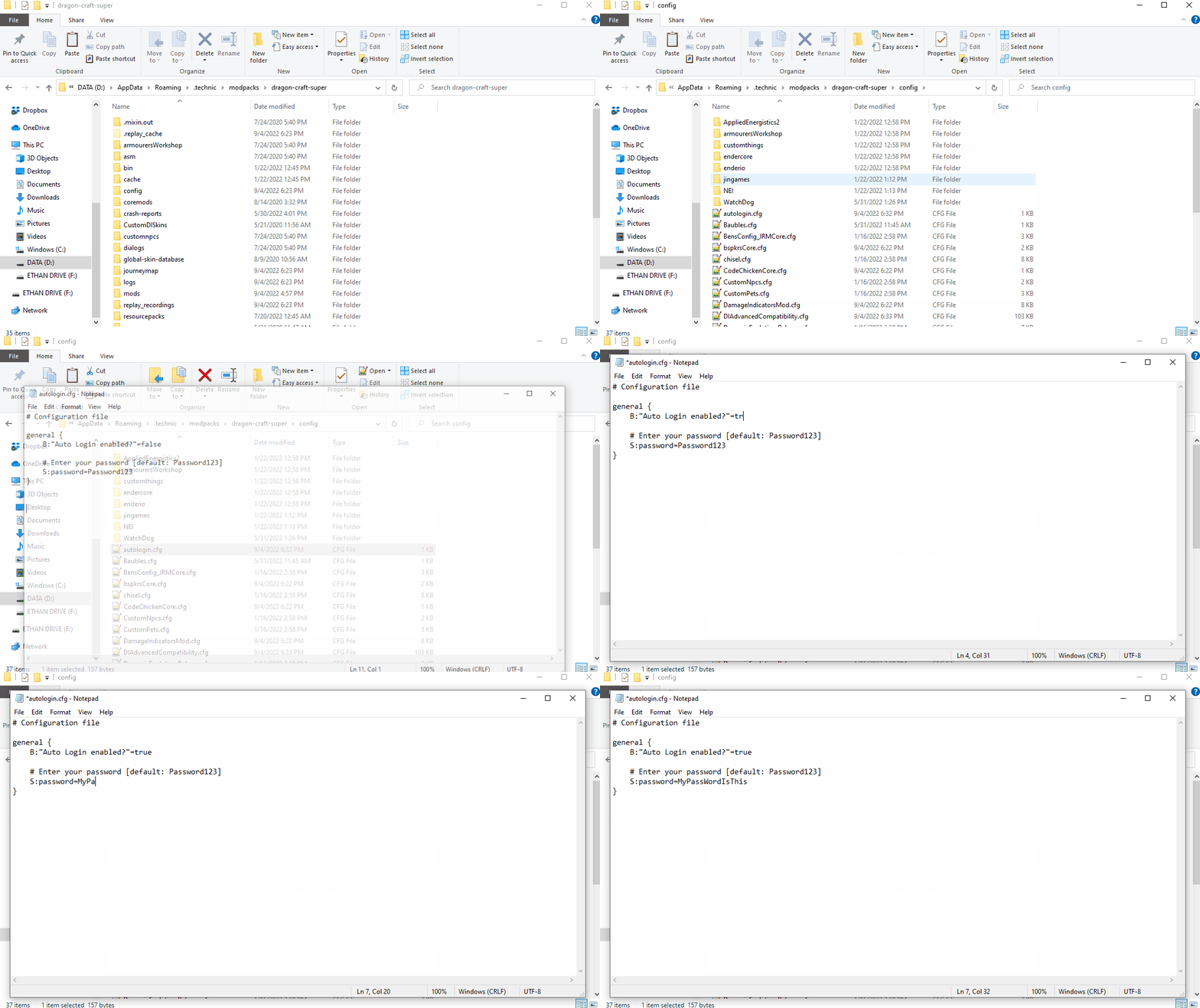
Project description from CurseForge.
Pick your setup
Autologin | Login Plugins by Minecraft version and loader
Choose the version and loader you play, then open the matching release.
Check the dependencies, then try the file in a copied instance before changing a world you care about.
Recent files
Autologin | Login Plugins versions and loaders
Autologin-V1.2.jar
22 Sept 2022
Client Source doesn’t say Server Source doesn’t say Dependencies No extras listed Listed on Release listing
Check the 1.7.10 · Forge setup Forge1.7.10 release
Autologin-V1.1.jar
18 Sept 2022
Client Source doesn’t say Server Source doesn’t say Dependencies No extras listed Listed on Release listing
Check the 1.7.10 · Forge setup Forge1.7.10 release
Autologin.jar
4 Sept 2022
Client Source doesn’t say Server Source doesn’t say Dependencies No extras listed Listed on Release listing
Check the 1.7.10 · Forge setup Forge1.7.10 release
Looking for an older file? The official CurseForge project page is in Resources.
 mod
mod CurseForge · Minecraft
Dimension Leak Fix
Frees the worlds and singleplayer servers the game leaves behind when other mods keep a reference to them. Fabric, Forge and NeoForge, client side.
 mod
mod CurseForge · Minecraft
Cursed Gold
Added 70+ crafting recipes and several intermediate items.
 mod
mod CurseForge · Minecraft
Dimensional Quarry
Yet another quarry mod to gather resources, this one, however, uses its own separate virtual dimension and seed to mine in, causing zero damage to your Overworld or existing dimensions.