Minecraft version
Back to mods 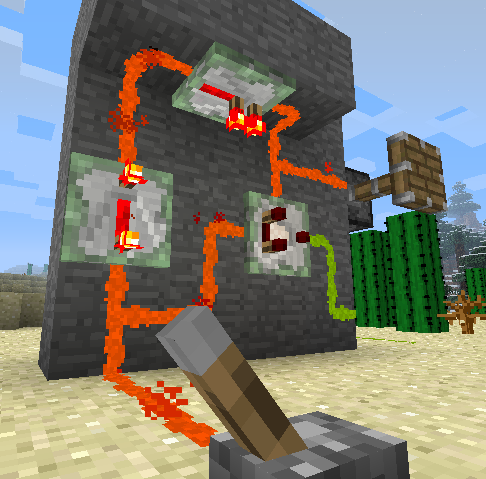
CurseForge · Minecraft mod
Redstone Paste
Adds a paste form of redstone, which can stick to various surfaces.
Choose a version Pick your version below, then grab the matching file.
Quick answer
Which Redstone Paste release should I use?
Latest stable file Redstone Paste v1.7.5 (for Minecraft 1.12.x)
Game version 1.12.1, 1.12, 1.12.2
Loader Not required
Redstone Paste v1.7.5 (for Minecraft 1.12.x) targets 1.12.1, 1.12, 1.12.2. The project page does not say whether this file belongs on the client, dedicated server, or both. No extra mods listed for this file.
Where it goes
Is Redstone Paste required on the client, server, or both?
The project page does not say whether this file belongs on the client, dedicated server, or both.
Client Source doesn’t say
Dedicated server Source doesn’t say
Loader for this release No loader listed
Required install it here Optional supported, not mandatory Not supported do not install here Source doesn’t say do not assume
The source does not explicitly classify this release as client-only or server-only.
What else does Redstone Paste v1.7.5 (for Minecraft 1.12.x) need?
Redstone Paste v1.7.5 (for Minecraft 1.12.x). Change the file and its required mods may change too.
This file does not list any required mods. Do not add a library just because a different file uses it.
This file does not list any required or optional mods.
Before you install it
Add Redstone Paste without breaking your instance.
Built for Redstone Paste v1.7.5 (for Minecraft 1.12.x). Pick another file and the loader, install side or required mods may change.
- 01
Stick to this file
Use Redstone Paste v1.7.5 (for Minecraft 1.12.x). It targets 1.12.1, 1.12, 1.12.2; another release may have different loader, side or dependency requirements.
- 02
Bring the mods it needs
This file does not list any required mods. Do not add a library just because a different file uses it.
- 03
Put it on the correct side
The project page does not say whether this file belongs on the client, dedicated server, or both.
- 04
Pick the file you checked
Use the “Get this file” button beside Redstone Paste v1.7.5 (for Minecraft 1.12.x). It opens that exact file at the source.
About this project
What does Redstone Paste add?
Redstone Paste Mod adds a new form of redstone dust into the game, allowing you to transmit redstone signals across a variety of surfaces, including ceilings and walls. Also included are sticky repeaters and sticky comparators, to keep your redstone current strong or do complex logic no matter where you decide to run your paste.
The placement of the paste is uniquely different than normal redstone, however. It can be applied to any of the four directions of a block face, allowing you to create compact redstone paths, and only direct current in the directions you desire. Individual segments can be removed by clicking them while highlighted, or you can remove the entire face at once by clicking the center area.
Holding the sneak key allows you to place both the segment you've selected as well as the one opposite. If sneaking when placing paste in the center area, it will place paste in all four directions of the face.
Paste can interact with dust when you explicitly connect to it. Otherwise it can run side by side without transmitting redstone current between them.
You can hide paste, sticky repeaters, and sticky comparators using half-slabs by right-clicking them while holding one. A ghost image of the slab will appear when it's possible to cover it. You can even place them vertically! To remove it, simply break with your hand or any tool. Note that only one Redstone Paste object (paste, sticky repeater, sticky comparator) is allowed within a block space in order to be covered with a slab.
This feature works with slabs from any mod which derive from Minecraft's standard slab classes. Biomes O' Plenty is tested to be compatible.
Since the stone slab has a unique texture compared to stone blocks, it will instead take the appearance of a stone block when applied to paste to blend in better.
The crafting recipe is shapeless, consisting of simply a piece of redstone dust and a slimeball, yielding four pieces of paste. The config file allows you to specify how many pieces of paste the recipe gives, as well as providing an alternate recipe of a slimeball surrounded by redstone dust. You might wish to use these settings to better balance your game, depending on factors such as other mods you have installed, availability of slimeballs, or the intended focus of your game.
The recipe for sticky repeaters is equally simple.
As are sticky comparators.
Project description from CurseForge.
Pick your setup
Redstone Paste by Minecraft version and loader
Choose the version and loader you play, then open the matching release.
Minecraft version
1.12.1
1 loader buildMinecraft version
1.12
1 loader buildMinecraft version
1.11.2
1 loader buildMinecraft version
1.10.2
1 loader buildMinecraft version
1.10
1 loader buildMinecraft version
1.9.4
1 loader buildMinecraft version
1.9
1 loader buildMinecraft version
1.8.9
1 loader buildMinecraft version
1.8.8
1 loader buildMinecraft version
1.8
1 loader buildMinecraft version
1.7.10
1 loader buildShowing the newest 12 of 16 game versions. Older files are in the list below.
Check the dependencies, then try the file in a copied instance before changing a world you care about.
Recent files
Redstone Paste versions and loaders
Redstone Paste v1.7.5 (for Minecraft 1.12.x)
redstonepaste-mc1.12-1.7.5.jar
9 Sept 2017
Client Source doesn’t say Server Source doesn’t say Dependencies No extras listed Listed on Release listing
Check the 1.12.2 setup 1.12.11.121.12.2 release
Redstone Paste v1.7.4 (for Minecraft 1.11.2)
redstonepaste-mc1.11.2-1.7.4.jar
19 Feb 2017
Client Source doesn’t say Server Source doesn’t say Dependencies No extras listed Listed on Release listing
Check the 1.11.2 setup 1.11.2 release
Redstone Paste v1.7.4
redstonepaste-mc1.9.4-1.7.4.jar
25 Jun 2016
Client Source doesn’t say Server Source doesn’t say Dependencies No extras listed Listed on Release listing
Check the 1.10.2 setup 1.9.41.10.21.10 release
Redstone Paste v1.7.3 (for Minecraft 1.9)
redstonepaste-mc1.9-1.7.3.jar
15 Apr 2016
Client Source doesn’t say Server Source doesn’t say Dependencies No extras listed Listed on Release listing
Check the 1.9 setup Redstone Paste v1.7.2 (for Minecraft 1.8.8/1.8.9)
redstonepaste-mc1.8.8-1.7.2.jar
10 Jan 2016
Client Source doesn’t say Server Source doesn’t say Dependencies No extras listed Listed on Release listing
Check the 1.8.9 setup 1.8.81.8.9 release
Redstone Paste v1.7.1 (for Minecraft 1.8)
redstonepaste-mc1.8-1.7.1.jar
28 Jan 2015
Client Source doesn’t say Server Source doesn’t say Dependencies No extras listed Listed on Release listing
Check the 1.8 setup 1.8 release
Redstone Paste v1.7 (for Minecraft 1.8)
redstonepaste-mc1.8-1.7.jar
18 Jan 2015
Client Source doesn’t say Server Source doesn’t say Dependencies No extras listed Listed on Release listing
Check the 1.8 setup 1.8 release
RedstonePasteMod-1.7.10-1.6.2.jar
10 Aug 2014
Client Source doesn’t say Server Source doesn’t say Dependencies No extras listed Listed on Release listing
Check the 1.7.10 setup 1.7.10 release
RedstonePasteMod-1.7.2-1.6.jar
15 Feb 2014
Client Source doesn’t say Server Source doesn’t say Dependencies No extras listed Listed on Release listing
Check the 1.7.2 setup 1.7.2 release
RedstonePasteMod1.5.1.zip
17 Nov 2013
Client Source doesn’t say Server Source doesn’t say Dependencies No extras listed Listed on Release listing
Check the 1.6.4 setup 1.6.41.6.2 release
RedstonePasteMod1.5_152.zip
17 Nov 2013
Client Source doesn’t say Server Source doesn’t say Dependencies No extras listed Listed on Release listing
Check the 1.5.2 setup 1.5.2 release
RedstonePasteMod1.5.zip
1 Nov 2013
Client Source doesn’t say Server Source doesn’t say Dependencies No extras listed Listed on Release listing
Check the 1.6.4 setup 1.6.41.6.2 release
Looking for an older file? The official CurseForge project page is in Resources.