Fabric API Needed by Useless Reptile 0.14.0-26.2
requiredMatching file found Matched file: [26.2] Fabric API 0.156.0+26.2
CurseForge · Minecraft mod
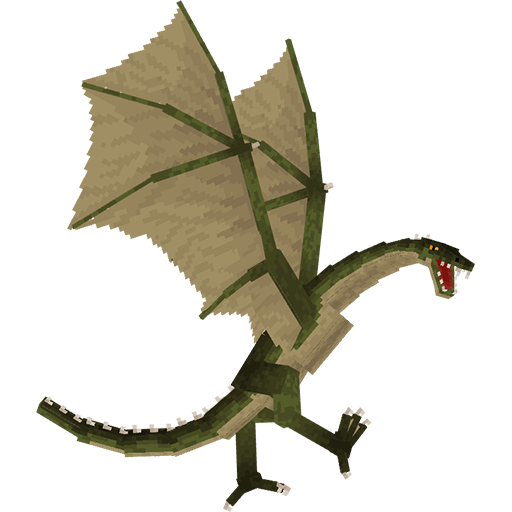
Adds a dragons that you can tame (and sometimes ride)
Quick answer
Useless Reptile 0.14.0-26.2 targets 26.2 with Fabric. The project page does not say whether it belongs on the client. The project page does not say whether it belongs on the dedicated server. All 3 required mods have matching files.
Where it goes
The project page does not say whether it belongs on the client. The project page does not say whether it belongs on the dedicated server.
The source does not explicitly classify this release as client-only or server-only.
Useless Reptile 0.14.0-26.2. Change the file and its required mods may change too.
Install Fabric API, YetAnotherConfigLib, YetAnotherConfigLib (YACL) first. We found matching files for this game-version and loader setup.
We only count dependency files that match this setup. A file for another loader does not fill the gap.
Before you install it
Built for Useless Reptile 0.14.0-26.2. Pick another file and the loader, install side or required mods may change.
Use Useless Reptile 0.14.0-26.2. It targets 26.2 with Fabric; another release may have different loader, side or dependency requirements.
Install Fabric API, YetAnotherConfigLib, YetAnotherConfigLib (YACL) first. We found matching files for this game-version and loader setup.
The project page does not say whether it belongs on the client. The project page does not say whether it belongs on the dedicated server.
Use the “Get this file” button beside Useless Reptile 0.14.0-26.2. It opens that exact file at the source.
About this project
Useless Reptile is a Fabric mod that aimed to bring some dragons into your world that you can tame (or kill).
Warning: mod is Work-in-Progress and a lot of stuff may change in the future updates.
The following description is relevant for mod version 0.13.x
To report issue with mod, either do that on Discord Server or GitHub Issues page
Minecraft version support:
Versions between 26.1 and latest are automatically discontinued when new game version is released. Everything below 26.1 is also not supported
If you ask for backport, I'll steal your kneecaps
YetAnotherConfigLib and Fabric API are required.
Mod versions below 0.12.0 require Geckolib.
For mod versions below 0.3.0 Cloth Config API is required instead of YetAnotherConfigLib.
Some mod versions for 1.19.2 may require AzureLib instead of Geckolib
Note: older versions may not contain all features listed.
Swamp Wyvern - can be found on swamps and tamed with 1-2 stacks of raw or cooked chicken or 4 stacks of any other meat (rotten flesh included). You can ride tamed Swamp Wyverns with use of a saddle. You can also get acid from it by right-clicking with empty bottle and use the acid later as any other potion. Cannot equip armor, but can equip saddle that can hold 2 passengers.
Can shoot acid blasts with mediocre accuracy and bite.
Moleclaw - can be found in caves and tamed with 0.5-1 stacks of beetroot. Needs saddle to be ridden, useful for digging. Afraid of light, but can ignore it if Moleclaw Helmet is equipped.
By default can only destroy blocks that wooden pickaxe can break. You can use strength or weakness potions to break blocks requiring stronger tool or to completely prevent block breaking.
Has only melee AoE attacks.
River Pikehorn - can be found near non-frozen rivers and beaches. You can tame it with bucket of tropical fish or 4-8 tropical fish (as item). Also you can use flute for extra level of control over your Pikehorns, like sending them to fish for you or attack some mob. Oh, and also you can put one on your head (you have to crouch and click on block with to put dragon on and off).
Has only melee attacks.
Lightning Chaser - can appear during thunderstorms near any player. To tame it you have to defeat it in a fight by taking down to low HP and successfully hitting it with lightning at least 3 times (you can use Trident with Channelling enchantment for that). Can be ridden with saddle on.
Lightning breath attacks can trigger same effect as normal lightning strike (i.e. transforming Villagers into Witches, creating charged Creepers, e.t.c.), but without setting target on fire. And also destroys blocks. Shockwave attack can be used to deflect projectiles and push back mobs. Shockwave can be used only if dragon is flying, otherwise dragon can use bite.
Both shockwave and lightning breath inflict shock effect that decreases attack and movement speed and obscures vision.
Magmamuncher - can be found in The Nether near lava lakes. To tame you have to give it 4-12 Blaze Rods. From time to time will attempt to dig up Magma Blocks, turning those into Depleted Magma blocks and sometimes digging up coal in process. Depleted Magma can turn back into magma over time if placed in either The Nether or near lava.
Dragon itself can be put on head similarly to River Pikehorn. When on head, if it has any furnace fuel items in inventory, it can consume those to apply Fire Resistance effect on its owner if they manage to catch on fire.
Dragon has only melee attacks with chance to set target on fire. Immune to fire.
Once you open inventory, you can notice several buttons on the left. This is dragon's command menu. Each button does the following:
You can add custom dragon variants and dragon equipment via power of data and resource packs, that Mojang gladly made very useful for mod makers too.
You can read more about those features and see examples here:
Note: if you need to see example packs for another game version, change branch to one with name that matches your game version
Q: I found a bug! How can I report it?
A: If you found a bug, please report it in #mod-feedback-bug-reports at the Discord server, following the instructions.
Q: I have some ideas for this mod, where I can leave one?
A: Leave your ideas at the Discord server. Can't say that I'll listen to all of them, but who knows me.
Q: I want to share my resource/data pack that I made for this mod, where I can do so?
A: You can promote your packs at the Discord server in #mod-user-generated-content as well as upload to other platforms.
Q: Can you backport mod to 1.18/1.16/1.7.10/Beta 1.0/insert-some-old-version-of-your-choice-here?
A: No. They are old, lack performance and features that latest versions have
Q: Can you port this mod to Forge/other mod loader?
A: I'm not going to do it myself because this is too much for me, and I'm personally not a big fan of Forge bloatness (kinda includes NeoForge too). But I'm open for anyone who is wishing to make port themselves.
But if you wish to use this mod with NeoForge here and now, you can use Sinytra Connector. Warning: no complaints about incorrect work of the mod in this case will be reviewed. I'll accept bug reports only if you were using mod on Fabric/Quilt
Q: When is update?
A: I can't give any ETA on any update. I have real life stuff to deal with (more specifically my study at university) and I never know how it'll turn out and how much of free time I'll have. Also keep in mind there's only one person (me, the owner) working on this project.
You are allowed:
Mod is currently fully translated into the following languages:
Following translations are presented in the mod, but may be outdated or/and not complete:
If you want to contribute into translating the feel free to suggest your help at Discord Server :)
Alternatively, you can make Pull Request to dev branch with translation file ready
Project description from CurseForge.
Pick your setup
Choose the version and loader you play, then open the matching release.
Showing the newest 12 of 19 game versions. Older files are in the list below.
Check the dependencies, then try the file in a copied instance before changing a world you care about.
Recent files
useless-reptile-0.14.0-26.2.jar
3 Aug 2026
useless-reptile-0.14.0-26.1.2.jar
3 Aug 2026
useless-reptile-0.13.5-26.2.jar
5 Jul 2026
useless-reptile-0.13.5-26.1.2.jar
5 Jul 2026
useless-reptile-0.13.4-26.2.jar
20 Jun 2026
useless-reptile-0.13.4-26.1.2.jar
20 Jun 2026
useless-reptile-0.13.3-26.2.jar
16 Jun 2026
useless-reptile-0.13.3-26.1.2.jar
16 Jun 2026
useless-reptile-0.13.2-26.1.jar
26 Apr 2026
useless-reptile-0.13.1-26.1.jar
22 Apr 2026
useless-reptile-0.13.0-26.1.jar
24 Mar 2026
useless-reptile-0.12.3-1.21.11.jar
5 Jan 2026
Looking for an older file? The official CurseForge project page is in Resources.
 mod
modMobs are attracted to the exact spot where you send a chat message.
 mod
modTame phantoms and ride them. Lead one, feed it raw fish, then saddle up and fly. Craft Phantom Armor to keep it alive in daylight. Tamed phantoms circle their owner and never despawn.
 mod
modA lightweight mod that adds configuration options to limit elytra flight speed and change firework boost strength and duration.