Minecraft version
Back to mods 
CurseForge · Minecraft mod
Inmis Backpack Retextured
Retextured version of the Inmis back pack mod
Choose a version Pick your version below, then grab the matching file.
Quick answer
Which Inmis Backpack Retextured release should I use?
Latest stable file inmis_retextured-2.7.0-1.19.jar
Game version 1.19.3, 1.19.2, 1.19.1
Loader Fabric
Inmis Backpack Retextured inmis_retextured-2.7.0-1.19.jar targets 1.19.3, 1.19.2, 1.19.1 with Fabric. The project page does not say whether this file belongs on the client, dedicated server, or both. No extra mods listed for this file.
Where it goes
Is Inmis Backpack Retextured required on the client, server, or both?
The project page does not say whether this file belongs on the client, dedicated server, or both.
Client Source doesn’t say
Dedicated server Source doesn’t say
Loader for this release Fabric
Required install it here Optional supported, not mandatory Not supported do not install here Source doesn’t say do not assume
The source does not explicitly classify this release as client-only or server-only.
What else does Inmis Backpack Retextured inmis_retextured-2.7.0-1.19.jar need?
inmis_retextured-2.7.0-1.19.jar. Change the file and its required mods may change too.
This file does not list any required mods. Do not add a library just because a different file uses it.
This file does not list any required or optional mods.
Before you install it
Add Inmis Backpack Retextured without breaking your instance.
Built for Inmis Backpack Retextured inmis_retextured-2.7.0-1.19.jar. Pick another file and the loader, install side or required mods may change.
- 01
Stick to this file
Use inmis_retextured-2.7.0-1.19.jar. It targets 1.19.3, 1.19.2, 1.19.1 with Fabric; another release may have different loader, side or dependency requirements.
- 02
Bring the mods it needs
This file does not list any required mods. Do not add a library just because a different file uses it.
- 03
Put it on the correct side
The project page does not say whether this file belongs on the client, dedicated server, or both.
- 04
Pick the file you checked
Use the “Get this file” button beside inmis_retextured-2.7.0-1.19.jar. It opens that exact file at the source.
About this project
What does Inmis Backpack Retextured add?
Inmis Backpack Mod Retextured This mod for fabric and needs to be installed both server side and client to work for multiplayer and it expands storage with various backpack sizes, created from the Inmis Backpack Mod and replaces the 2D models and tweaks some crafting recipes, You do NOT need to install the original mod along side this as this mod is standalone you only need the Fabric API
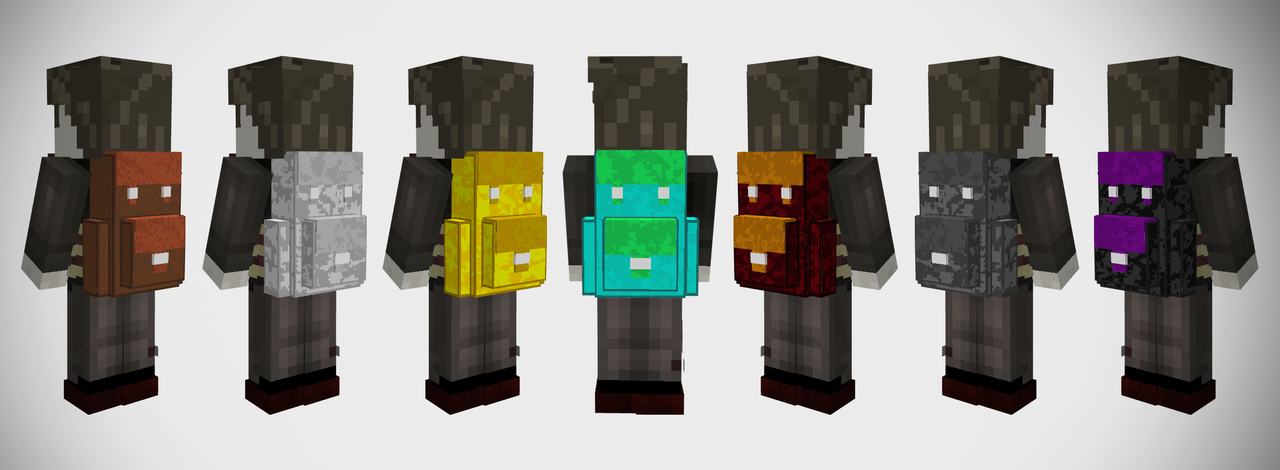
By default right_clicking with a backpack in your hand to open it or by pressing B to open from your inventory or chestplate armor slot, this can be changed in your control settings.
Compatibility
If Tinkers is installed as well you are able to use the Tinkers slot to equip the backpack, For viewing the contents without opening ShulkerBoxTooltip works great for this.
Crafting

Discord I have since moved away from using fabric mods as I maintain a vanilla-esc networking server with a good friend so if you have any questions about the mod or want to support us you can find me at Nomad Nation where you can open a ticket or just @Just__Ju.
GitHub This project was originally maintained from GitHub, where under the raw files branch you will find all the resources used to update the original mod, there you will also find a tutorial on how to create your very own models and I would love to see what you have created so if you have created a model and would like it to be included in the downloads section of this curseforge page please open a issue on github with your model files and credit will of course be given.
Inmis Retextured is under the MIT licence
Project description from CurseForge.
Pick your setup
Inmis Backpack Retextured by Minecraft version and loader
Choose the version and loader you play, then open the matching release.
Minecraft version
1.19.2
1 loader buildMinecraft version
1.19.1
1 loader buildMinecraft version
1.19
1 loader buildMinecraft version
1.18.2
1 loader buildMinecraft version
1.18.1
1 loader buildCheck the dependencies, then try the file in a copied instance before changing a world you care about.
Recent files
Inmis Backpack Retextured versions and loaders
inmis_retextured-2.7.0-1.19.jar
25 Oct 2022
Client Source doesn’t say Server Source doesn’t say Dependencies No extras listed Listed on Release listing
Check the 1.19.3 · Fabric setup 1.19.3Fabric1.19.21.19.1 release
inmis_retextured-2.5.2-1.18.2.jar
25 Oct 2022
Client Source doesn’t say Server Source doesn’t say Dependencies No extras listed Listed on Release listing
Check the 1.18.2 · Fabric setup Fabric1.18.2 release
inmis_retexured-2.5.1-1.18.1.jar
25 Oct 2022
Client Source doesn’t say Server Source doesn’t say Dependencies No extras listed Listed on Release listing
Check the 1.18.1 · Fabric setup 1.18.1Fabric release
Looking for an older file? The official CurseForge project page is in Resources.
 mod
CurseForge + Modrinth · Minecraft
Actual Shelf Mushrooms
Makes the shelf mushroom an actual shelf!
 mod
CurseForge · Minecraft
Ocean's Delight: Classic Edition
Turn the ocean's bounty into delicious seafood dishes! A Farmer's Delight addon for Forge 1.7.10 and 1.12.2.
 mod
CurseForge · Minecraft
End's Delight: Classic Edition
Discover strange ingredients and exotic meals from the End! A Farmer's Delight addon for Forge 1.7.10 and 1.12.2.