Collective Needed by Biome Spawn Point 1.20-2.0-forge+fabric
requiredNo matching file
CurseForge · Minecraft mod
🌲 Allows specifying which biome and dimension players will spawn in on new world creation.
Quick answer
Biome Spawn Point 1.20-2.0-forge+fabric targets 1.20 with Fabric, Forge, Quilt. Do not install it on the client. It must be installed on the dedicated server. 1 required mod needs a matching file.
Where it goes
Do not install it on the client. It must be installed on the dedicated server.
This file is marked server-only.
1.20-2.0-forge+fabric on 1.20. Every mod below is checked against that same setup.
Install Collective first, but 1 required mod has no matching file for this setup. Do not mix loader builds to force a match.
We only count dependency files that match this setup. A file for another loader does not fill the gap.
Before you install it
Built for Biome Spawn Point 1.20-2.0-forge+fabric on 1.20. Pick another file and the loader, install side or required mods may change.
Use 1.20-2.0-forge+fabric. It targets 1.20 with Fabric, Forge, Quilt; another release may have different loader, side or dependency requirements.
Install Collective first, but 1 required mod has no matching file for this setup. Do not mix loader builds to force a match.
Do not install it on the client. It must be installed on the dedicated server.
Use the “Get this file” button beside 1.20-2.0-forge+fabric. It opens that exact file at the source.
About this project


Biome Spawn Point allows specifying in which biome players should spawn when a new world is generated. This will work for vanilla biomes, as well as modded biomes. The spawn biomes can be picked on the Create World screen, in the World tab. Or for all new worlds via the 'spawnBiomes' config option, which also works on servers. Each biome can be given a weight, a higher weight is picked more often.
Biomes of other dimensions can be used too. Pick a Nether, End or modded biome, and the world spawn will be set in that dimension.
The spawn point is placed on land and a bit away from the biome's edge, so a beach that continues into the sea won't leave you in the water. The biome is picked using the world seed, so the same seed gives the same spawn point.
The bonus chest world generation feature is compatible. If enabled, the bonus chest will be placed around the biome spawn position.
This mod is compatible with Village Spawn Point. With both installed, players spawn in a village inside the chosen biome, if one can be found nearby, using Village Spawn Point's village settings.


All available config options:
spawnBiomes default ""
The biomes new worlds spawn in, a higher weight is picked more often. A biome from another dimension, modded ones included, moves the spawn there.
biomeSearchRadius default 6400, min 256, max 30000
How far from the center of the world (x=0, z=0), in blocks, the mod searches for one of the spawn biomes. A larger radius finds rarer biomes, but makes creating a new world take longer.
minimumDistanceFromBiomeEdge default 16, min 0, max 128
How far inside the biome, in blocks, the spawn point should be, so players don't spawn just outside of it. When no spot that far inside the biome is found, a spot closer to the edge is used.
preferSpawningOnLand default true
Whether the spawn point should be on land when the chosen biome also exists under water, like beaches that continue into the sea. A spot in water is only used when the biome has no land nearby.

Both '/biomespawnpoint' and '/bsp' can be used.
/bsp usage - Shows the usage of commands.
/bsp enable <biome> - Adds a biome to the spawn biomes.
/bsp disable <biome> - Removes a biome from the spawn biomes.
/bsp repick - Moves the world spawn point to a random new spot in one of the enabled biomes.
/bsp reset - Moves the world spawn point to where a new world with the same seed would place it.

Pick the spawn biomes on the Create World screen, in the World tab: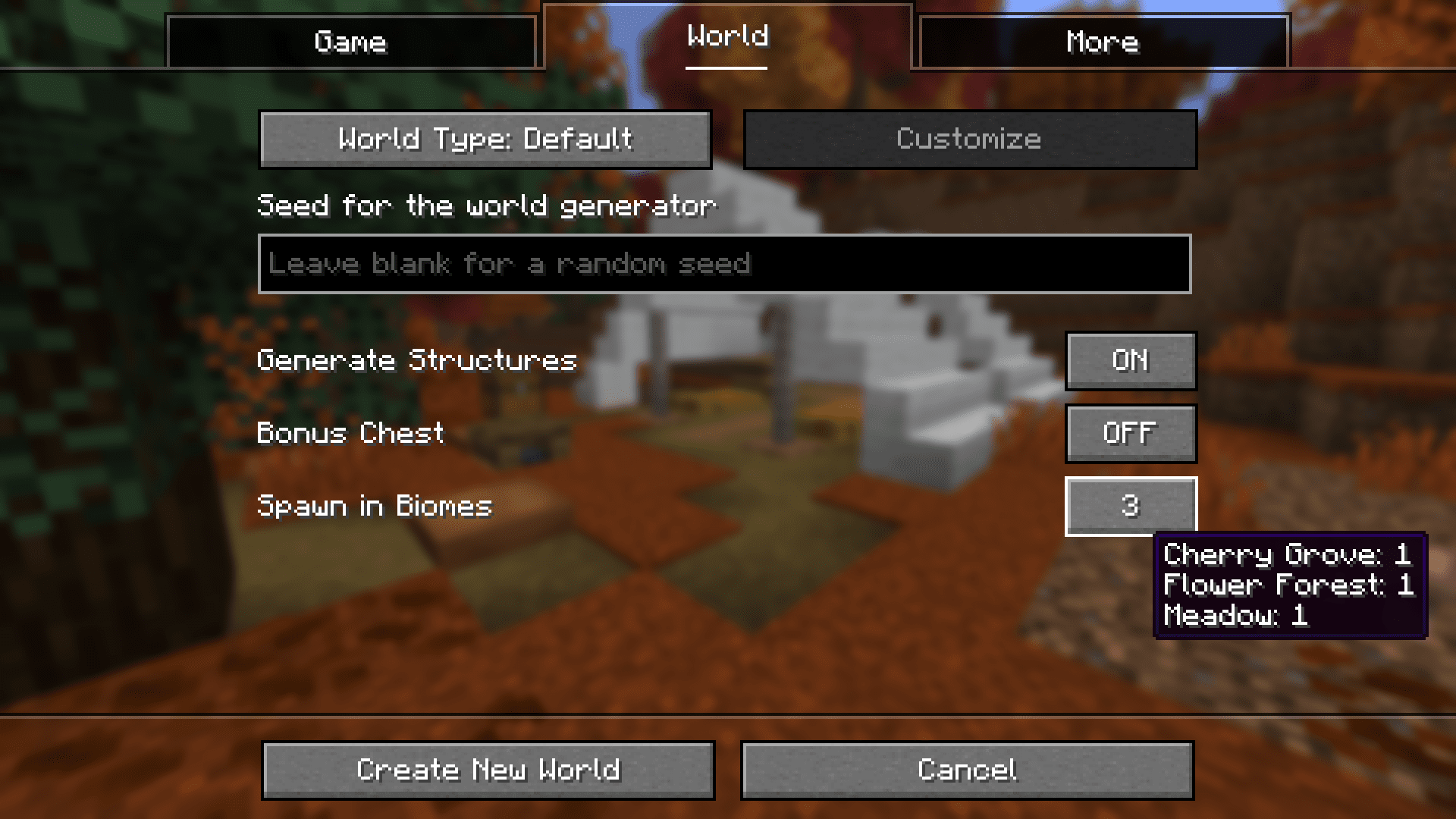

You may freely use this mod in any modpack, as long as the download remains hosted within the CurseForge or Modrinth ecosystem.
Serilum.com contains an overview and more information on all mods available.
Comments are disabled as I'm unable to keep track of them across so many separate mod pages.
For issues, ideas, suggestions or anything else there is the Github repo. Thanks!
Project description from CurseForge.
Pick your setup
Choose the version and loader you play, then open the matching release.
Showing the newest 12 of 29 game versions. Older files are in the list below.
Check the dependencies, then try the file in a copied instance before changing a world you care about.
Recent files
biomespawnpoint-1.20.0-2.0.jar
8 Jun 2023
Looking for an older file? The official CurseForge project page is in Resources.
 mod
A Vanilla+ Snow & Frost Update Survival Experience for Minecraft - sister mod of Scorchful!
 mod
Create easily NPCs with dialogs for your world or for your mods.
 mod
Treecapitator and veinminer in one: cut one log and the whole tree falls, mine one ore and the whole vein follows. Felled trees replant themselves, drops land in one pile, builds stay safe, tools never break.