Minecraft version
Back to mods 
CurseForge · Minecraft mod
Potion Blender
Potion Blender is a small mod to merge potion effects into one item, allowing for interesting combinations.
Choose a version Pick your version below, then grab the matching file.
Quick answer
Which Potion Blender release matches 1.19.3 Forge?
Best match for your filters Potion-Blender-1.19.3-FORGE-1.1.0.jar
Game version 1.19.3
Loader Forge
Potion Blender Potion-Blender-1.19.3-FORGE-1.1.0.jar targets 1.19.3 with Forge. The project page does not say whether this file belongs on the client, dedicated server, or both. No extra mods listed for this file.
Where it goes
Is Potion Blender required on the client, server, or both?
The project page does not say whether this file belongs on the client, dedicated server, or both.
Client Source doesn’t say
Dedicated server Source doesn’t say
Loader for this release Forge
Required install it here Optional supported, not mandatory Not supported do not install here Source doesn’t say do not assume
The source does not explicitly classify this release as client-only or server-only.
What else does Potion Blender Potion-Blender-1.19.3-FORGE-1.1.0.jar need?
Potion-Blender-1.19.3-FORGE-1.1.0.jar on 1.19.3 Forge. Every mod below is checked against that same setup.
This file does not list any required mods. Do not add a library just because a different file uses it.
This file does not list any required or optional mods.
Before you install it
Add Potion Blender without breaking your instance.
Built for Potion Blender Potion-Blender-1.19.3-FORGE-1.1.0.jar on 1.19.3 Forge. Pick another file and the loader, install side or required mods may change.
- 01
Stick to this file
Use Potion-Blender-1.19.3-FORGE-1.1.0.jar. It targets 1.19.3 with Forge; another release may have different loader, side or dependency requirements.
- 02
Bring the mods it needs
This file does not list any required mods. Do not add a library just because a different file uses it.
- 03
Put it on the correct side
The project page does not say whether this file belongs on the client, dedicated server, or both.
- 04
Pick the file you checked
Use the “Get this file” button beside Potion-Blender-1.19.3-FORGE-1.1.0.jar. It opens that exact file at the source.
About this project
What does Potion Blender add?
Potion Blender
Overview
Potion Blender is a small mod to merge potion effects into one item, allowing for interesting combinations.
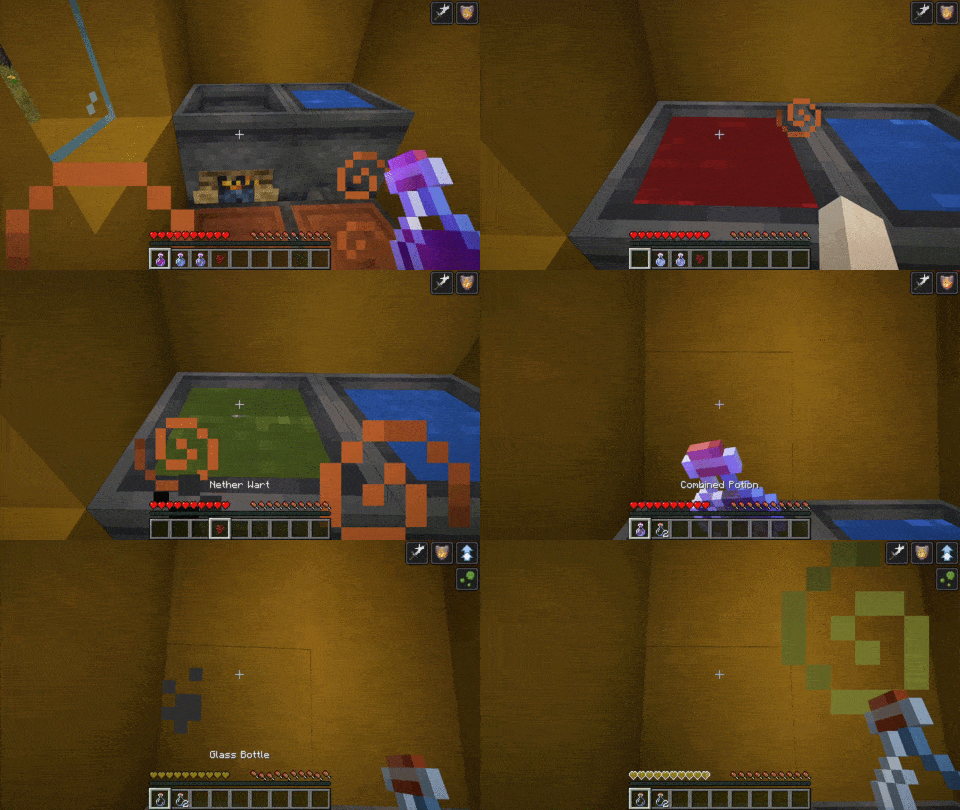
How to use
1 - Cauldron
First, you need to make a special cauldron. Do so by right-clicking a campfire (or soulfire) with a vanilla cauldron.
2 - Starting to blend
Then, throw a potion into the cauldron. It can be any vanilla potion that is not Splash or Lingering. The potion effects will be the base of your combined brew. You can then add up to two more potions (neither splash nor lingering) to add their effects to the final product.
Note that throwing any combined potion into the cauldron is strongly discouraged
3 - The final ingredient
You may choose one of these three ingredients to create a combined potion of the following type :
- Nether wart -> Normal potion
- Gunpowder -> Splash potion
- Dragon Breath -> Lingering potion
Please wait for the brewing cauldron to perform its magic and grab your combined brew!
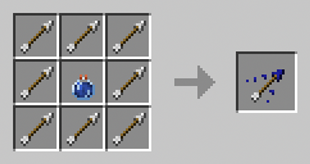
4 - Using arrows
You can craft tipped arrows with multiple effects using a combined lingering potion. It follow the same pattern as the vanilla craft:
5 - Cancelling the blend
You can reset the cauldron anytime by right-clicking on the cauldron to get back your ingredients.
Effect stacking
Adding the same effect to a potion multiple times results in effects adding. It, however, comes with a price as each additional effect decreases the added time. The first stacked effect adds 50% of its duration, and the 2nd one 25%. Decay factor can be adjusted trough the recipe.
Instant Effects does not stack as duplicated effects are lost.
Configuration
You can add recipes to the cauldron using datapack. See this page on wiki for a quick guide.
FAQ
Will this work with X potion mod?
Any mod that adds potion via the vanilla system is compatible. Typically these potions use the vanilla flask or appear in the vanilla potion tab. However, some mod implements their own potion system, such as Botania. These potions are incompatible and will not work. Compatibility has been tested with Dave's Potioneering since version 2.0.0
Known issues
- Sodium breaks the cauldron rendering, causing it to appear with water instead of the potion's colors. Setting biome blend to 0 fixes the issues. This is a long-standing bug on sodium end.
- Setting the graphic quality to anything other than "Fabulous" cause the potion model inside the cauldron to be invisible.
License
This mod is available under the GPLv3 license.
======
If you encounter a bug or have a suggestion, feel free to leave a comment or open an issue on GitHub
Project description from CurseForge.
Pick your setup
Potion Blender by Minecraft version and loader
Choose the version and loader you play, then open the matching release.
Minecraft version
1.21
1 loader buildMinecraft version
1.20.6
2 loader buildsMinecraft version
1.20.4
1 loader buildMinecraft version
1.20.2
1 loader buildMinecraft version
1.20.1
3 loader buildsMinecraft version
1.20
2 loader buildsMinecraft version
1.19.4
2 loader buildsMinecraft version
1.19.3
2 loader buildsMinecraft version
1.19.2
2 loader buildsMinecraft version
1.18.2
2 loader buildsCheck the dependencies, then try the file in a copied instance before changing a world you care about.
Recent files
Potion Blender versions and loaders
Potion-Blender-1.19.3-FORGE-1.1.0.jar
19 Apr 2023
Client Source doesn’t say Server Source doesn’t say Dependencies No extras listed Listed on Release listing
Check the 1.19.3 · Forge setup 1.19.3Forge release
Potion-Blender-1.19.3-FORGE-1.0.3.jar
16 Feb 2023
Client Source doesn’t say Server Source doesn’t say Dependencies No extras listed Listed on Release listing
Check the 1.19.3 · Forge setup 1.19.3Forge release
Potion-Blender-1.19.3-FORGE-1.0.2.jar
14 Jan 2023
Client Source doesn’t say Server Source doesn’t say Dependencies No extras listed Listed on Release listing
Check the 1.19.3 · Forge setup 1.19.3Forge release
Looking for an older file? The official CurseForge project page is in Resources.