Minecraft version
Back to mods 
Modrinth · Minecraft mod
Mod Menu for Neoforge
mod menu but its neoforge
Choose a version Pick your version below, then grab the matching file.
Quick answer
Which Mod Menu for Neoforge release should I use?
Latest stable file 17.0.1
Game version 26.1, 26.1.1, 26.1.2
Loader NeoForge
Mod Menu for Neoforge 17.0.1 targets 26.1, 26.1.1, 26.1.2 with NeoForge. It must be installed on the client. Do not install it on the dedicated server. No extra mods listed for this file.
Where it goes
Is Mod Menu for Neoforge required on the client, server, or both?
It must be installed on the client. Do not install it on the dedicated server.
Client Required
Dedicated server Not supported
Loader for this release NeoForge
Required install it here Optional supported, not mandatory Not supported do not install here Source doesn’t say do not assume
This file is marked client-only.
What else does Mod Menu for Neoforge 17.0.1 need?
17.0.1. Change the file and its required mods may change too.
This file does not list any required mods. Do not add a library just because a different file uses it.
This file does not list any required or optional mods.
Before you install it
Add Mod Menu for Neoforge without breaking your instance.
Built for Mod Menu for Neoforge 17.0.1. Pick another file and the loader, install side or required mods may change.
- 01
Stick to this file
Use 17.0.1. It targets 26.1, 26.1.1, 26.1.2 with NeoForge; another release may have different loader, side or dependency requirements.
- 02
Bring the mods it needs
This file does not list any required mods. Do not add a library just because a different file uses it.
- 03
Put it on the correct side
It must be installed on the client. Do not install it on the dedicated server.
- 04
Pick the file you checked
Use the “Get this file” button beside 17.0.1. It opens that exact file at the source.
About this project
What does Mod Menu for Neoforge add?
use Better ModList instead, its much better than my version
this is a port of Mod Menu for the Neoforge mod loader, as I believe Neoforge is in need of a better-looking mod menu than the one that is currently provided.
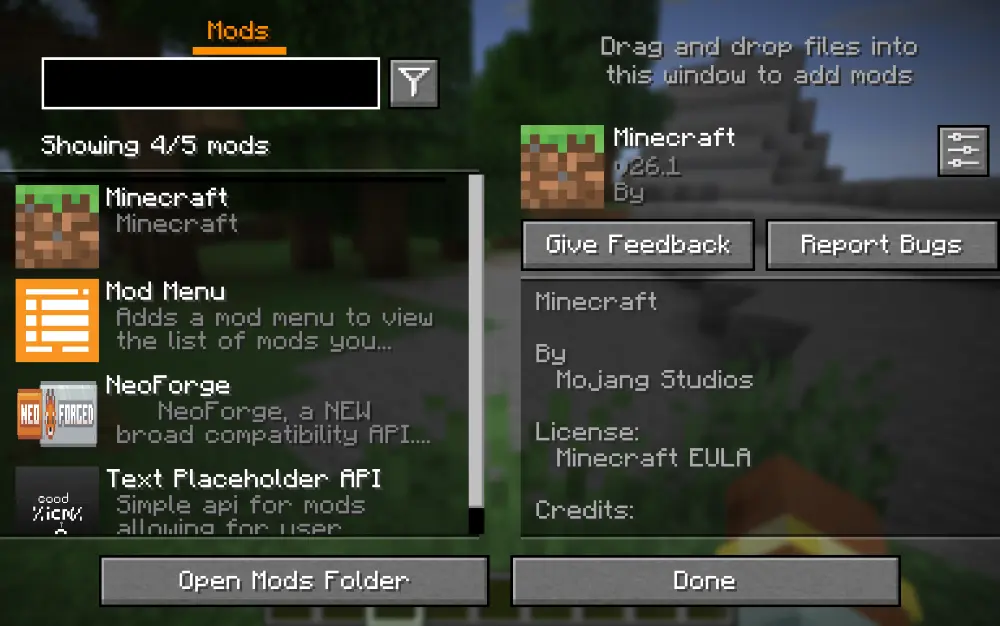
requires Text Placeholder API (Neoforge edition)), but since it's Neoforge I couldn't bundle them together, so you'll have to download that as well.
original mod was here, but I needed this as a dependency for one of my project which I am porting to Neoforge which is why this whole mess of ports was made in the first place.
additionally, the little widget that appears when you hover over a mods config is gone, i'll look to fix that. however, this version also automatically detects if a mod has a config, and if so, it will be accessible - no need to rely on this mod for its apis, it will automatically use your config if the user has the mod installed.
Project description from Modrinth.
Pick your setup
Mod Menu for Neoforge by Minecraft version and loader
Choose the version and loader you play, then open the matching release.
Minecraft version
26.1.1
1 loader buildMinecraft version
26.1
1 loader buildCheck the dependencies, then try the file in a copied instance before changing a world you care about.
Recent files
Mod Menu for Neoforge versions and loaders
17.0.1
modmenu-neoforge-17.0.1.jar
17 May 2026
Client Required Server Not supported Dependencies No extras listed Listed on Release listing
Check the 26.1.2 · NeoForge setup 26.126.1.126.1.2NeoForge release
17.0.0
modmenu-neoforge-17.0.0.jar
3 May 2026
Client Required Server Not supported Dependencies No extras listed Listed on Release listing
Check the 26.1.2 · NeoForge setup 26.126.1.126.1.2NeoForge release
Looking for an older file? The official Modrinth project page is in Resources.
 mod
Modrinth · Minecraft
Better Integrated Inventory
Bring your Equipment, Curios, Cosmetic Armor, Crafting Grid and Attributes together in one
 mod
Modrinth · Minecraft
Record Players - The Jukebox Reimagined
Adds functioning record players that can play 7" singles and 12" LPs containing music within the game.
 mod
Modrinth · Minecraft
Mob Capture & Ally MOD 敵味方MOD
Anyone is free to use this content to create and distribute videos. どなたでも自由に動画化・配信にご利用いただけます本MODは、実況者であるなぎすたんす様の敵味方クラフトシリーズにインスパイアされて制作いたしました※なぎすたんす様ご本人より、お名前の掲載およびインスパイア表記の許可をいただいております