Minecraft version
Back to mods 
Modrinth · Minecraft mod
No Creative Menu
A lightweight client-side mod that optimizes performance by allowing you to hide the vanilla creative inventory.
Choose a version Pick your version below, then grab the matching file.
Quick answer
Which No Creative Menu release matches 26.2?
Best match for your filters 1.1.0
Game version 26.2
Loader Fabric, NeoForge
No Creative Menu 1.1.0 targets 26.2 with Fabric, NeoForge. It must be installed on the client. Do not install it on the dedicated server. No extra mods listed for this file.
Where it goes
Is No Creative Menu required on the client, server, or both?
It must be installed on the client. Do not install it on the dedicated server.
Client Required
Dedicated server Not supported
Loader for this release Fabric, NeoForge
Required install it here Optional supported, not mandatory Not supported do not install here Source doesn’t say do not assume
This file is marked client-only.
What else does No Creative Menu 1.1.0 need?
1.1.0 on 26.2. Every mod below is checked against that same setup.
This file does not list any required mods. Do not add a library just because a different file uses it.
This file does not list any required or optional mods.
Before you install it
Add No Creative Menu without breaking your instance.
Built for No Creative Menu 1.1.0 on 26.2. Pick another file and the loader, install side or required mods may change.
- 01
Stick to this file
Use 1.1.0. It targets 26.2 with Fabric, NeoForge; another release may have different loader, side or dependency requirements.
- 02
Bring the mods it needs
This file does not list any required mods. Do not add a library just because a different file uses it.
- 03
Put it on the correct side
It must be installed on the client. Do not install it on the dedicated server.
- 04
Pick the file you checked
Use the “Get this file” button beside 1.1.0. It opens that exact file at the source.
About this project
What does No Creative Menu add?
❌ NoCreativeMenu
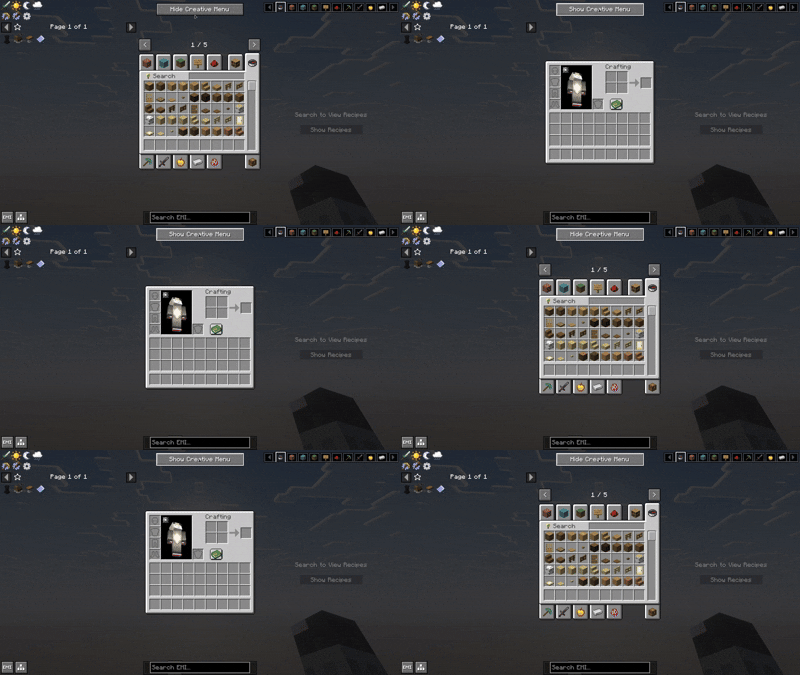
NoCreativeMenu is a lightweight, high-performance client-side utility for Minecraft that allows you to disable the vanilla creative inventory. Perfect for those who rely on external item browsers like JEI, REI, or EMI. For both Fabric and Neoforge
🚀 Why NoCreativeMenu?
In large modpacks, the vanilla creative menu becomes a source of performance overhead. To display thousands of items, Minecraft must populate dozens of tabs and build complex search trees every time you open the screen, leading to noticeable "lag spikes".
If you are already using JEI, REI, or EMI, the vanilla creative inventory is redundant. NoCreativeMenu stops that unnecessary rendering, saving CPU and RAM cycles for what truly matters: your gameplay.
✨ Features
- Toggle on the Fly: A clean button integrated into your inventory to switch between the full creative screen and the optimized survival-style inventory.
- Configurable Placement: Choose between 8 different corner presets for the toggle button to avoid overlapping with other mod interfaces.
- Performance Metrics: For power users, the mod logs the exact initialization time (in ms) of each screen to the console, allowing you to see your performance gains.
- For both Fabric and Neoforge
🌍 Global Support
Fully localized for a global community:
- English (US)
- Spanish (ES & LATAM)
- Portuguese (BR)
- Chinese (Simplified)
📜 License & Credits
Developed by Ixeken Studios in México.
Licensed under the MIT License. You are free to include this mod in any modpack!
Chech out my create addon
https://modrinth.com/mod/create-easier-sheets
Project description from Modrinth.
Pick your setup
No Creative Menu by Minecraft version and loader
Choose the version and loader you play, then open the matching release.
Minecraft version
26.1.2
2 loader buildsMinecraft version
26.1.1
1 loader buildMinecraft version
26.1
1 loader buildMinecraft version
1.21.1
2 loader buildsCheck the dependencies, then try the file in a copied instance before changing a world you care about.
Recent files
No Creative Menu versions and loaders
1.1.0
nocreativemenu-1.1.0-universal.jar
21 Jul 2026
Client Required Server Not supported Dependencies No extras listed Listed on Release listing
Check the 26.2 · Fabric setup 26.2FabricNeoForge release
Looking for an older file? The official Modrinth project page is in Resources.
 mod
mod CurseForge + Modrinth · Minecraft
Simple Gunpowder
Adds gunpowder recipes, villager trades, piglin bartering, Abandoned Camps and End City loot, including bulk recipes for large amounts of gunpowder.
 mod
mod Modrinth · Minecraft
YetAnotherConfigLib (YACL)
A builder-based configuration library for Minecraft!
 mod
mod Modrinth · Minecraft
KoreanChat
Automatically convert English Alphabet to Korean Chat!