Minecraft version
Back to mods 
CurseForge · Minecraft mod
Ping Counter
Displays ping on HUD with adjustable position, size, color, and text.
Choose a version Pick your version below, then grab the matching file.
Quick answer
Which Ping Counter release should I use?
Latest stable file Ping Counter-1.0.3-MC1.21.9-1.21.10-Fabric
Game version 1.21.9, 1.21.10
Loader Fabric
Ping Counter-1.0.3-MC1.21.9-1.21.10-Fabric targets 1.21.9, 1.21.10 with Fabric. The project page does not say whether it belongs on the client. The project page does not say whether it belongs on the dedicated server. No extra mods listed for this file.
Where it goes
Is Ping Counter required on the client, server, or both?
The project page does not say whether it belongs on the client. The project page does not say whether it belongs on the dedicated server.
Client Source doesn’t say
Dedicated server Source doesn’t say
Loader for this release Fabric
Required install it here Optional supported, not mandatory Not supported do not install here Source doesn’t say do not assume
The source does not explicitly classify this release as client-only or server-only.
What else does Ping Counter-1.0.3-MC1.21.9-1.21.10-Fabric need?
Ping Counter-1.0.3-MC1.21.9-1.21.10-Fabric. Change the file and its required mods may change too.
This file does not list any required mods. Do not add a library just because a different file uses it.
This file does not list any required or optional mods.
Before you install it
Add Ping Counter without breaking your instance.
Built for Ping Counter-1.0.3-MC1.21.9-1.21.10-Fabric. Pick another file and the loader, install side or required mods may change.
- 01
Stick to this file
Use Ping Counter-1.0.3-MC1.21.9-1.21.10-Fabric. It targets 1.21.9, 1.21.10 with Fabric; another release may have different loader, side or dependency requirements.
- 02
Bring the mods it needs
This file does not list any required mods. Do not add a library just because a different file uses it.
- 03
Put it on the correct side
The project page does not say whether it belongs on the client. The project page does not say whether it belongs on the dedicated server.
- 04
Pick the file you checked
Use the “Get this file” button beside Ping Counter-1.0.3-MC1.21.9-1.21.10-Fabric. It opens that exact file at the source.
About this project
What does Ping Counter add?
My attempt at a HUD ping display mod.

Appearance settings can be accessed via the button on the top left of the escape menu (only on 1.8.9), by the keybind (by default -), and by the command /pingcounter (1.21.x+).
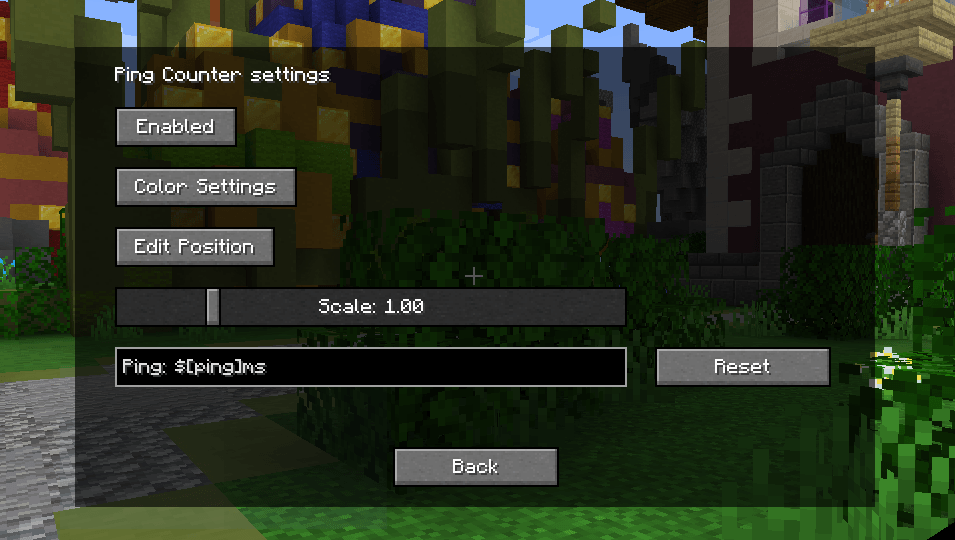
In case the settings button (only on 1.8.9) overlaps with other mods, it is possible to turn it off by setting "hideSettingsButton", in the config file, to true.
In the displayed text, $[ping] is replaced with the ping to the server. Leaving the text box empty will revert it to default.
Configs may change after updates.
GitHub: https://github.com/EverTech1/PingCounter
Report issues here: https://github.com/EverTech1/PingCounter/issues
Contact email: evertech1mc@gmail.com
Project description from CurseForge.
Pick your setup
Ping Counter by Minecraft version and loader
Choose the version and loader you play, then open the matching release.
Minecraft version
1.21.9
3 loader buildsMinecraft version
1.21.8
3 loader buildsMinecraft version
1.21.7
3 loader buildsMinecraft version
1.21.6
3 loader buildsMinecraft version
1.21.5
3 loader buildsMinecraft version
1.21.4
2 loader buildsMinecraft version
1.21.3
2 loader buildsMinecraft version
1.21.2
2 loader buildsMinecraft version
1.21.1
2 loader buildsMinecraft version
1.21
2 loader buildsMinecraft version
1.8.9
1 loader buildCheck the dependencies, then try the file in a copied instance before changing a world you care about.
Recent files
Ping Counter versions and loaders
Ping Counter-1.0.3-MC1.21.9-1.21.10-Fabric
pingcounter-1.0.3.jar
1 Dec 2025
Client Source doesn’t say Server Source doesn’t say Dependencies No extras listed Listed on Release listing
Check the 1.21.10 · Fabric setup Fabric1.21.91.21.10 release
1.0.3
pingcounter-1.0.3.jar
1 Dec 2025
Client Required Server Not supported Dependencies 1 required · 1 unchecked Listed on Release listing
Check the 1.21.10 · Fabric setup 1.21.91.21.10Fabric release
Ping Counter-1.0.2-MC1.21.9-1.21.10-Forge
pingcounter-1.0.2.jar
10 Oct 2025
Client Source doesn’t say Server Source doesn’t say Dependencies No extras listed Listed on Release listing
Check the 1.21.10 · Forge setup 1.21.91.21.10Forge release
1.0.2
pingcounter-1.0.2.jar
10 Oct 2025
Client Required Server Not supported Dependencies No extras listed Listed on Release listing
Check the 1.21.10 · Forge setup 1.21.91.21.10Forge release
1.0.2
pingcounter-1.0.2.jar
10 Oct 2025
Client Required Server Not supported Dependencies No extras listed Listed on Release listing
Check the 1.21.10 · NeoForge setup 1.21.91.21.10NeoForge release
Ping Counter-1.0.2-MC1.21.9-1.21.10-Neoforge
pingcounter-1.0.2.jar
10 Oct 2025
Client Source doesn’t say Server Source doesn’t say Dependencies No extras listed Listed on Release listing
Check the 1.21.10 · NeoForge setup 1.21.91.21.10NeoForge release
Ping Counter-1.0.2-MC1.21.9-1.21.10-Fabric
pingcounter-1.0.2.jar
10 Oct 2025
Client Source doesn’t say Server Source doesn’t say Dependencies No extras listed Listed on Release listing
Check the 1.21.10 · Fabric setup Fabric1.21.91.21.10 release
1.0.2
pingcounter-1.0.2.jar
10 Oct 2025
Client Required Server Not supported Dependencies 1 required · 1 unchecked Listed on Release listing
Check the 1.21.10 · Fabric setup 1.21.91.21.10Fabric release
1.0.1
pingcounter-1.0.1.jar
25 Jul 2025
Client Required Server Not supported Dependencies No extras listed Listed on Release listing
Check the 1.21.8 · Forge setup 1.21.61.21.71.21.8Forge release
1.0.1
pingcounter-1.0.1.jar
25 Jul 2025
Client Required Server Not supported Dependencies No extras listed Listed on Release listing
Check the 1.21.8 · NeoForge setup 1.21.61.21.71.21.8NeoForge release
pingcounter-1.0.1-MC1.21.6-1.21.8-Neoforge.jar
pingcounter-1.0.1.jar
25 Jul 2025
Client Source doesn’t say Server Source doesn’t say Dependencies No extras listed Listed on Release listing
Check the 1.21.8 · NeoForge setup 1.21.8NeoForge1.21.71.21.6 release
pingcounter-1.0.1-MC1.21.6-1.21.8-Forge.jar
pingcounter-1.0.1.jar
25 Jul 2025
Client Source doesn’t say Server Source doesn’t say Dependencies No extras listed Listed on Release listing
Check the 1.21.8 · Forge setup 1.21.8Forge1.21.71.21.6 release
Looking for an older file? The official CurseForge project page is in Resources.
 mod
mod CurseForge + Modrinth · Minecraft
Vistas
Allows the addition of new title screen panoramas
 mod
mod CurseForge + Modrinth · Minecraft
StylizedDamage
A damage number display mod, offering a highly customizable and buttery-smooth experience.
 mod
mod CurseForge · Minecraft
Music Events
An event-based dynamic music engine with an intuitive and easy to use in-game GUI that grants control over game, mod, and custom music.