Mod Menu Optional for Pick Block Pro Pick-Block-Pro-1.11.32-mc1.21.3
optionalMatching file found Matched file: v12.0.1 for 1.21.3
CurseForge · Minecraft mod
An advanced client side Block, Entity, Component, NBT, Tool and ID picker (Fabric)
Quick answer
Pick Block Pro Pick-Block-Pro-1.11.32-mc1.21.3 targets 1.21.3, 1.21.2 with Fabric, Quilt. The project page does not say whether this file belongs on the client, dedicated server, or both. All 3 required mods have matching files.
Where it goes
The project page does not say whether this file belongs on the client, dedicated server, or both.
The source does not explicitly classify this release as client-only or server-only.
Pick-Block-Pro-1.11.32-mc1.21.3. Change the file and its required mods may change too.
Install Cloth Config API (Fabric/Forge/NeoForge), Fabric API, Cloth Config API first. We found matching files for this game-version and loader setup. 2 come through another mod in the chain.
2 extra mods were pulled in by other dependencies. Indented rows show who needs each one. We only count dependency files that match this setup. A file for another loader does not fill the gap.
Before you install it
Built for Pick Block Pro Pick-Block-Pro-1.11.32-mc1.21.3. Pick another file and the loader, install side or required mods may change.
Use Pick-Block-Pro-1.11.32-mc1.21.3. It targets 1.21.3, 1.21.2 with Fabric, Quilt; another release may have different loader, side or dependency requirements.
Install Cloth Config API (Fabric/Forge/NeoForge), Fabric API, Cloth Config API first. We found matching files for this game-version and loader setup. 2 come through another mod in the chain.
The project page does not say whether this file belongs on the client, dedicated server, or both.
Use the “Get this file” button beside Pick-Block-Pro-1.11.32-mc1.21.3. It opens that exact file at the source.
About this project
Pick Block: Get the block/item of what you're looking at in creative or switch to that block/item in survival.
This mod is an advanced version of this and adds a lot of extra features (see below)
Important:
This mod replaces the default Pick Block, however the ID and Tool picker use their own keybindings.
Most things below are configurable in the config settings using the config file or Mod Menu
Block Picking with item-containers (shulkers / bundles)
When picking a block in survival the mod will first search through all the items in your inventory. If it can't find the item, it'll search containers like shulkers and bundles that are inside the inventory. If found, the mod will move the container with the highest amount of that item to the player's main hand. This should work with all item-containers that work in the same way as the shulker or bundle do.
**Hold ALT for block state copying:**You might already know it's possible to hold CTRL while block picking to copy block-entity data, such as player skulls and banners with patterns. This mod allows on top of that to also copy block-state data when holding ALT, this includes for example if a campfire/candle is lit or not and also the rotation of blocks like stairs. (There are many more things you can copy with this, see wiki link for the full list)
This feature was inspired by the Pick-BlockState mod by Minenash.
**Hold CTRL for entity data copying:**Just like how you can pick block-entity data, now you can also pick entity data. This will for example copy most data of the mob and put it inside the spawn egg as NBT data. This will also work for things like armor stands, item frames (copying what's inside of them) and paintings (copying the exact variant of the painting).
**Extended pick block range:**By default Minecraft only allows to pick blocks that are within reaching distance. This mod however allows to pick blocks at a distance of 100 blocks away and this can even be set way higher (or lower) if so desired. No need anymore to fly all the way over to a block you'd like to pick.
**Lock inventory slots:**By default Minecraft will first fill in all empty slots in the hotbar when using pick block, however once the hotbar is completely full it'll replace the item in your current selected slot. This item might actually be something you'd prefer to keep. This mod lets you lock any slots you'd like in the config settings. When locked, this mod will still place an item inside that slot if it's empty. However once an item/block is located in a locked slot, this mod will skip that slot (keeping the item/block safe) and use the next available slot instead.
**Tool Picking:**When using the Tool Picker this mod will provide you with the best tool for the job. In creative you'll get a fully enchanted tool (configurable), but in survival it'll go through your inventory and search for the best tool instead. If it's able to find a suitable tool it'll switch it to your current selected slot.
Hotbar block/item ID copyCopy the ID's of blocks/items from your hotbar directly in the chat when it's open. Making it a lot easier and faster to create WE commands. Especially great for making brushes with a lot of different blocks. Hold CTRL + 0 through 9 while your chat is open, 0 is for the off hand slot.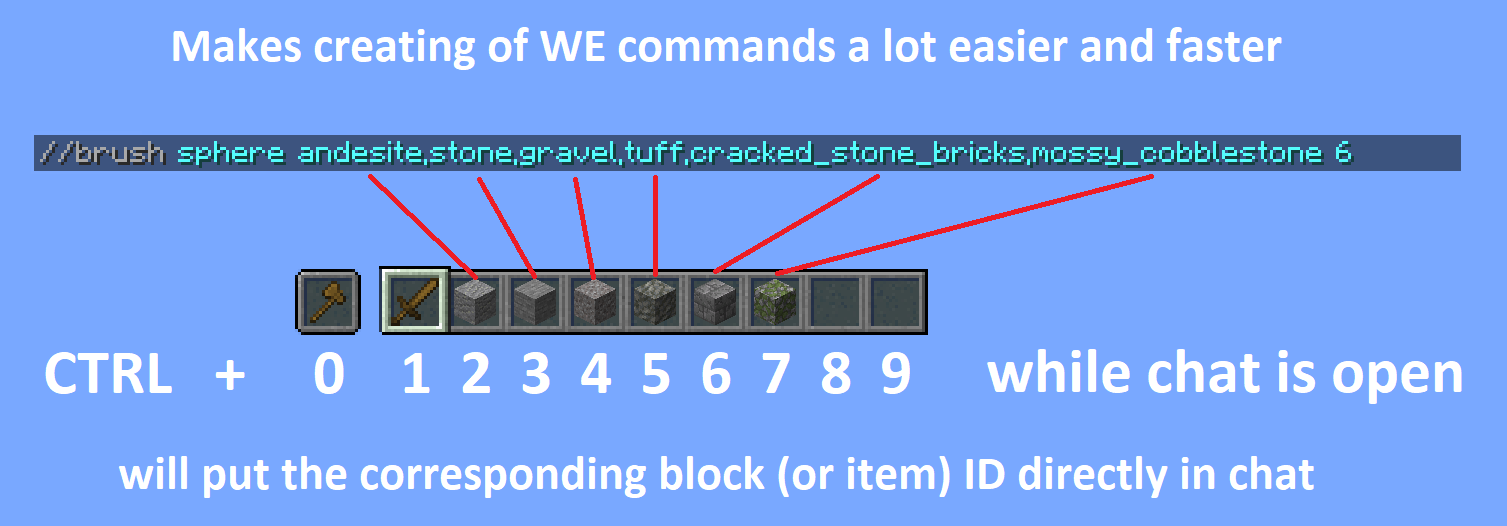
**Pick ID's:**Ever wrote a WE command using block ID's with a lot of properties? This mod will make that a lot easier by allowing you to pick the ID including properties of the block you're looking at directly into your clipboard. Once picked you can then paste this ID when writing out your command.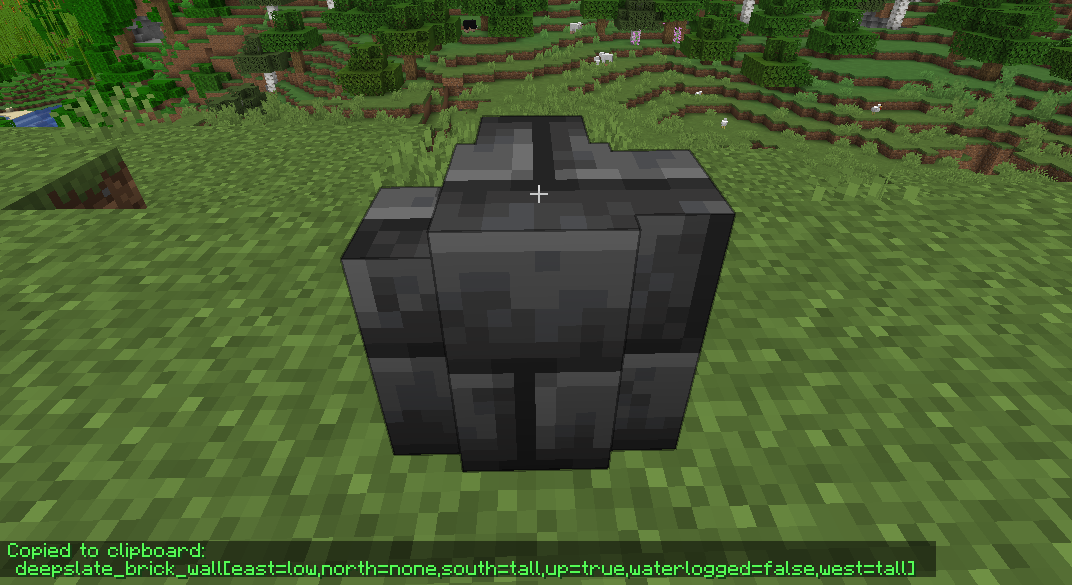
From 1.19 onwards this mod no longer includes Cloth Config
Required:
Optional:
Older Versions:
1.16 - 1.18
Required:
Optional:
Already included/embedded:
1.14 - 1.15
Required:
Optional:
Already included/embedded:
Please let me know if you experience any issues or have any suggestions
Project description from CurseForge.
Pick your setup
Choose the version and loader you play, then open the matching release.
Showing the newest 12 of 69 game versions. Older files are in the list below.
Check the dependencies, then try the file in a copied instance before changing a world you care about.
Recent files
Pick-Block-Pro-1.11.32-mc1.21.3.jar
2 Nov 2024
Pick-Block-Pro-1.10.32-mc1.21.1.jar
2 Nov 2024
Pick-Block-Pro-1.11.31-mc1.21.3.jar
26 Oct 2024
Pick-Block-Pro-1.10.31-mc1.21.1.jar
19 Aug 2024
Pick-Block-Pro-1.9.31-mc1.20.6.jar
19 Aug 2024
Pick-Block-Pro-1.10.30-mc1.21.jar
26 Jun 2024
Pick-Block-Pro-1.10.30-beta-mc1.21.jar
23 Jun 2024
Pick-Block-Pro-1.9.29-mc1.20.6.jar
16 May 2024
Pick-Block-Pro-1.9.28-beta-mc1.20.5.jar
22 Apr 2024
Pick-Block-Pro-1.8.28-mc1.20.4.jar
11 Apr 2024
Pick-Block-Pro-1.7.28-mc1.20.2.jar
11 Apr 2024
Pick-Block-Pro-1.9.27-beta-mc1.20.5.jar
5 Mar 2024
Looking for an older file? The official CurseForge project page is in Resources.
 mod
modA mod that lets you throw axes.
 mod
modAutomatically switches players to Adventure Mode and prevents them from breaking or placing blocks in any form inside configured dimensions, structures, and feature areas.
 mod
modDisposable public fixture for testing the Modpacks.ch GitHub catalogue flow