Minecraft version
Back to mods 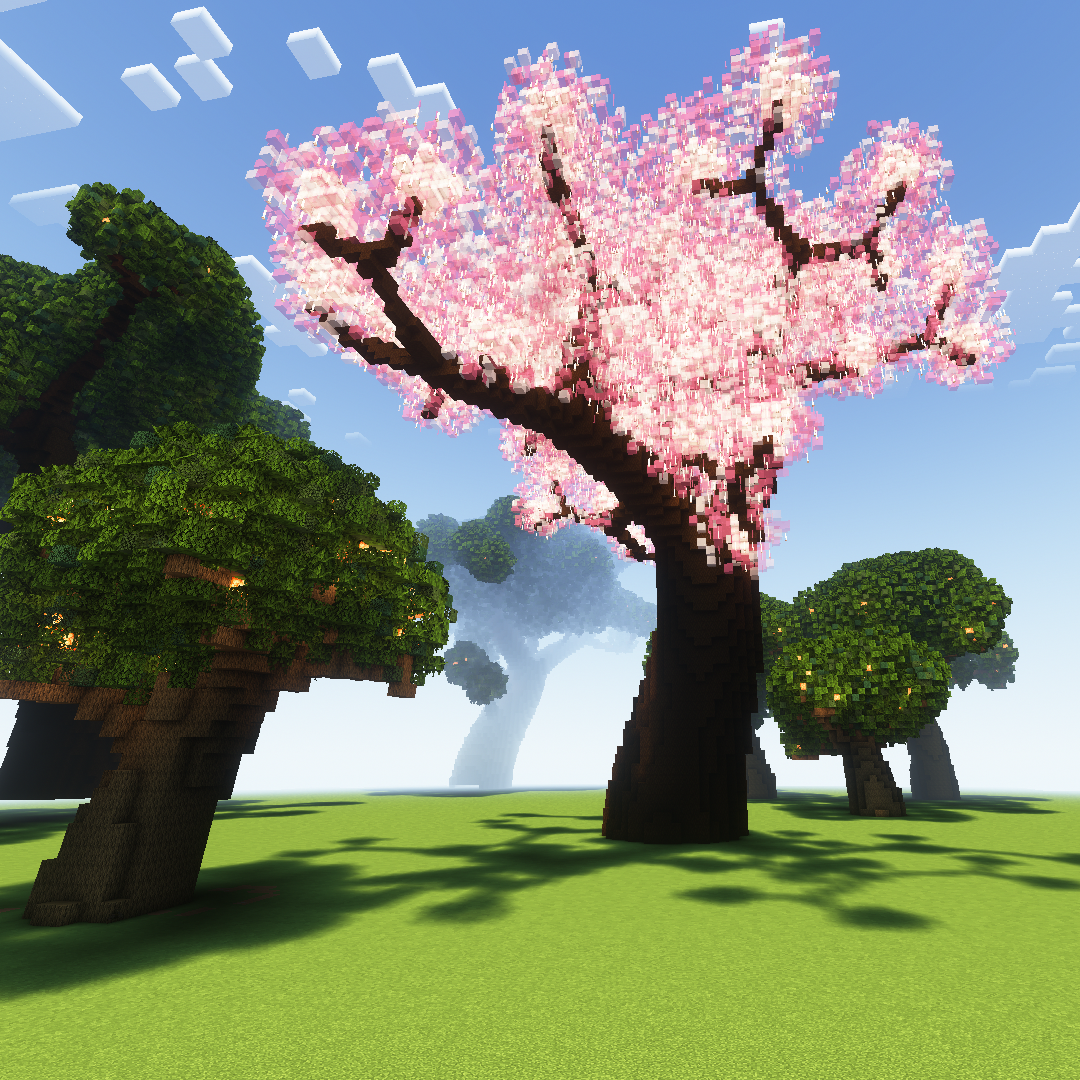
CurseForge · Minecraft mod
Parametric Generation
Generate structures and graph math equations.
Choose a version Pick your version below, then grab the matching file.
Quick answer
Which Parametric Generation release should I use?
Latest stable file boschs-mod-4.0.0
Game version 1.19.3, 1.19.2, 1.19.1
Loader Fabric
Parametric Generation boschs-mod-4.0.0 targets 1.19.3, 1.19.2, 1.19.1 with Fabric. The project page does not say whether this file belongs on the client, dedicated server, or both. No extra mods listed for this file.
Where it goes
Is Parametric Generation required on the client, server, or both?
The project page does not say whether this file belongs on the client, dedicated server, or both.
Client Source doesn’t say
Dedicated server Source doesn’t say
Loader for this release Fabric
Required install it here Optional supported, not mandatory Not supported do not install here Source doesn’t say do not assume
The source does not explicitly classify this release as client-only or server-only.
What else does Parametric Generation boschs-mod-4.0.0 need?
boschs-mod-4.0.0. Change the file and its required mods may change too.
This file does not list any required mods. Do not add a library just because a different file uses it.
This file does not list any required or optional mods.
Before you install it
Add Parametric Generation without breaking your instance.
Built for Parametric Generation boschs-mod-4.0.0. Pick another file and the loader, install side or required mods may change.
- 01
Stick to this file
Use boschs-mod-4.0.0. It targets 1.19.3, 1.19.2, 1.19.1 with Fabric; another release may have different loader, side or dependency requirements.
- 02
Bring the mods it needs
This file does not list any required mods. Do not add a library just because a different file uses it.
- 03
Put it on the correct side
The project page does not say whether this file belongs on the client, dedicated server, or both.
- 04
Pick the file you checked
Use the “Get this file” button beside boschs-mod-4.0.0. It opens that exact file at the source.
About this project
What does Parametric Generation add?
I created this mod after I'd used WorldEdit's //generate command, but was left frustrated that I had to come up with some ridiculous equations to describe some curves and shapes that could've been pretty easily described parametrically. There are now a wide number of commands that are pretty useful when building in your world, complete with a comprehensive and efficient expression parser and a custom format for block templates!
Block Palatte Formatting:
Due to some weird things with how Minecraft handles commands, we are forced to use quotes occasionally. But if you are generating a structure, there are a number of pretty easy ways to generate exactly the type of block palette you want!
Basic: stone, or "stone"
Quotes optional. This will make every block placed by the command be just stone.
Multiple Blocks: "stone:diamond_ore"
Tragically, the quotes are required. But now half the blocks placed will be stone, the other half diamond ore, randomly distributed.
Multiple Blocks with Weights: "stone:10%diamond_ore"
If a weight is not specified, a weight of 100% is assumed. In this case, there will be a 100%:10%, or 10:1, ratio of stone to diamond ore.
Multiple Palettes: "stone:10%diamond_ore,dirt,grass"
Some commands (/parametric, /isometric) let you specify the block variable in their expression. For block < 1 (based on whatever equation you'd like), the command will place from the first palatte. For 1 <= block < 2, it will place a dirt block, and for block >= 2 it will place grass. Tip: False evaluates to 0 and True to 1, so if you are just using two palettes you can just use a boolean expression.
Generation Commands:
/paintbucket [palette] [radius]:
This command uses a block search algorithm to fill the region around you that it can reach by only going through the blocks that you are standing in. So if you were standing inside of a hollow, closed, irregular shape, this command is great for filling the space. It will only try placing the blocks within [radius] of you to prevent infinite expansion if there is a gap in your container.
/parametric [palette] [t-0] [t-max] [t-step] [expression]:
My pride and joy, and the ultimate reason for this mod. This lets you trace a parametrically defined path with a given (or defaulted to 1.5) radius. You define x, y, and z in the expression with the given formatting: x=f(t);y=g(t);z=h(t)
For example, a nice helix can be given by: x=10*cos(t/2); y=t; z=10*sin(t/2)
You can also define how thick the line is tracing the parametric (optional): r=5+2*cos(3*t)
You can, in this command, define which block palette to use (optional): block=y>10
A final parameter that is read by the command is the "margin", or how far on each side of the tube segments connecting each iteration of t the segments should stretch out. This can be helpful when you are working with a path that has high curvature: margin=1;
As a tip, the variables are computed left to right, so you can use the pre-calculated value of a variable in any new calculation to its right. For example, look at this donut that uses all the features of /parametric:
/parametric "stripped_oak_wood,pink_wool:10%lime_wool:10%blue_wool" 0 6.3 0.1 x=30*sin(t);y=0;z=30*cos(t);r=12;block=y>(4+sin(z/2)*3+3*cos(x/2)); margin=1
This parametric provides two block palettes; it provides stripped_oak_wood for the tan of the donut, and a combination of wools for the frosting. It starts at t=0, and climbs to t=6.3 in increments of 0.1. Looking at the equations for x, y, and z it's clearly just a circle with radius 30. We trace around curve with a tube of radius 12 to make the full torus shape. We then define what block palette to use based on the x, y, and z of the point to provide a kind of wavy frosting pattern, and provide a small extended margin for the tubes to make sure the donut is fully encased.
/isometric [palette] [box-size] [expression]:
This will search in a cubic position centered at the player when they use the command every x, y, z tuple and evaluate the expression, passing in x, y, and z. The variable "place" will determine whether or not the block gets placed (0 means the block is not placed, non-zero means it is placed. As in parametric, you can pass in multiple block palettes and choose which one is placed by setting block.
/gentree [trunk-palette] [leaf-palette] [light-palette] [radius] [scale] [leaf density]:
Another beautiful command. This will generate really pretty giant trees. Each of the palettes only takes a single palette, but mess with the radius, scale, and density as you wish. In general, the best combinations of the radius, scale, and leaf density are about:
4 0.5 0.85 (for "small" trees)
8 1 1 (for "medium" trees)
12 1.6 1.3 (for "large" trees)
I also like to pair oak_wood, "oak_leaves:50%mangrove_leaves:10%spruce_leaves", and shroomlight, as well as "spruce_wood:25%dark_oak_wood", the recommended leaf one that is just a bunch of pink and white stained glass, and pearlescent_froglight. The first is a great giant oak, and the second a giant cherry!
Selection Commands:
/nah: This will undo your most recent placement or generation command, whether it be generating a tree, graphing a parametric, or pasting a selection. Super helpful.
/mark1, /mark2: Doing these will mark the corners of a selection area a la WorldEdit's //pos1 and //pos2.
/copysel: Copies the selection area marked by mark1 and mark2 to your clipboard. Paste position is relative to where the player stood when copying.
/pastesel: Pastes the clipboard relative to the player presently vs. where they were when they copied.
/flipsel [axis]: Axis is either x, y, or z, and this will flip the clipboard along that axis.
/rotsel [degree] [axis]: Rotates clipboard by specified degrees around specified axis.
/scoot [x] [y] [z]: If you are unhappy with exactly where you placed something or where you generated it, you can scoot it by the specified number of blocks. Great if you like the way a tree came out but just wanna move it a little to the left.
/snip: If you generated or pasted something, it will remove it from the world but save it to your clipboard. Great for generating a tree or a curve, but then deciding you want to flip or rotate it before putting it back.
/retry: Will undo the last generation command you did, then redo it with the exact same parameters and at the last position you used it. Useful if you don't exactly like the way a tree randomly generated, but the settings you used were good.
That is about it for now, but I plan to keep adding to this!
Github: https://github.com/EganBoschCodes/BoschsMod/tree/release
Project description from CurseForge.
Pick your setup
Parametric Generation by Minecraft version and loader
Choose the version and loader you play, then open the matching release.
Minecraft version
1.19.2
1 loader buildMinecraft version
1.19.1
1 loader buildMinecraft version
1.19
1 loader buildCheck the dependencies, then try the file in a copied instance before changing a world you care about.
Recent files
Parametric Generation versions and loaders
boschs-mod-4.0.0
boschs-mod-4.0.0.jar
21 Nov 2022
Client Source doesn’t say Server Source doesn’t say Dependencies No extras listed Listed on Release listing
Check the 1.19.3 · Fabric setup 1.19.3Fabric1.19.21.19.1 release
boschs-mod-3.2.0
boschs-mod-3.2.0.jar
19 Nov 2022
Client Source doesn’t say Server Source doesn’t say Dependencies No extras listed Listed on Release listing
Check the 1.19.3 · Fabric setup 1.19.3Fabric1.19.21.19.1 release
Looking for an older file? The official CurseForge project page is in Resources.
 mod
CurseForge + Modrinth · Minecraft
Remnants | RPG Mobs
Monsters grow stronger the farther, deeper and longer you play, with levels, five ranks, sixteen traits and rare named Remnants with boss bars.
 mod
CurseForge · Minecraft
Death Cinematics
Mod to customize player's Death Animation with various templates of animation.
 mod
CurseForge · Minecraft
VoxelPvP Client
Addition To The Minecraft Server: voxelpvp.com , Improves Gameplay, Adds Useful HUD's.