Minecraft version
Back to mods 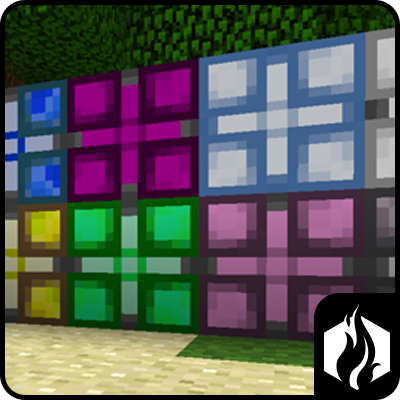
CurseForge · Minecraft mod
AE Lights
Lights powered by AE
Choose a version Pick your version below, then grab the matching file.
Quick answer
Which AE Lights release should I use?
beta file AELights-0.2.0.jar
Game version 1.6.4
Loader Not required
AE Lights AELights-0.2.0.jar targets 1.6.4. The project page does not say whether this file belongs on the client, dedicated server, or both. No extra mods listed for this file.
Where it goes
Is AE Lights required on the client, server, or both?
The project page does not say whether this file belongs on the client, dedicated server, or both.
Client Source doesn’t say
Dedicated server Source doesn’t say
Loader for this release No loader listed
Required install it here Optional supported, not mandatory Not supported do not install here Source doesn’t say do not assume
The source does not explicitly classify this release as client-only or server-only.
What else does AE Lights AELights-0.2.0.jar need?
AELights-0.2.0.jar. Change the file and its required mods may change too.
This file does not list any required mods. Do not add a library just because a different file uses it.
This file does not list any required or optional mods.
Before you install it
Add AE Lights without breaking your instance.
Built for AE Lights AELights-0.2.0.jar. Pick another file and the loader, install side or required mods may change.
- 01
Stick to this file
Use AELights-0.2.0.jar. It targets 1.6.4; another release may have different loader, side or dependency requirements.
- 02
Bring the mods it needs
This file does not list any required mods. Do not add a library just because a different file uses it.
- 03
Put it on the correct side
The project page does not say whether this file belongs on the client, dedicated server, or both.
- 04
Pick the file you checked
Use the “Get this file” button beside AELights-0.2.0.jar. It opens that exact file at the source.
About this project
What does AE Lights add?
About AE Lights
AE Lights is a Forge Mod that add Light Blocks to Minecraft that run off the Applied Energistics network.
AE Lights comes in all 16 Minecraft Colors, and each light uses 2 AE/t which is around 1 EU/t. The lights connect directly to any colored AE Cable and lights touching other lights will extend the AE network just like other AE Machines. When adding a AE Light to your network, it is just like adding a machine, it will cause a reboot of your AE network, so make sure you dont have anything crafting. Currently there is no way to turn off the lights other than to disconnect them from the AE network, but there are many future release plans that I have and one of them will include more options with the lights.
If you have any suggestions, comments or bugs please post and ill see what i can do.
Latest Version
Latest Recommended Build: 0.2.0 (Beta 2)
Planned Updates
I have a lot of exciting things that I want to add after getting the beta version out. These features include:
- Addons to the lights, add things like Backup Batteries, and Anti-Mob Spawning (like the Magnum Torch).
- Additional Machines to control the lights (so you can make your disco floor, or just control the lights in your house)
Change Log
Version 0.2.0 - Beta 2
- Added support for WAILA, currently just shows the power stored in the internal battery
- Added a 20AE battery to the lights, this way when the grid updates the lights wont flicker, light will be powered by battery for just a few seconds.
- Fixed the right click issue, now you can right click on the block and it will work as normal. If you right click with nothing in your inventory it will show the battery power (if you are not using WAILA).
Screen Shots
Spotlights
I don't have any spotlights at the moment, if you are interested in creating one for my mod let me know,. I will probably do a spotlight once it is more completed.
Crafting Recipes
All the lights require Lux Dust as part of their recipe. You can create 2 Lux Dusts with 1 Redstone Ore, 1 Glowstone Dust, 1 Nether Quarts Dust, and 1 Certus Quartz Dust. This is a shapeless recipe.
The lights require 4 Lux Dust, 4 Quartz Glass, and the Dye of your choosing. The color of the dye that you use will determine the color of the lamp. You will get 6 lamps from this recipe.
Required Mods
This mod requires:
- Forge
- Applied Energistics Rv13+
- Minecraft 1.6.4
Configuration
The configuration file will automatically be generated and put into the config folder. The config file will allow you to change the Light Block ID and the Lux Dust ID if there are conflicts with other blocks. The ID's should automatically change if there is a conflict. Also the configuration option will allow you to change the amount of power draw the lights have on the AE network. Changing this to 0 will disable them from drawing any power.
License Information
AE Lights is Copyright 2014 by Craft Minecraft Development. All rights reserved. http://dev.craftminecraft.net for more information.
Mod Packs
If anyone wants to add this mod to their public or private mod pack you have my permission to do so.
Special Thanks
A Special thanks goes out to TechMac for creating the textures for this mod and also to M3gaFr3ak for use of his source code from Extra Cells (http://www.minecraftforum.net/topic/1801643-ae-add-onm3gas-extracells-v-162d-smp-ssp/) to get a good base for making an AE Add-On.
Project description from CurseForge.
Pick your setup
AE Lights by Minecraft version and loader
Choose the version and loader you play, then open the matching release.
Check the dependencies, then try the file in a copied instance before changing a world you care about.
Recent files
AE Lights versions and loaders
AELights-0.2.0.jar
25 Jan 2014
Client Source doesn’t say Server Source doesn’t say Dependencies No extras listed Listed on Release listing
Check the 1.6.4 setup 1.6.4 beta
AELights-0.1.0.jar
6 Jan 2014
Client Source doesn’t say Server Source doesn’t say Dependencies No extras listed Listed on Release listing
Check the 1.6.4 setup 1.6.4 beta
AELights-0.0.2.jar
4 Jan 2014
Client Source doesn’t say Server Source doesn’t say Dependencies No extras listed Listed on Release listing
Check the 1.6.4 setup 1.6.4 alpha
AELights-0.0.1.jar
4 Jan 2014
Client Source doesn’t say Server Source doesn’t say Dependencies No extras listed Listed on Release listing
Check the 1.6.4 setup 1.6.4 alpha
Looking for an older file? The official CurseForge project page is in Resources.
 mod
mod Modrinth · Minecraft
Petrol's Parts
Unique kinetic components for Create
 mod
mod CurseForge · Minecraft
Shahed and other drones
shahed mod-Adds Shaheds. Only one type of Shahed is available in the alpha version.
 mod
mod Modrinth · Minecraft
Create Aeronautics: Transmission & Linkage
An Aeronautics expansion mod that adds items useful for designing vehicles, as well as practical utility items such as universal joints and kinetic converters.