Minecraft version
Back to mods 
CurseForge · Minecraft mod
Ping Wheel
Allows players to temporarily mark locations and entities
Choose a version Pick your version below, then grab the matching file.
Quick answer
Which Ping Wheel release matches 1.21.1 Forge?
beta file v1.12.2 for Forge 1.21.1
Game version 1.21, 1.21.1
Loader Forge
Ping Wheel v1.12.2 for Forge 1.21.1 targets 1.21, 1.21.1 with Forge. The project page does not say whether it belongs on the client. The project page does not say whether it belongs on the dedicated server. No extra mods listed for this file.
Where it goes
Is Ping Wheel required on the client, server, or both?
The project page does not say whether it belongs on the client. The project page does not say whether it belongs on the dedicated server.
Client Source doesn’t say
Dedicated server Source doesn’t say
Loader for this release Forge
Required install it here Optional supported, not mandatory Not supported do not install here Source doesn’t say do not assume
The source does not explicitly classify this release as client-only or server-only.
What else does Ping Wheel v1.12.2 for Forge 1.21.1 need?
v1.12.2 for Forge 1.21.1 on 1.21.1 Forge. Every mod below is checked against that same setup.
This file does not list any required mods. Do not add a library just because a different file uses it.
This file does not list any required or optional mods.
Before you install it
Add Ping Wheel without breaking your instance.
Built for Ping Wheel v1.12.2 for Forge 1.21.1 on 1.21.1 Forge. Pick another file and the loader, install side or required mods may change.
- 01
Stick to this file
Use v1.12.2 for Forge 1.21.1. It targets 1.21, 1.21.1 with Forge; another release may have different loader, side or dependency requirements.
- 02
Bring the mods it needs
This file does not list any required mods. Do not add a library just because a different file uses it.
- 03
Put it on the correct side
The project page does not say whether it belongs on the client. The project page does not say whether it belongs on the dedicated server.
- 04
Pick the file you checked
Use the “Get this file” button beside v1.12.2 for Forge 1.21.1. It opens that exact file at the source.
About this project
What does Ping Wheel add?
About
Modern co-op games often allow players to communicate via "pings" to mark in-game locations.
This simple mod provides such pinging mechanism for the fabric and forge mod loaders.
Default keybind is "Mouse5" aka "Forward" to ping. Hold "Tab" (Player List) to see player names on pings.
The settings can be changed via /pingwheel config or Mod Menu.
Read the Wiki for additional information.
If you are looking to use the mod on Bukkit servers, you can install our official Plugin.
Regarding any issues with the mod, please head over to the GitHub Issues page.
Gallery
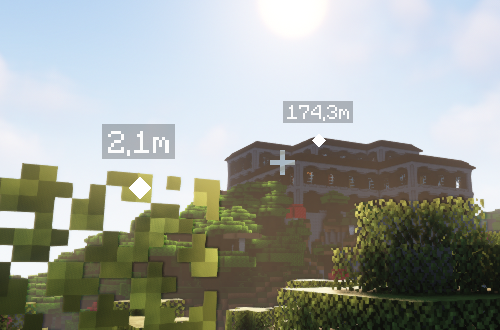
The following screenshot shows two pings in different distances with according scale.
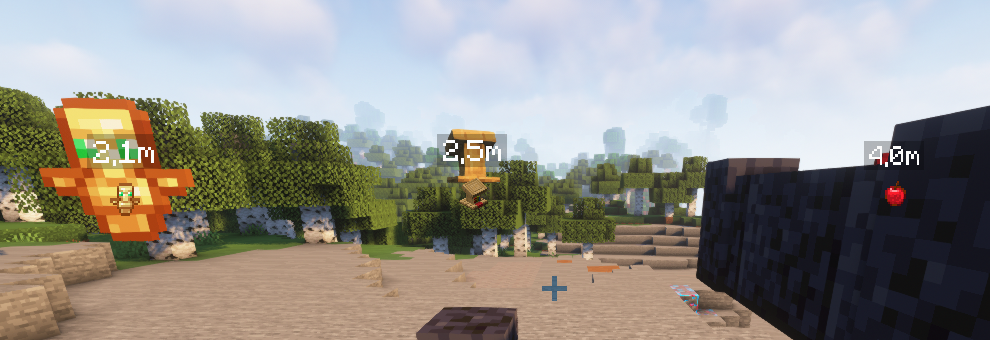
When Item Icons are enabled in the settings, the respective markers reflect the item texture (or model).
Dependencies

Project description from CurseForge.
Pick your setup
Ping Wheel by Minecraft version and loader
Choose the version and loader you play, then open the matching release.
Minecraft version
26.1.2
3 loader buildsMinecraft version
26.1.1
3 loader buildsMinecraft version
26.1
3 loader buildsMinecraft version
1.21.11
3 loader buildsMinecraft version
1.21.10
3 loader buildsMinecraft version
1.21.9
3 loader buildsMinecraft version
1.21.8
3 loader buildsMinecraft version
1.21.7
3 loader buildsMinecraft version
1.21.6
1 loader buildMinecraft version
1.21.5
3 loader buildsMinecraft version
1.21.4
3 loader buildsShowing the newest 12 of 31 game versions. Older files are in the list below.
Check the dependencies, then try the file in a copied instance before changing a world you care about.
Recent files
Ping Wheel versions and loaders
v1.12.2 for Forge 1.21.1
Ping-Wheel-1.12.2-forge-1.21.1.jar
26 Apr 2026
Client Source doesn’t say Server Source doesn’t say Dependencies No extras listed Listed on Release listing
Check the 1.21.1 · Forge setup 1.21Forge1.21.1 beta
v1.12.1 for Forge 1.21.1
Ping-Wheel-1.12.1-forge-1.21.1.jar
2 Jan 2026
Client Source doesn’t say Server Source doesn’t say Dependencies No extras listed Listed on Release listing
Check the 1.21.1 · Forge setup 1.21Forge1.21.1 beta
Looking for an older file? The official CurseForge project page is in Resources.
 mod
mod CurseForge + Modrinth · Minecraft
Better Library
This is just a simple lib for config, 1st join message and live message
 mod
mod CurseForge + Modrinth · Minecraft
Safra
Don’t mess with the server Play Minecraft with your friends in 2 clicks
 mod
mod CurseForge · Minecraft
Pet Vault
Store, summon, and manage your tamed pets and mounts from one place.