Minecraft version
Back to mods 
CurseForge · Minecraft mod
Cinematics
Play video cinematics in minecraft.
Choose a version Pick your version below, then grab the matching file.
Quick answer
Which Cinematics release should I use?
Latest stable file Cinematics-1.0
Game version 1.19.2
Loader Fabric
Cinematics-1.0 targets 1.19.2 with Fabric. The project page does not say whether this file belongs on the client, dedicated server, or both. No extra mods listed for this file.
Where it goes
Is Cinematics required on the client, server, or both?
The project page does not say whether this file belongs on the client, dedicated server, or both.
Client Source doesn’t say
Dedicated server Source doesn’t say
Loader for this release Fabric
Required install it here Optional supported, not mandatory Not supported do not install here Source doesn’t say do not assume
The source does not explicitly classify this release as client-only or server-only.
What else does Cinematics-1.0 need?
Cinematics-1.0. Change the file and its required mods may change too.
This file does not list any required mods. Do not add a library just because a different file uses it.
This file does not list any required or optional mods.
Before you install it
Add Cinematics without breaking your instance.
Built for Cinematics-1.0. Pick another file and the loader, install side or required mods may change.
- 01
Stick to this file
Use Cinematics-1.0. It targets 1.19.2 with Fabric; another release may have different loader, side or dependency requirements.
- 02
Bring the mods it needs
This file does not list any required mods. Do not add a library just because a different file uses it.
- 03
Put it on the correct side
The project page does not say whether this file belongs on the client, dedicated server, or both.
- 04
Pick the file you checked
Use the “Get this file” button beside Cinematics-1.0. It opens that exact file at the source.
About this project
What does Cinematics add?
With this mod you can play cinematic videos in minecraft!!
Requirements:
- FancyVideoAPIby Nick1st_. (ONLY ON CLIENT SIDE)
- Web host to download videos (ON SPIGOT) or local files on .minecraft/videos folder.
If you want to use this mod while are playing on Spigot servers, you can download the plugin port to Spigot with commands to download remotely your videos and then plays to all or specific player.
Spigot Page: LINK
Images:
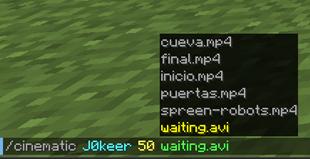
Project description from CurseForge.
Pick your setup
Cinematics by Minecraft version and loader
Choose the version and loader you play, then open the matching release.
Check the dependencies, then try the file in a copied instance before changing a world you care about.
Recent files
Cinematics versions and loaders
Cinematics-1.0
cinematic-1.0.jar
13 Dec 2022
Client Source doesn’t say Server Source doesn’t say Dependencies No extras listed Listed on Release listing
Check the 1.19.2 · Fabric setup Fabric1.19.2 release
Looking for an older file? The official CurseForge project page is in Resources.
 mod
CurseForge + Modrinth · Minecraft
Runeborn | Soulslike RPG progression
A soulslike RPG overhaul: earn runes, level eight attributes at Ember Shrines, wield 74 scaling armaments and hunt seven Sovereigns.
 mod
CurseForge · Minecraft
Torcherino Community Edition Remake
Torcherino Community Edition Remake — a torch that makes everything around it run faster.
 mod
Modrinth · Minecraft
AnvilCraft
A technology mod centered around anvils