Item Upgrader Core Needed by Item Upgrader itemupgrader-1.1.0.jar
requiredMatching file found Matched file: itemupgrader-core-1.0.4.jar

CurseForge · Minecraft mod
Add special upgrades to your items!
Quick answer
Item Upgrader itemupgrader-1.1.0.jar targets 1.19.2 with Forge. The project page does not say whether this file belongs on the client, dedicated server, or both. All 1 required mods have matching files.
Where it goes
The project page does not say whether this file belongs on the client, dedicated server, or both.
The source does not explicitly classify this release as client-only or server-only.
itemupgrader-1.1.0.jar. Change the file and its required mods may change too.
Install Item Upgrader Core first. We found matching files for this game-version and loader setup.
We only count dependency files that match this setup. A file for another loader does not fill the gap.
Before you install it
Built for Item Upgrader itemupgrader-1.1.0.jar. Pick another file and the loader, install side or required mods may change.
Use itemupgrader-1.1.0.jar. It targets 1.19.2 with Forge; another release may have different loader, side or dependency requirements.
Install Item Upgrader Core first. We found matching files for this game-version and loader setup.
The project page does not say whether this file belongs on the client, dedicated server, or both.
Use the “Get this file” button beside itemupgrader-1.1.0.jar. It opens that exact file at the source.
About this project
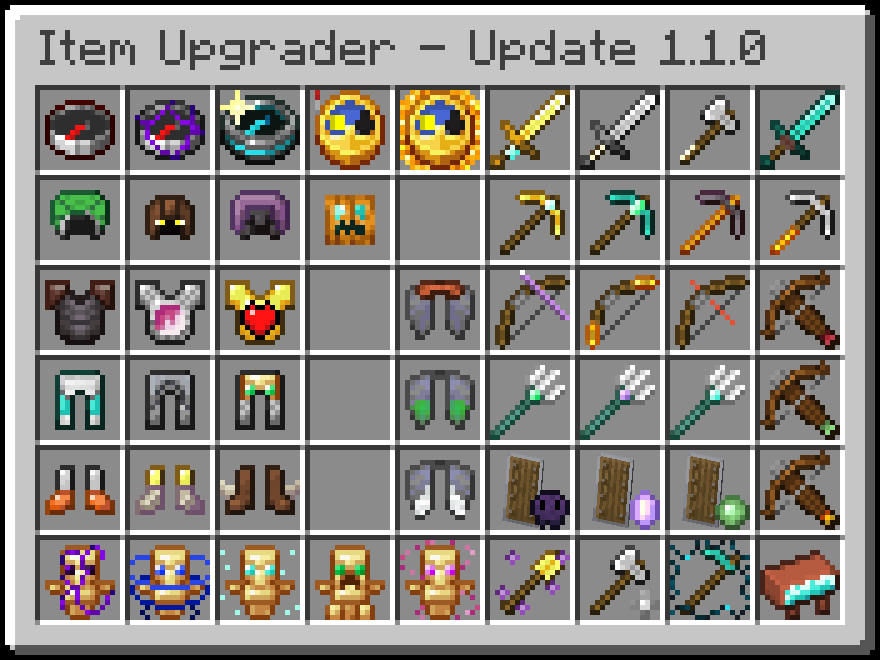
Visit The Wiki to get a summary of every upgrade! There is ingame documentation via JEI and on any upgraded item though.
I'm a Kinetic Hosting partner! If you need a Minecraft server and want to support me, click the image below!

Item Upgrader is a mod that adds upgrades for items, complementing enchantments and providing more use to the smithing table!
These can be applied in the smithing table by combining items with other items!

Be warned, however. The item you use to upgrade it will be consumed forever!
You also cannot apply multiple upgrades to a single item. You must choose one. You can, of course, have multiple items with different upgrades, but they will not stack on a single item.
Trying to upgrade an item with one already applied will work, but it will overwrite the previous upgrade!
Just Enough Items is highly recommended for use with this mod, as Upgrade recipes have built in compatibility for browsing in JEI!
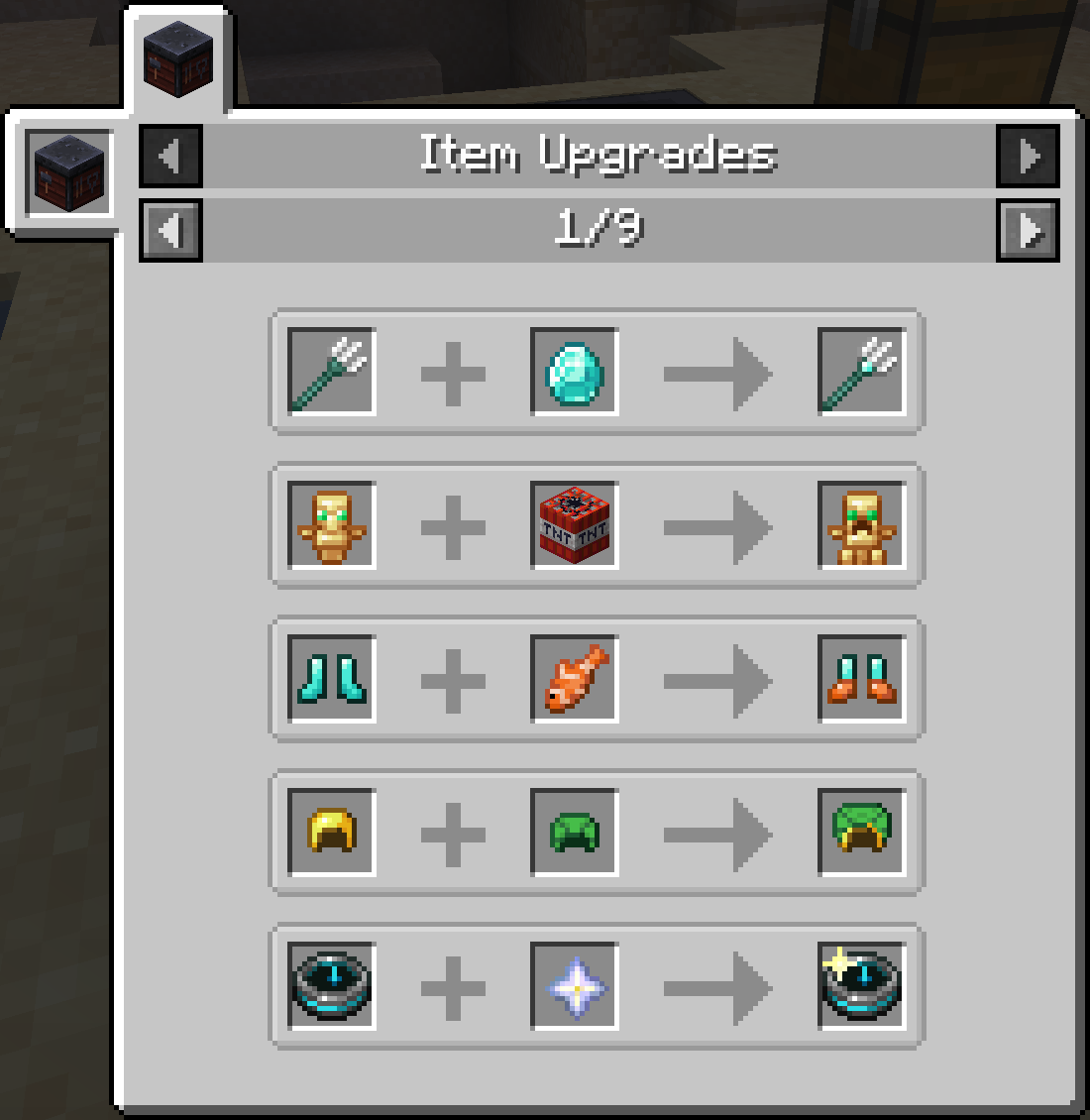
You can easily access this list of recipes by clicking the hammer in the smithing table!

Some upgrades may be slightly complex to use, such as Dolphin's Gift, which gives dolphin's grace to any players who repeatedly enter water. To maintain this effect, you must exit and re-enter water repeatedly, swimming like a dolphin! However, this behavior could be controlled by careful infrastructure, too! Be creative with some of these, see what you can do!

Note: Upgrade textures are rendered above the items in the inventory and not merged into the models in your hand or elsewhere, as it's more difficult than you'd think to do something like that. Because of this, enchantment glint and other things may be obscured behind the upgrade texture. If this proves to be a problem, the overlays can be disabled in the Item Upgrader CORE client config under decoration.renderUpgradeOverlays.
Project description from CurseForge.
Pick your setup
Choose the version and loader you play, then open the matching release.
Check the dependencies, then try the file in a copied instance before changing a world you care about.
Recent files
9 Feb 2023
17 Dec 2022
17 Dec 2022
Looking for an older file? The official CurseForge project page is in Resources.
 mod
A data-driven enchantment component and utility library.
 mod
shows you what gear modififers you can roll at any level
 mod
King of the Hill type of gameplay. One Player. One Sword. One Curse. Infinite Progression. If you want the blade, be ready to throw everything at its user to take him down and become the cursed one.