GudLib Needed by Coolers 2.0.0.4
requiredMatching file found Matched file: GudLib 1.2.0.0
CurseForge · Minecraft mod
Adds coolers, they feed you.
Quick answer
Coolers 2.0.0.4 targets 1.11.2. The project page does not say whether this file belongs on the client, dedicated server, or both. All 1 required mods have matching files.
Where it goes
The project page does not say whether this file belongs on the client, dedicated server, or both.
The source does not explicitly classify this release as client-only or server-only.
Coolers 2.0.0.4. Change the file and its required mods may change too.
Install GudLib first. We found matching files for this game-version and loader setup.
We only count dependency files that match this setup. A file for another loader does not fill the gap.
Before you install it
Built for Coolers 2.0.0.4. Pick another file and the loader, install side or required mods may change.
Use Coolers 2.0.0.4. It targets 1.11.2; another release may have different loader, side or dependency requirements.
Install GudLib first. We found matching files for this game-version and loader setup.
The project page does not say whether this file belongs on the client, dedicated server, or both.
Use the “Get this file” button beside Coolers 2.0.0.4. It opens that exact file at the source.
About this project
When you place the block in the world and activate (right click) it, you will be presented with a GUI similar to a chest's, but with six slots.
When you break the cooler it keeps its inventory, and while it is in your inventory and you are hungry, the cooler will feed you, first from it's buffer, then it's inventory.
If you look at the cooler's tooltip in your inventory, you may notice that it says whether its colored and/or transparent, and if you have food stored in it, it will even display the items in it and their quantities, as well as displaying the cooler's food buffer (keep in mind that 1 point in its buffer is one-half of a hunger icon).
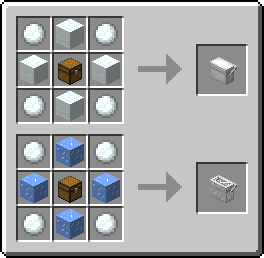
Crafting:
Curse based modpacks and spotlights are welcomed, no need to ask.
Project description from CurseForge.
Pick your setup
Choose the version and loader you play, then open the matching release.
Check the dependencies, then try the file in a copied instance before changing a world you care about.
Recent files
gud_coolers-2.0.0.4.jar
3 Mar 2017
gud_coolers-2.0.0.2.jar
14 Feb 2017
gud_coolers-2.0.0.2.jar
21 Jan 2017
gud_coolers-2.0.0.2.jar
21 Jan 2017
gud_coolers-2.0.0.1.jar
14 Jan 2017
gud_coolers-2.0.0.1.jar
14 Jan 2017
gud_coolers-2.0.jar
13 Jan 2017
gud_coolers-2.0a2.jar
5 Jan 2017
gud_coolers-2.0a1.jar
27 Dec 2016
27 Aug 2014
2 Aug 2014
20 Jul 2014
Looking for an older file? The official CurseForge project page is in Resources.
