Minecraft version
Back to mods 
Modrinth · Minecraft mod
Critfall
Tabletop style d20 combat for Minecraft: attack rolls against Armor Class, dice damage, crits and fumbles.
Choose a version Pick your version below, then grab the matching file.
Quick answer
Which Critfall release should I use?
Latest stable file 0.2.19+neoforge
Game version 1.21.1
Loader NeoForge
Critfall 0.2.19+neoforge targets 1.21.1 with NeoForge. Installation on the client is optional. Installation on the dedicated server is optional. No extra mods listed for this file.
Where it goes
Is Critfall required on the client, server, or both?
Installation on the client is optional. Installation on the dedicated server is optional.
Client Optional
Dedicated server Optional
Loader for this release NeoForge
Required install it here Optional supported, not mandatory Not supported do not install here Source doesn’t say do not assume
The source marks this as usable on both the client and server.
What else does Critfall 0.2.19+neoforge need?
0.2.19+neoforge. Change the file and its required mods may change too.
This file does not list any required mods. Do not add a library just because a different file uses it.
This file does not list any required or optional mods.
Before you install it
Add Critfall without breaking your instance.
Built for Critfall 0.2.19+neoforge. Pick another file and the loader, install side or required mods may change.
- 01
Stick to this file
Use 0.2.19+neoforge. It targets 1.21.1 with NeoForge; another release may have different loader, side or dependency requirements.
- 02
Bring the mods it needs
This file does not list any required mods. Do not add a library just because a different file uses it.
- 03
Put it on the correct side
Installation on the client is optional. Installation on the dedicated server is optional.
- 04
Pick the file you checked
Use the “Get this file” button beside 0.2.19+neoforge. It opens that exact file at the source.
About this project
What does Critfall add?
Critfall brings tabletop D20 combat to Minecraft. Every attack rolls a d20 against the target's Armor Class.
A hit rolls damage dices, natural 20s crit and natural 1s can fumble. Every mechanic has its own switch, and every number comes from
data you can change.

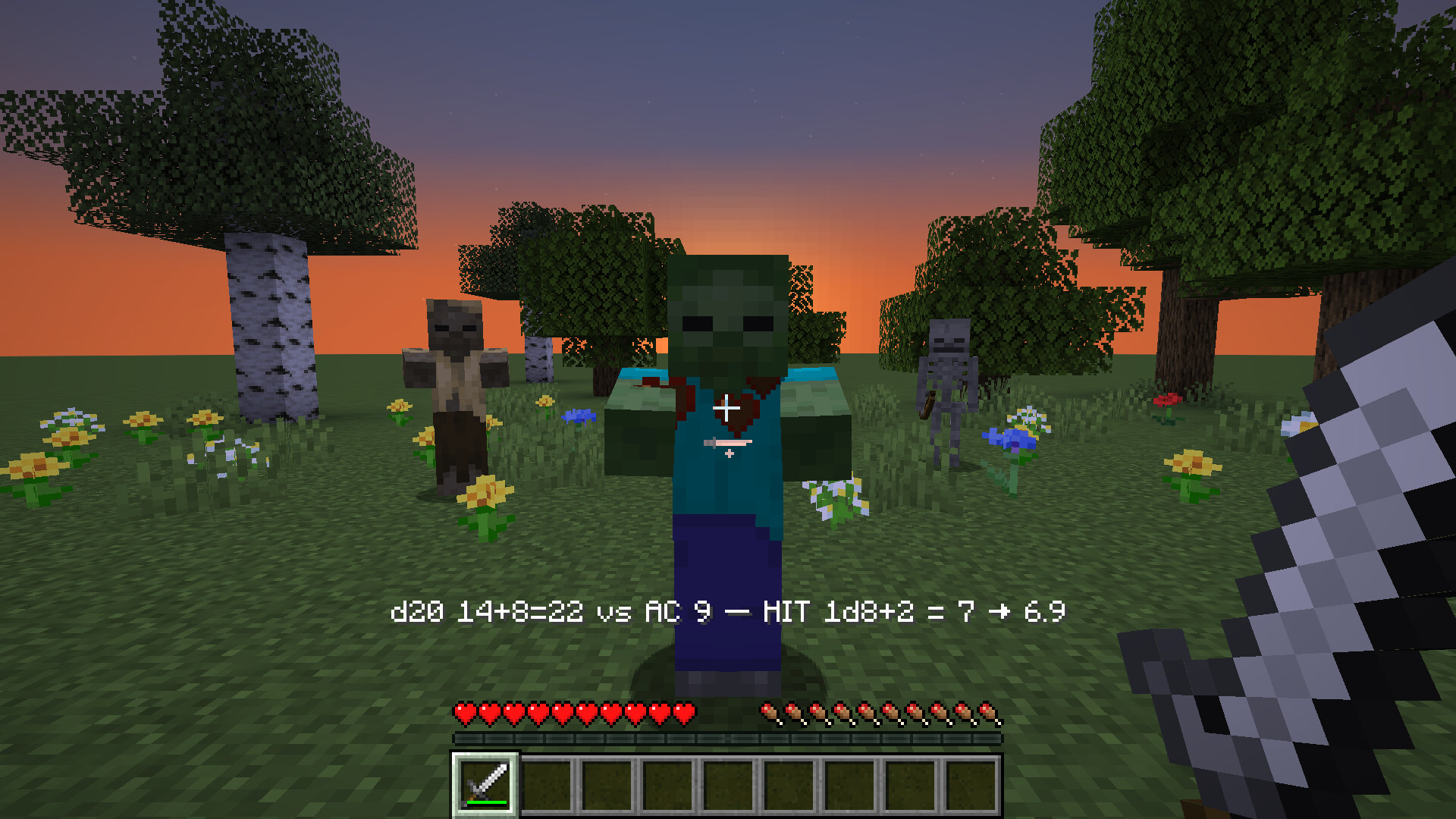
Attack rolls against Armor Class
Melee hits, arrows, thrown tridents and spells roll a d20 plus an attack bonus against the target's Armor Class. A miss
deals no damage. A hit rolls the weapon's damage dice. The action bar shows the roll, and the health the hit actually
took when armor or Resistance changed it.
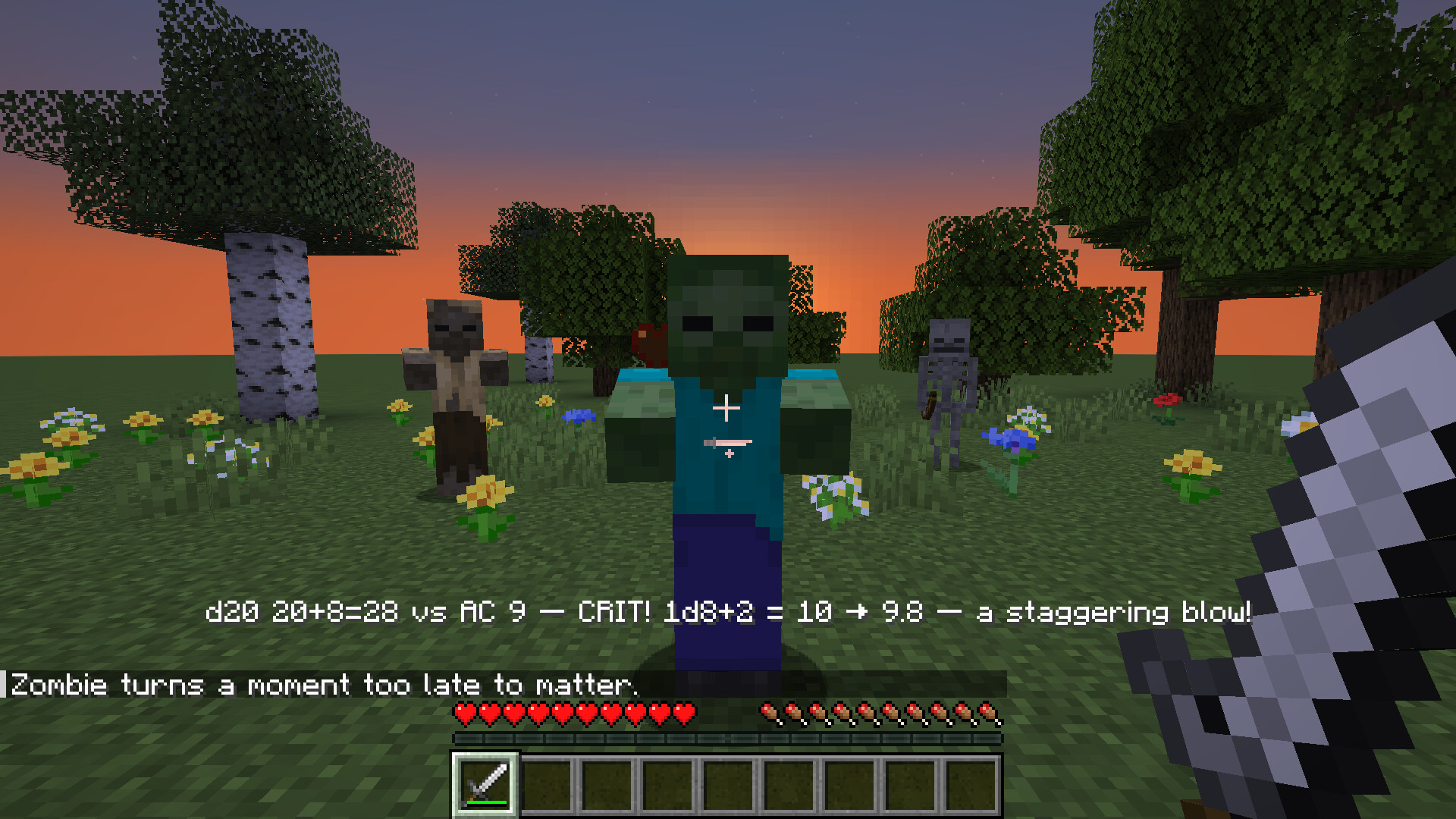
Natural 20s crit
A natural 20 always hits and deals the most its dice can roll. It can also slow the target or knock it back, and a line in
chat marks the moment. A jump attack rolls with advantage: two d20s, keep the higher.
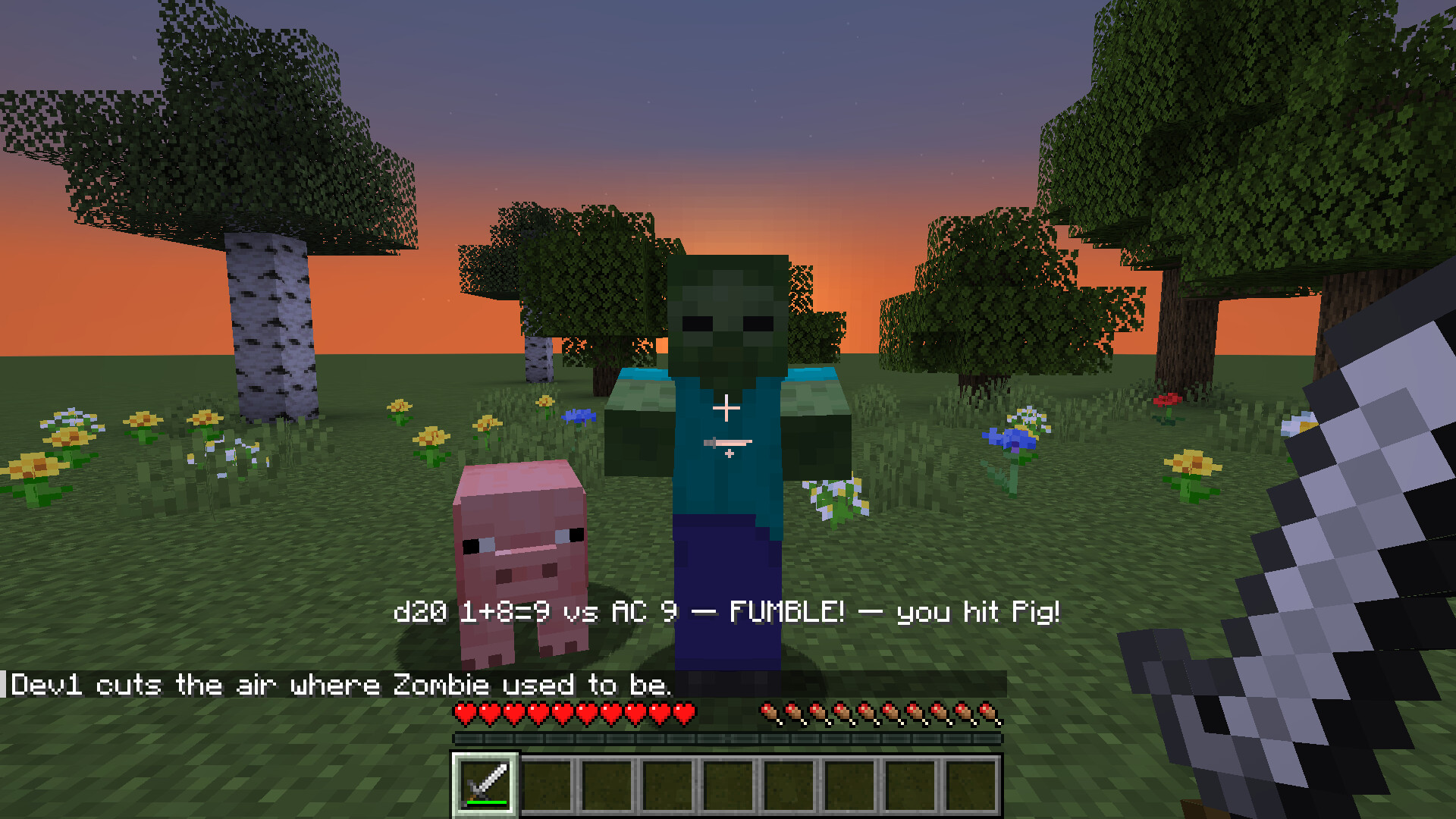
Natural 1s fumble
A natural 1 always misses, and a second d20 decides whether it turns into a fumble. A fumble can land on whoever stands
nearest. After a fumble, natural 1s are plain misses for 10 seconds, so fast fights don't fumble all the time. Weapon
damage on a fumble is off until you turn it on, and datapacks can add fumbles that drop the weapon, hurt the attacker or
make them stumble.
Stats for every mob and weapon
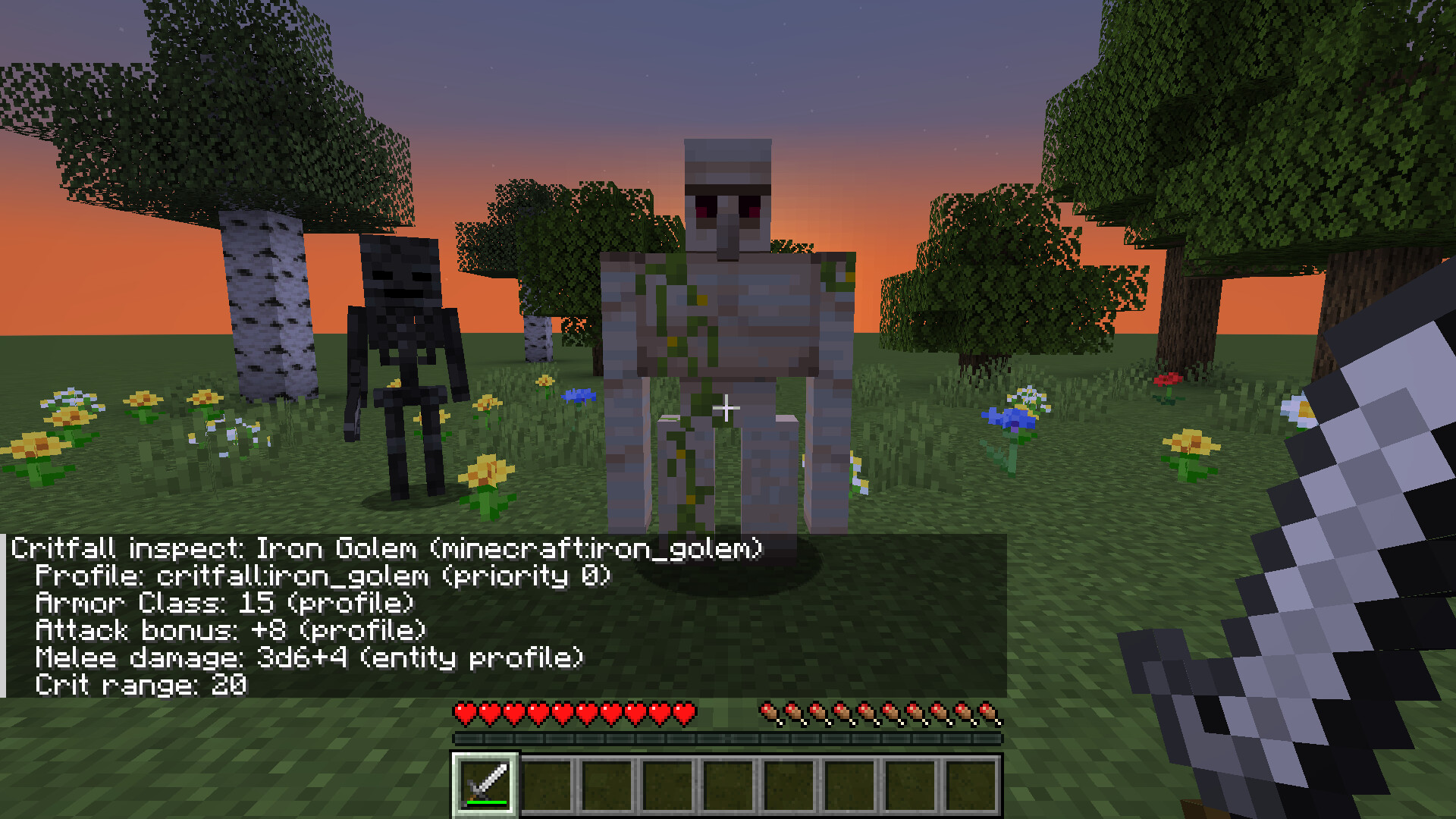
Vanilla mobs and weapons come with profiles: Armor Class, attack bonus, damage dice and crit range. Mobs and weapons from
other mods get stats worked out from their attributes, so a modpack works without setup. /critfall inspect shows what a
mob rolls with and which profile it came from.
For pack makers and mod developers
Profiles for mobs, weapons and spells are datapack JSON, matched by id or tag. /critfall generate writes an editable
profile for every mob and weapon in the pack, and /critfall report lists which ones have a profile and which use worked
out stats. Dry run shows every roll while vanilla damage still applies, so you can tune a pack in normal play. Three
presets set crits and fumbles: Tempered (the default), Classic and Lite.
Mods build on the public Java API in studio.modroll.critfall.api: roll events, RollService and a dice parser. Checks,
Initiative and the Headless Horseman use only this API. KubeJS scripts can call it too, with examples in the repo.

Requires
- Minecraft 1.21.1
- NeoForge 21.1 or newer, or Fabric Loader 0.16.9 or newer with Fabric API
- On a server, install it on the server. On clients it is optional: without it, players still see the roll as plain text,
without the flavor lines, sounds and particles.
Optional
- Mod Menu on Fabric, for the config button in the mod list.
Works with
- Critfall: Checks: ability scores feed Critfall's attack bonus, damage, Armor Class
and saving throws. - Critfall: Initiative: fights become turn based encounters. Critfall still
rolls every attack and save. - Critfall: Headless Horseman: a Halloween boss whose attacks, damage
and saves Critfall rolls. - Spell mods that tag their damage as magic: spells roll to hit or call for a saving throw. Tested with Iron's Spells 'n
Spellbooks and Ars Nouveau on NeoForge.

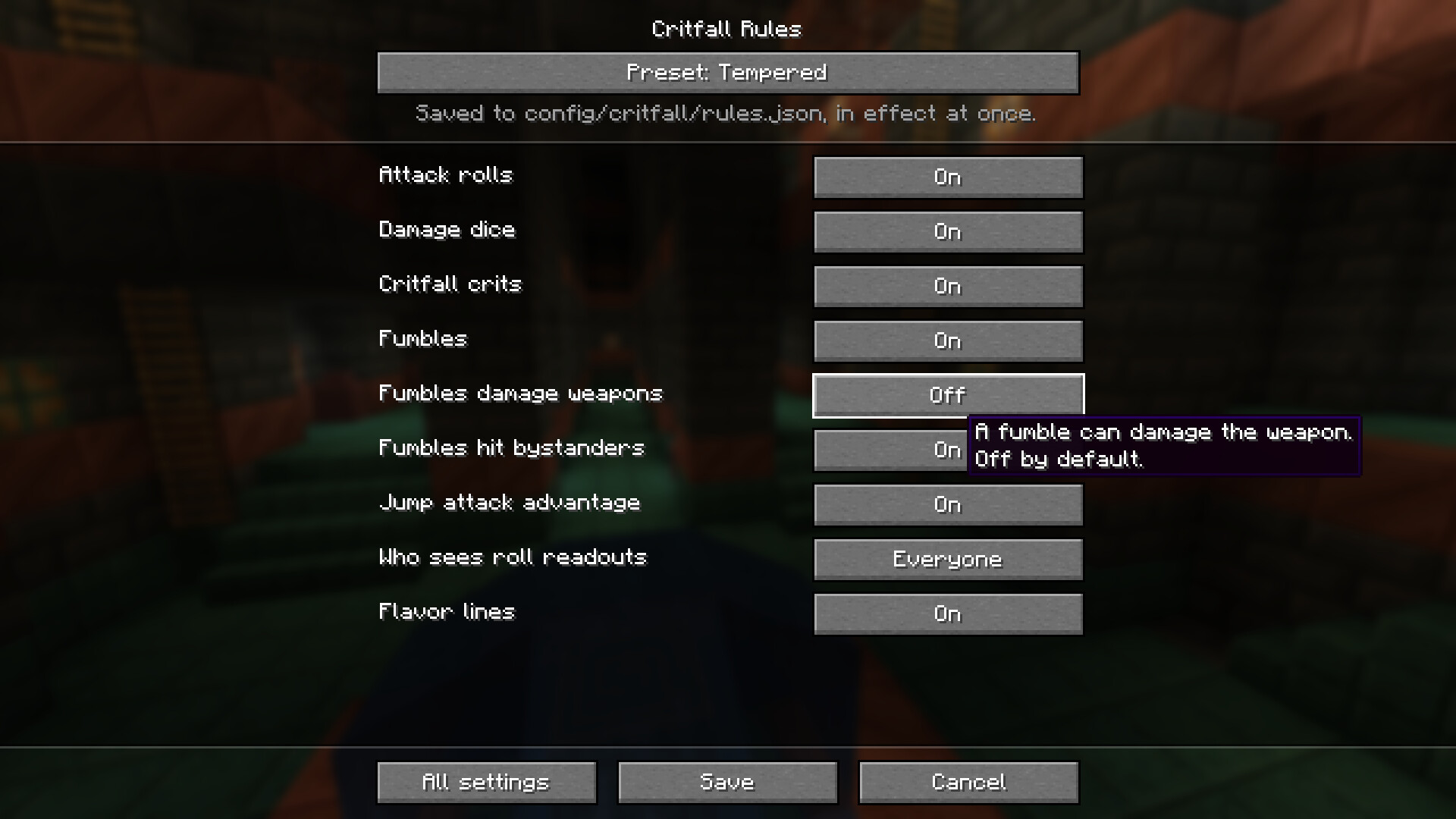
Open the config screen from the mod list: Mods → Critfall → Config on NeoForge, or the config button in Mod Menu on
Fabric. The first page has a preset (Tempered, Classic or Lite) and the switches most players want. All settings has
every rule. Save applies the rules at once.
The rules live in config/critfall/rules.json and are read again on /reload. On a server, the server's file applies.
Each player's config/critfall/client.json turns the readout, flavor lines, sounds and particles on or off.
Every option and its default
config/critfall/rules.json. Options in bold are on the first page of the config screen.
| Option | Default | What it does |
|---|---|---|
attack_rolls.enabled |
true |
Master switch: off leaves all combat vanilla. |
attack_rolls.players |
true |
Players' attacks roll to hit. |
attack_rolls.mobs |
true |
Mobs' attacks roll to hit. |
attack_rolls.projectiles |
true |
Arrows, tridents and thrown items roll when they land. |
attack_rolls.spells |
true |
Spell damage rolls to hit, or calls for a saving throw. |
damage_dice.enabled |
true |
A hit deals rolled dice; off keeps the vanilla damage. |
crits.enabled |
true |
Natural 20s crit. Off leaves crits to vanilla and other mods. |
crits.rule |
max_dice |
Crit damage: max_dice, double_dice or double_total. |
crits.nat20_always_hits |
true |
A natural 20 hits whatever the Armor Class. |
crits.apply_effect.enabled |
true |
A crit can put a status effect on the target. |
crits.knockback.enabled |
true |
A crit can knock the target back. |
fumbles.enabled |
true |
A natural 1 can set off a fumble. |
fumbles.nat1_always_misses |
true |
A natural 1 misses whatever the attack bonus. |
fumbles.confirmation_roll.enabled |
true |
A second d20 must also fail before a fumble counts. |
fumbles.confirmation_roll.dc |
10 |
The second d20 must roll below this (2 to 20). |
fumbles.cooldown_ticks |
200 |
After a fumble, natural 1s are plain misses this long. 20 ticks = 1 second. |
fumbles.durability_break.enabled |
false |
A fumble can damage the weapon. |
fumbles.durability_break.mode |
set_to_1 |
Down to 1 durability (set_to_1), or lose a share of it (percent_loss). |
fumbles.durability_break.percent |
25 |
Share of max durability lost in percent_loss mode. |
fumbles.hit_nearest_ally.enabled |
true |
A fumble can land on the nearest creature instead. |
fumbles.hit_nearest_ally.radius |
4 |
How far away, in blocks, that creature can be (1 to 64). |
fumbles.hit_nearest_ally.can_hit_players |
true |
Off never turns a fumble into a hit on a player. |
fumbles.hit_nearest_ally.respect_pvp_rules |
true |
Honors the server's PvP setting and team friendly fire. |
fumbles.self_damage.enabled |
false |
Lets a datapack's fumble make the attacker hurt themselves. |
fumbles.self_damage.dice |
1d4 |
Damage a fumble deals to the attacker. |
fumbles.drop_weapon.enabled |
false |
Lets a datapack's fumble knock the weapon out of the attacker's hand. |
fumbles.stumble.enabled |
false |
Lets a datapack's fumble slow the attacker for a moment. |
fumbles.stumble.slowness_ticks |
40 |
How long the stumble lasts. |
fumbles.applies_to |
players_and_mobs |
Whose natural 1s can fumble: players, mobs or players_and_mobs. |
spells.saves.enabled |
true |
Area spells make the target save instead of rolling to hit. |
spells.saves.default_dc |
13 |
The DC when a spell names none (1 to 30). |
spells.saves.on_success |
half |
A successful save takes half damage or none (negate). |
fallbacks.unknown_entity |
derive |
Mobs without a profile: derive stats, or stay vanilla (vanilla_passthrough). |
fallbacks.unknown_weapon |
derive |
Weapons without a profile: derive dice, or stay vanilla. |
fallbacks.unknown_spell |
derive |
Spells without a profile: derive dice, or stay vanilla. |
feedback.roll_visibility |
everyone |
Who is sent the readout: everyone, attacker_only or off. |
feedback.flavor.enabled |
true |
Flavor lines on crits, fumbles and some kills. |
feedback.flavor.cooldown_ticks |
20 |
Least time between flavor lines on one target. |
feedback.flavor.kill_chance_percent |
25 |
Chance of a line on an ordinary kill. Named mobs and bosses always get one. |
balance.global_damage_multiplier |
1.0 |
Scales all rolled damage. |
balance.disable_vanilla_armor_reduction |
false |
On, armor only raises Armor Class and no longer reduces hits. |
balance.armor_ac_divisor |
4 |
Armor points per point of Armor Class (1 to 100). |
balance.toughness_ac_divisor |
4 |
Armor toughness points per point of Armor Class (1 to 100). |
balance.player_attack_bonus |
5 |
Added to a player's attack bonus (−20 to 20). |
dry_run.enabled |
false |
Rolls are shown, but vanilla damage still applies. For tuning a modpack. |
modifier_providers.enabled |
true |
Use bonuses and Armor Class from a mod that supplies them, such as Checks. |
advantage_sources.jump_attack |
true |
A falling crit hit rolls two d20s and keeps the higher. |
config/critfall/client.json
| Option | Default | What it does |
|---|---|---|
rolls |
true |
The roll readout on the action bar. |
flavor |
true |
Flavor lines in chat. |
sounds |
true |
A sound on hits, crits and fumbles. |
particles |
true |
Particles on crits and fumbles. |
The full reference, with every value each option takes, is in
docs/rules-config.md.

All commands need operator permission.
| Command | What it does |
|---|---|
/critfall inspect [entity] |
A mob's Armor Class, attack bonus and damage, and which profile they came from. Without an entity, the one you look at. |
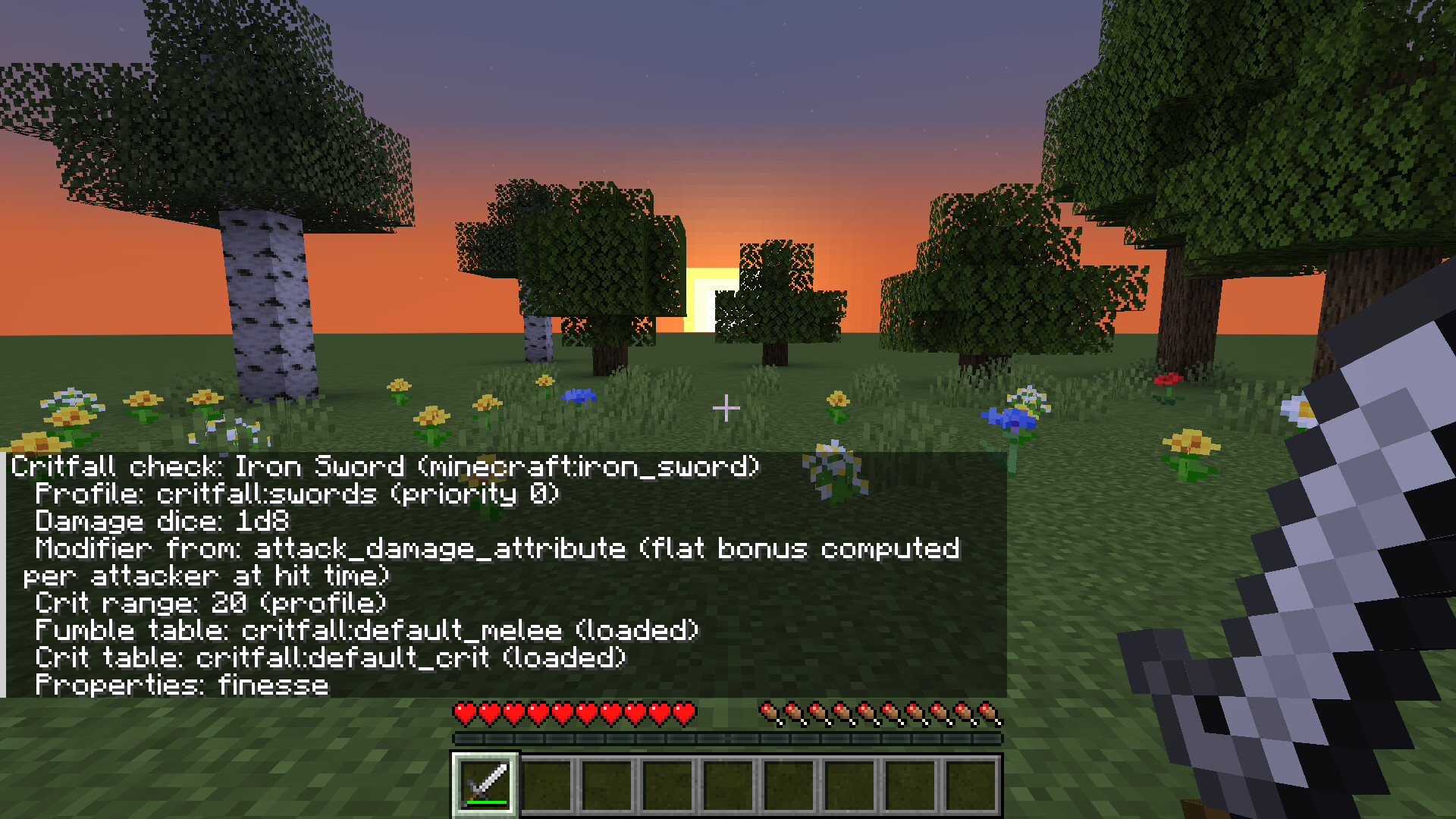
/critfall check [item] |
An item's dice, bonus, crit range and fumble and crit tables. Without an item, the one in your hand. |
/critfall generate [missing] |
Writes a datapack with a profile for every mob and weapon in the game, ready to edit. missing only writes the ones without a profile. |
/critfall report |
Writes a CSV and JSON list of every mob and item and where its stats come from. |

Free to use in any modpack.

Project description from Modrinth.
Pick your setup
Critfall by Minecraft version and loader
Choose the version and loader you play, then open the matching release.
Check the dependencies, then try the file in a copied instance before changing a world you care about.
Recent files
Critfall versions and loaders
0.2.19+neoforge
critfall-neoforge-0.2.19.jar
4 Nov 2026
Client Optional Server Optional Dependencies No extras listed Listed on Release listing
Check the 1.21.1 · NeoForge setup 1.21.1NeoForge release
0.2.19+fabric
critfall-fabric-0.2.19.jar
4 Nov 2026
Client Optional Server Optional Dependencies 1 required · 1 unchecked Listed on Release listing
Check the 1.21.1 · Fabric setup 1.21.1Fabric release
0.2.18+neoforge
critfall-neoforge-0.2.18.jar
3 Nov 2026
Client Optional Server Optional Dependencies No extras listed Listed on Release listing
Check the 1.21.1 · NeoForge setup 1.21.1NeoForge release
0.2.18+fabric
critfall-fabric-0.2.18.jar
3 Nov 2026
Client Optional Server Optional Dependencies 1 required · 1 unchecked Listed on Release listing
Check the 1.21.1 · Fabric setup 1.21.1Fabric release
0.2.17+neoforge
critfall-neoforge-0.2.17.jar
27 Oct 2026
Client Optional Server Optional Dependencies No extras listed Listed on Release listing
Check the 1.21.1 · NeoForge setup 1.21.1NeoForge release
0.2.17+fabric
critfall-fabric-0.2.17.jar
27 Oct 2026
Client Optional Server Optional Dependencies 1 required · 1 unchecked Listed on Release listing
Check the 1.21.1 · Fabric setup 1.21.1Fabric release
0.2.16+neoforge
critfall-neoforge-0.2.16.jar
21 Oct 2026
Client Optional Server Optional Dependencies No extras listed Listed on Release listing
Check the 1.21.1 · NeoForge setup 1.21.1NeoForge release
0.2.16+fabric
critfall-fabric-0.2.16.jar
21 Oct 2026
Client Optional Server Optional Dependencies 1 required · 1 unchecked Listed on Release listing
Check the 1.21.1 · Fabric setup 1.21.1Fabric release
0.2.15+neoforge
critfall-neoforge-0.2.15.jar
14 Oct 2026
Client Optional Server Optional Dependencies No extras listed Listed on Release listing
Check the 1.21.1 · NeoForge setup 1.21.1NeoForge release
0.2.15+fabric
critfall-fabric-0.2.15.jar
14 Oct 2026
Client Optional Server Optional Dependencies 1 required · 1 unchecked Listed on Release listing
Check the 1.21.1 · Fabric setup 1.21.1Fabric release
0.2.14+neoforge
critfall-neoforge-0.2.14.jar
14 Oct 2026
Client Optional Server Optional Dependencies No extras listed Listed on Release listing
Check the 1.21.1 · NeoForge setup 1.21.1NeoForge release
0.2.14+fabric
critfall-fabric-0.2.14.jar
14 Oct 2026
Client Optional Server Optional Dependencies 1 required · 1 unchecked Listed on Release listing
Check the 1.21.1 · Fabric setup 1.21.1Fabric release
Looking for an older file? The official Modrinth project page is in Resources.
 mod
CurseForge + Modrinth · Minecraft
Safra
Don’t mess with the server Play Minecraft with your friends in 2 clicks via P2P
 mod
Modrinth · Minecraft
Create: Northstar - Structures
An addon that adds structures to the planets of Northstar Redux.
 mod
Modrinth · Minecraft
Log To
Craft sticks and chests using logs!