Mod Menu Optional for Bedrock Skins 26.2-2.0.1+fabric
optionalMatching file found Matched file: 20.0.2

Modrinth · Minecraft mod
Allows Bedrock Edition and Legacy Console Edition skin packs to be used natively on Java Edition!
Quick answer
Bedrock Skins 26.2-2.0.1+fabric targets 26.2 with Fabric, Quilt. Installation on the client is optional. Installation on the dedicated server is optional. All 1 required mods have matching files.
Where it goes
Installation on the client is optional. Installation on the dedicated server is optional.
The source marks this as usable on both the client and server.
26.2-2.0.1+fabric. Change the file and its required mods may change too.
Install Fabric API first. We found matching files for this game-version and loader setup. 1 comes through another mod in the chain.
1 extra mod was pulled in by another dependency. Indented rows show who needs each one. We only count dependency files that match this setup. A file for another loader does not fill the gap.
Before you install it
Built for Bedrock Skins 26.2-2.0.1+fabric. Pick another file and the loader, install side or required mods may change.
Use 26.2-2.0.1+fabric. It targets 26.2 with Fabric, Quilt; another release may have different loader, side or dependency requirements.
Install Fabric API first. We found matching files for this game-version and loader setup. 1 comes through another mod in the chain.
Installation on the client is optional. Installation on the dedicated server is optional.
Use the “Get this file” button beside 26.2-2.0.1+fabric. It opens that exact file at the source.
About this project
This mod allows you to load and render skins from Bedrock Edition and Legacy Console Edition Skin Packs natively. It enables fully custom 3D geometry, unique skin animations, as well as high-resolution textures.
K, or via the buttons added directly to both the Main Menu and the Pause Screen. Browse your installed packs and cosmetics, preview skins, and manage your favorites.Additional skin packs can be downloaded with the following resource pack.
skin_packs folder in your main game directory (e.g., .minecraft/skin_packs).skins.json file. If your skins utilize custom models, a geometry.json file is also required.Example:
.minecraft/skin_packs/MyCustomPack/skins.json
persona folder in your main game directory (e.g., .minecraft/persona)..meta.json file.Example:
.minecraft/persona/steve_shirt/steve_shirt.meta.json
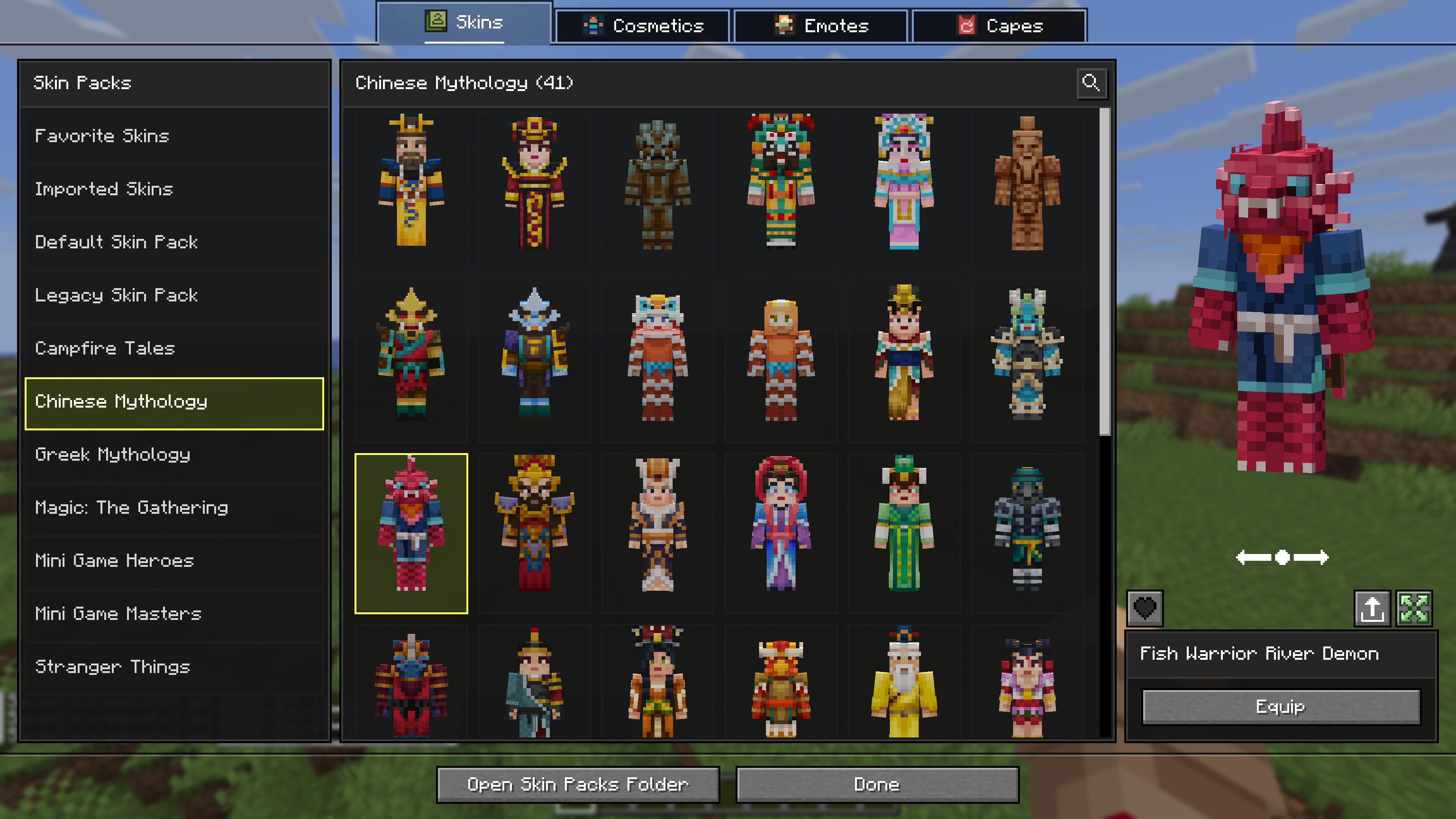
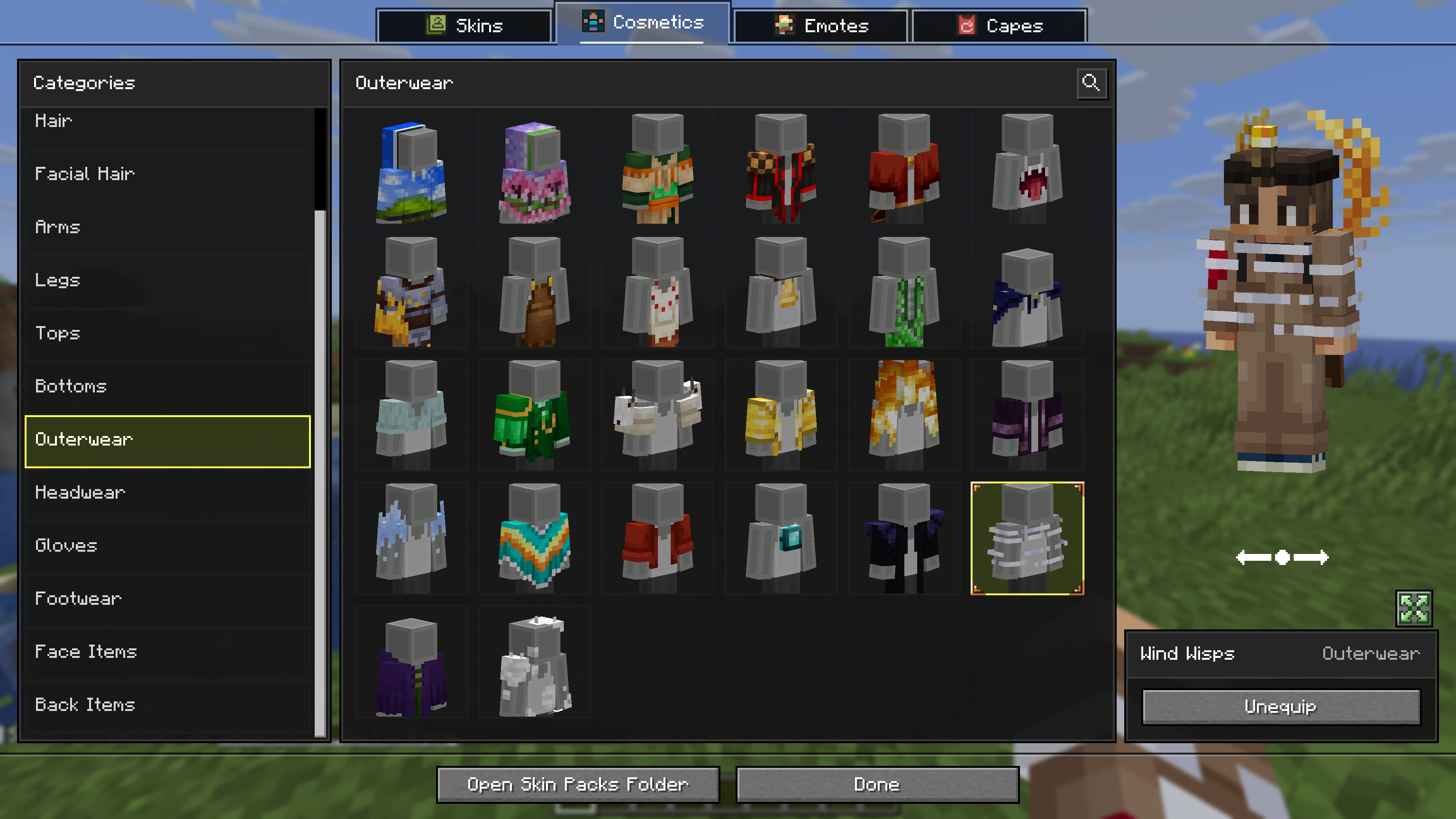

Project description from Modrinth.
Pick your setup
Choose the version and loader you play, then open the matching release.
Check the dependencies, then try the file in a copied instance before changing a world you care about.
Recent files
BedrockSkins-26.2-2.0.1-fabric.jar
16 Sept 2026
BedrockSkins-26.1.2-2.0.1-neoforge.jar
16 Sept 2026
BedrockSkins-1.21.9-2.0.1-neoforge.jar
16 Sept 2026
BedrockSkins-1.21.9-2.0.1-fabric.jar
16 Sept 2026
BedrockSkins-1.21.11-2.0.1-neoforge.jar
16 Sept 2026
BedrockSkins-1.21.10-2.0.1-neoforge.jar
16 Sept 2026
BedrockSkins-1.21.11-2.0.1-fabric.jar
16 Sept 2026
BedrockSkins-1.21.10-2.0.1-fabric.jar
16 Sept 2026
BedrockSkins-26.3-2.0.1-fabric.jar
16 Sept 2026
BedrockSkins-26.1.2-2.0.1-fabric.jar
16 Sept 2026
BedrockSkins-26.3-2.0.0-fabric.jar
15 Sept 2026
BedrockSkins-26.1.2-2.0.0-neoforge.jar
11 Sept 2026
Looking for an older file? The official Modrinth project page is in Resources.
 mod
modAdding compatibility between Serene Seasons and other mods or datapacks for a smoother experience.
 mod
modA Minecraft clientside inventory utilities mod
 mod
modAdds the /model command, allowing any item to be given any model