Xaero's World Map Needed by Geotagged Screenshots geotagged-screenshots-1.20.1-0.2.0
requiredMatching file found Matched file: xaeroworldmap-forge-1.20.1-1.44.2.jar

CurseForge · Minecraft mod
Enriches screenshots with metadata like in-game coordinates to make them viewable in Xaero's World Map.
Quick answer
Geotagged Screenshots geotagged-screenshots-1.20.1-0.2.0 targets 1.20.1 with Forge. The project page does not say whether this file belongs on the client, dedicated server, or both. All 4 required mods have matching files.
Where it goes
The project page does not say whether this file belongs on the client, dedicated server, or both.
The source does not explicitly classify this release as client-only or server-only.
geotagged-screenshots-1.20.1-0.2.0. Change the file and its required mods may change too.
Install Xaero's World Map, Xaero's Minimap, Xaero's World Map, Xaero's Minimap first. We found matching files for this game-version and loader setup. 1 comes through another mod in the chain.
1 extra mod was pulled in by another dependency. Indented rows show who needs each one. We only count dependency files that match this setup. A file for another loader does not fill the gap.
Before you install it
Built for Geotagged Screenshots geotagged-screenshots-1.20.1-0.2.0. Pick another file and the loader, install side or required mods may change.
Use geotagged-screenshots-1.20.1-0.2.0. It targets 1.20.1 with Forge; another release may have different loader, side or dependency requirements.
Install Xaero's World Map, Xaero's Minimap, Xaero's World Map, Xaero's Minimap first. We found matching files for this game-version and loader setup. 1 comes through another mod in the chain.
The project page does not say whether this file belongs on the client, dedicated server, or both.
Use the “Get this file” button beside geotagged-screenshots-1.20.1-0.2.0. It opens that exact file at the source.
About this project
Minecraft saves all taken screenshots inside a single folder without context information. Making it difficult if you are looking for specific screenshots of a certain world or a special place. This can be improved so that players can take an imaginary journey back to visited places.
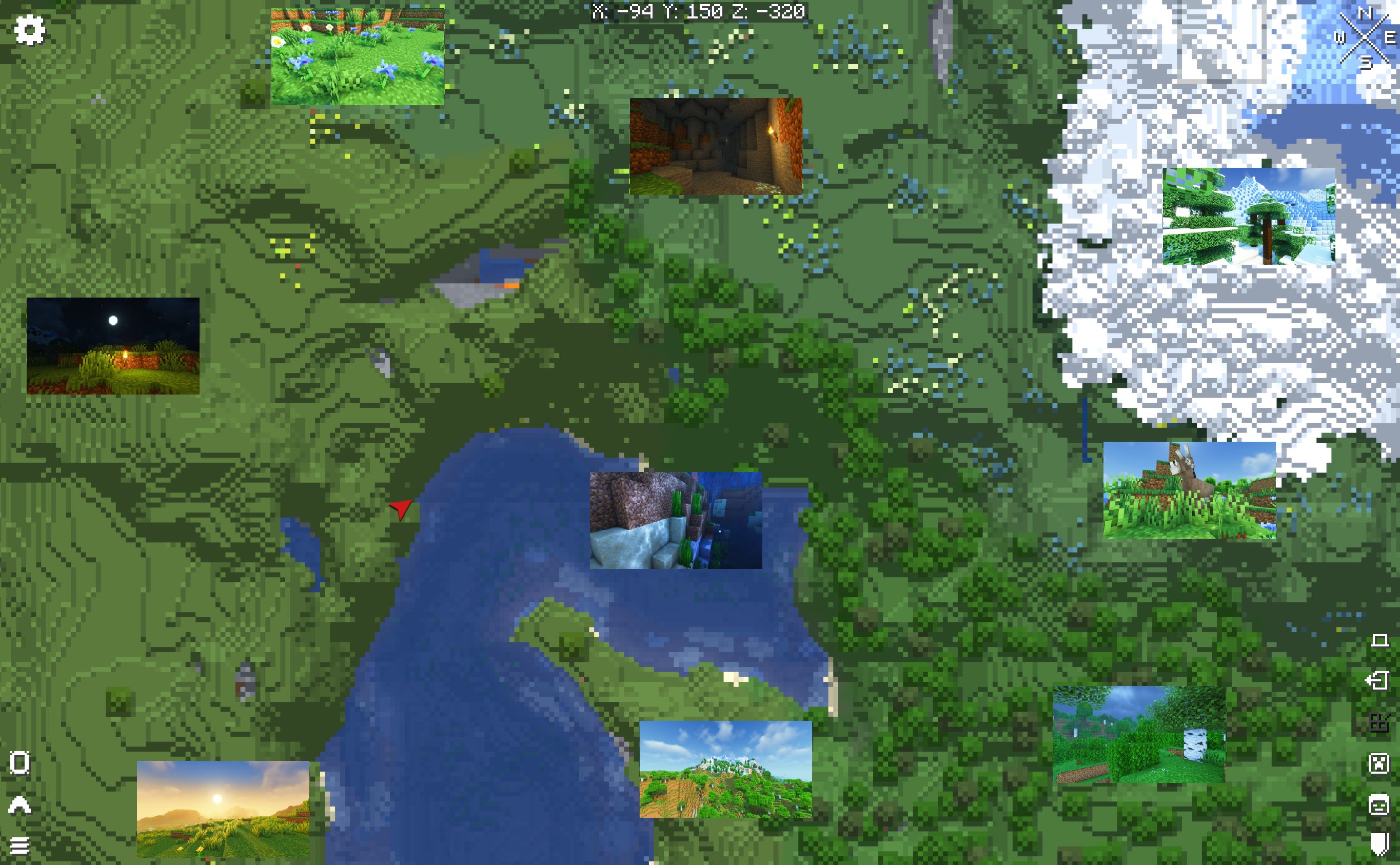
Whenever you create a new screenshot in Minecraft this mods adds various information about your in-game location to the screenshot file. In addition to that it also creates new waypoints to Xaero's World Map and Minimap to the exact same location in a separate waypoint set: Geotagged Screenshots
These two pieces of information are being used to render the screenshots in Xaero's World Map. All of these can be viewed in a full screen viewer by left-clicking it. Both mods, Xaero's World Map and Minimap, are required dependencies.
Geotagged Screenshots currently adds the following metadata to newly created screenshots:
Furthermore it creates a separate directory for thumbnails (each file includes the same metadata as the original one). These thumbnails are used to display them in the world map. Screenshots will only be loaded for the fullscreen viewer.
Q: I cannot see my created screenshots in the world map. A: Make sure to select the waypoint set "Geotagged Screenshots".
Q: Can I use Geotagged Screenshots in my modpack? A: Yes - Feel free to include it - Remember to give credit and don't claim it as your own creation.
Q: Are you going to create or support a Fabric version? A: No. But every other dev is allowed to do so under the given conditions of the license.
Q: Can you add ...?
A: Please create a feature request on GitHub.
This mod is only available for Forge. Support for NeoForge will be added with the next major release at the earliest.
Project description from CurseForge.
Pick your setup
Choose the version and loader you play, then open the matching release.
Check the dependencies, then try the file in a copied instance before changing a world you care about.
Recent files
geotagged_screenshots-1.20.1-0.2.0.jar
20 Dec 2023
geotagged_screenshots-1.19.2-0.2.0.jar
20 Dec 2023
geotagged_screenshots-1.19.2-0.1.0.jar
12 Dec 2023
Looking for an older file? The official CurseForge project page is in Resources.
 mod
modA cute add-on for Farmer's Delight adding a new Bunny villager, placeable easter eggs and easter-themed foods!
 mod
modThis add-on for Epic Fight introduces new weapons with brand-new animations and much more!
 mod
modUnofficial Manwha/Anime Solo Leveling Mod for Minecraft with gates, dungeons, weapons, classes and more!