Minecraft version
Back to mods 
Modrinth · Minecraft mod
Mini Model
This mod can turn blocks into mini models.
Choose a version Pick your version below, then grab the matching file.
Quick answer
Which Mini Model release should I use?
Latest stable file 1.0.0-26.3
Game version 26.3
Loader Fabric
Mini Model 1.0.0-26.3 targets 26.3 with Fabric. Installation on the client is optional. Installation on the dedicated server is optional. No extra mods listed for this file.
Where it goes
Is Mini Model required on the client, server, or both?
Installation on the client is optional. Installation on the dedicated server is optional.
Client Optional
Dedicated server Optional
Loader for this release Fabric
Required install it here Optional supported, not mandatory Not supported do not install here Source doesn’t say do not assume
The source marks this as usable on both the client and server.
What else does Mini Model 1.0.0-26.3 need?
1.0.0-26.3. Change the file and its required mods may change too.
This file does not list any required mods. Do not add a library just because a different file uses it.
This file does not list any required or optional mods.
Before you install it
Add Mini Model without breaking your instance.
Built for Mini Model 1.0.0-26.3. Pick another file and the loader, install side or required mods may change.
- 01
Stick to this file
Use 1.0.0-26.3. It targets 26.3 with Fabric; another release may have different loader, side or dependency requirements.
- 02
Bring the mods it needs
This file does not list any required mods. Do not add a library just because a different file uses it.
- 03
Put it on the correct side
Installation on the client is optional. Installation on the dedicated server is optional.
- 04
Pick the file you checked
Use the “Get this file” button beside 1.0.0-26.3. It opens that exact file at the source.
About this project
What does Mini Model add?
Description
This mod can turn blocks into mini models. You can even put a mountain into a block.
The Mini Models only serve a decorative purpose. Blocks such as bookshelves and redstones have no practical use.
How to use
Holding the Mini Model Tool in hand, right-click on a block as the starting point, and right-click on another block as the ending point. All blocks within this range will be collected as mini models.
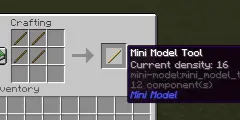
You can press Shift + scroll the mouse wheel to switch the density of the Tool. The scale of Mini Model equals 1/density. This method can switch the density to values of 8, 16, 32, and 64. But the value of density can be any integer in [1, 128]. You can use command "/minimodel density " to set the density more freely.
You can also use command "/minimodel " to collect blocks. This method is convenient for blocks that cannot be right-click interacted with, such as water.
These commands do not require OP permission, so you do not need to enable cheating to use them.
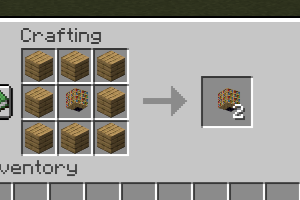
You can easily replicate Mini Models using 8 wooden planks without the need for re-collection.
Project description from Modrinth.
Pick your setup
Mini Model by Minecraft version and loader
Choose the version and loader you play, then open the matching release.
Minecraft version
26.2
1 loader buildMinecraft version
26.1.2
1 loader buildCheck the dependencies, then try the file in a copied instance before changing a world you care about.
Recent files
Mini Model versions and loaders
1.0.0-26.3
mini-model-1.0.0-26.3.jar
22 Oct 2026
Client Optional Server Optional Dependencies No extras listed Listed on Release listing
Check the 26.3 · Fabric setup 26.3Fabric release
1.0.0-26.2
mini-model-1.0.0-26.2.jar
3 Aug 2026
Client Optional Server Optional Dependencies No extras listed Listed on Release listing
Check the 26.2 · Fabric setup 26.2Fabric release
1.0.0-26.1.2
mini-model-1.0.0-26.1.2.jar
3 Aug 2026
Client Optional Server Optional Dependencies No extras listed Listed on Release listing
Check the 26.1.2 · Fabric setup 26.1.2Fabric release
Looking for an older file? The official Modrinth project page is in Resources.
 mod
CurseForge + Modrinth · Minecraft
Asgard Shield: Reloaded
A Minecraft mod that adds giant swords and shields to the game. A re-make of the original Asgard Shield, made popular by the 1.5 modpack Hexxit.
 mod
CurseForge + Modrinth · Minecraft
ModernFix
All-in-one mod that improves performance, reduces memory usage, and fixes many bugs. Compatible with all your favorite performance mods!
 mod
CurseForge + Modrinth · Minecraft
Polydium
Well-rounded client-side optimization mod. Extremely compatible Vulkan backend for 1.21.11-26.1.2. By Polyfrost, best with OneClient.