Kotlin for Forge Needed by Nodeworks 0.9.13
requiredMatching file found Matched file: 6.3.0

Modrinth · Minecraft mod
Create programmable logistics and automation networks
Quick answer
Nodeworks 0.9.13 targets 26.1.2, 26.2, 26.3 with NeoForge. Installation on the client is optional. Installation on the dedicated server is optional. All 2 required mods have matching files.
Where it goes
Installation on the client is optional. Installation on the dedicated server is optional.
The source marks this as usable on both the client and server.
0.9.13. Change the file and its required mods may change too.
Install Kotlin for Forge, GuideME first. We found matching files for this game-version and loader setup.
We only count dependency files that match this setup. A file for another loader does not fill the gap.
Before you install it
Built for Nodeworks 0.9.13. Pick another file and the loader, install side or required mods may change.
Use 0.9.13. It targets 26.1.2, 26.2, 26.3 with NeoForge; another release may have different loader, side or dependency requirements.
Install Kotlin for Forge, GuideME first. We found matching files for this game-version and loader setup.
Installation on the client is optional. Installation on the dedicated server is optional.
Use the “Get this file” button beside 0.9.13. It opens that exact file at the source.
About this project


A network-based automation and inventory management mod. Build autocrafting with Crafting CPUs and Processing Handlers, view network storage through Inventory Terminals, share recipes across dimensions with antennas, and debug everything from a built-in diagnostic tool. Every device is also programmable in Lua with a full in-game IDE, autocomplete, hover docs, and inline diagnostics for when you want to write custom logic.

Smelting subnet connected to a "main" network. Recipes are broadcasted and usable for autocrafting by the "main" network.
You can either use Processing Handlers to feed and pull from machines for non-crafting table recipes or script them yourself using the scripting terminal.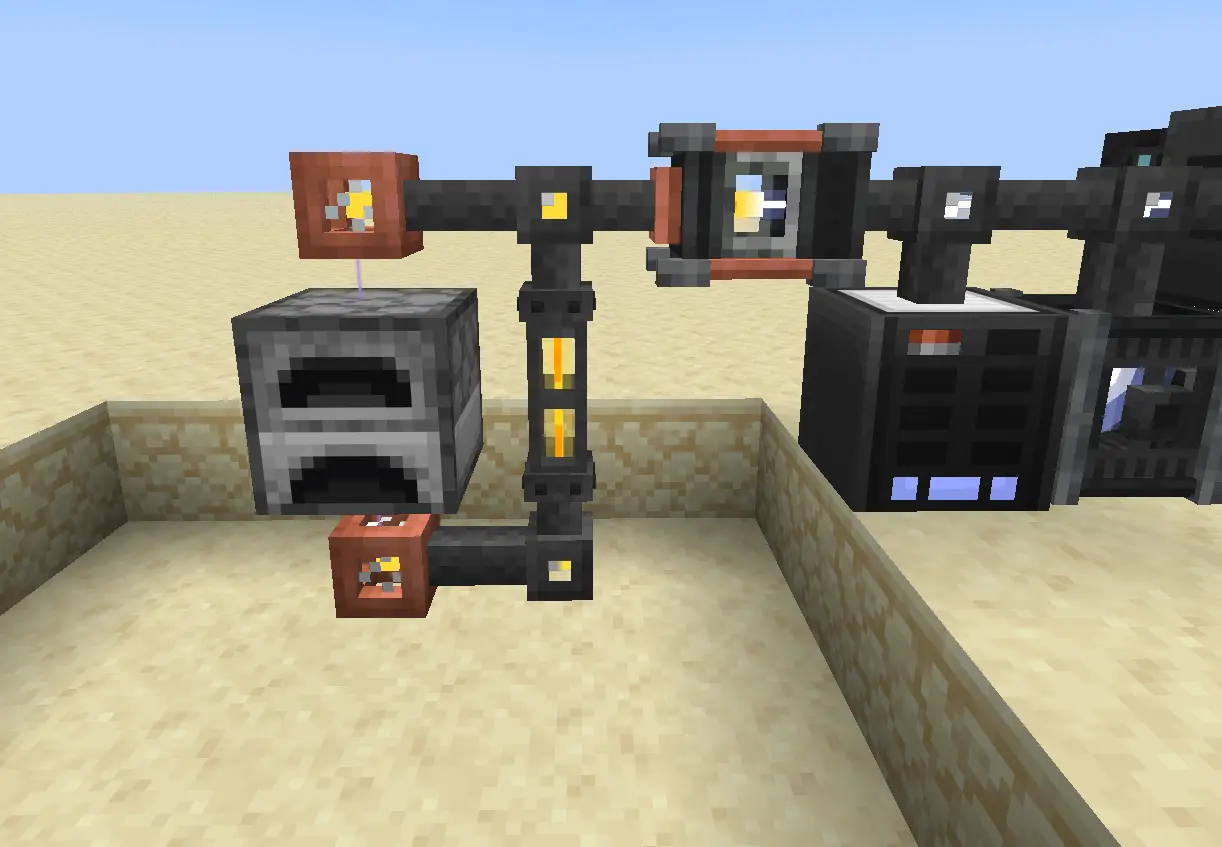
Above shows a Processing Handler create a micro-network (shown by yellow and orange striped lasers) which input items are inserted to Blue Storage Cards and output items are pulled from inventories with Red Storage Cards.
Optionally you can use the Scripting Terminal to do everything for the power users out there. With modules to interact with your network and devices network. Scheduling tasks using scheduler. Create atomically shared variables using Variable devices, and plenty more. This mod was developed with scripting in mind first, unlock further possibilities with IO Cards and scripting to create complex automated farms and systems.
Import items to your network easily using preset types such as importer

Create handlers for complex recipes for furnaces/machines/etc.

Project description from Modrinth.
Pick your setup
Choose the version and loader you play, then open the matching release.
Check the dependencies, then try the file in a copied instance before changing a world you care about.
Recent files
nodeworks-0.9.13.jar
13 Oct 2026
nodeworks-0.9.12.jar
13 Oct 2026
nodeworks-0.9.11.jar
13 Oct 2026
nodeworks-0.9.8.jar
12 Oct 2026
nodeworks-0.9.7.jar
2 Oct 2026
nodeworks-0.9.2.jar
21 Jun 2026
nodeworks-0.9.1.jar
5 Jun 2026
nodeworks-0.9.0.jar
3 Jun 2026
nodeworks-0.8.0.jar
30 May 2026
nodeworks-0.7.3.jar
29 May 2026
nodeworks-0.7.2.jar
29 May 2026
nodeworks-0.7.1.jar
15 May 2026
Looking for an older file? The official Modrinth project page is in Resources.
 mod
modRing a bell on top of a trial spawner to make all its mobs glow!
 mod
modAn extremely customizable crosshair mod
 mod
modMini-games and one big goal: to reach the End. Inspired by CSGONET.