Minecraft version
Back to mods 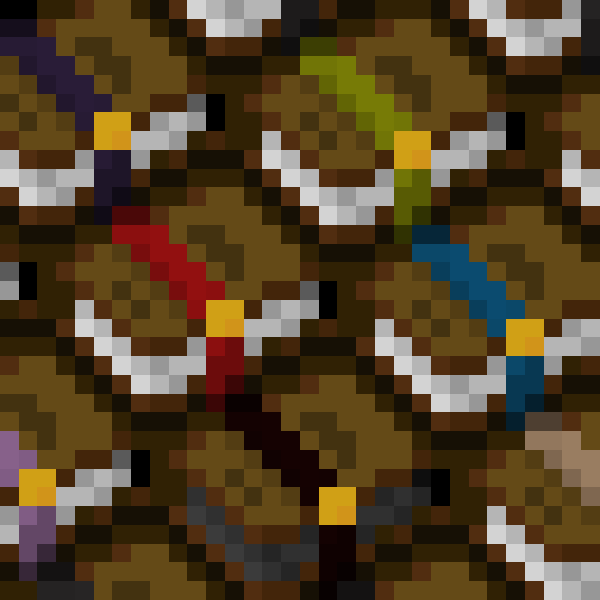
CurseForge · Minecraft mod
Colorful Enchantments
A unique colored book for every enchantment!
Choose a version Pick your version below, then grab the matching file.
Quick answer
Which Colorful Enchantments release should I use?
Latest stable file colorfulenchantments-1.1.1+fabric_1.19.3.jar
Game version 1.19.3
Loader Fabric
Colorful Enchantments colorfulenchantments-1.1.1+fabric_1.19.3.jar targets 1.19.3 with Fabric. The project page does not say whether this file belongs on the client, dedicated server, or both. No extra mods listed for this file.
Where it goes
Is Colorful Enchantments required on the client, server, or both?
The project page does not say whether this file belongs on the client, dedicated server, or both.
Client Source doesn’t say
Dedicated server Source doesn’t say
Loader for this release Fabric
Required install it here Optional supported, not mandatory Not supported do not install here Source doesn’t say do not assume
The source does not explicitly classify this release as client-only or server-only.
What else does Colorful Enchantments colorfulenchantments-1.1.1+fabric_1.19.3.jar need?
colorfulenchantments-1.1.1+fabric_1.19.3.jar. Change the file and its required mods may change too.
This file does not list any required mods. Do not add a library just because a different file uses it.
This file does not list any required or optional mods.
Before you install it
Add Colorful Enchantments without breaking your instance.
Built for Colorful Enchantments colorfulenchantments-1.1.1+fabric_1.19.3.jar. Pick another file and the loader, install side or required mods may change.
- 01
Stick to this file
Use colorfulenchantments-1.1.1+fabric_1.19.3.jar. It targets 1.19.3 with Fabric; another release may have different loader, side or dependency requirements.
- 02
Bring the mods it needs
This file does not list any required mods. Do not add a library just because a different file uses it.
- 03
Put it on the correct side
The project page does not say whether this file belongs on the client, dedicated server, or both.
- 04
Pick the file you checked
Use the “Get this file” button beside colorfulenchantments-1.1.1+fabric_1.19.3.jar. It opens that exact file at the source.
About this project
What does Colorful Enchantments add?
COLORFUL ENCHANTMENTS
Aren't you tired of seeing chests filled with boring and undescribing enchanted books?
Aren't you tired of looking through every single book to find the correct enchantment?
Aren't you tired of having enchanted books with just ONE COLOR?

This mods solves all these really serious problems of enchanted books by introducing a unique color for every enchantment!
It also works for modded enchantments which are assigned a random color (that can be changed).
For example, this is the same chest of the previous image but with the mod active:

Notice that, only for enchanted books, the glint color is changed to white to make colors more visible.
CUSTOMIZING COLORS
If you don't like a particular color assigned to an enchantment, you can change it with the following command:
/colorfulenchantments enchantment <enchantment> <red> <green> <blue>
In which <red>, <green> and <blue> are integer values in the range [0-255] that represent the components of the color.
These components can be obtained by searching for "color picker" the browser and selecting the color that you want.
Instead, you can use the following command if you want to change the color back to the default one (if present):
/colorfulenchantments <enchantment> reset
MORE ENCHANTMENTS ON A BOOK
More than one enchantments in a book are represented by adding more colored laces to the enchanted books.
But, because of this method, it is possible to visualize only the first four enchantments.

MORE BOOK VARIATIONS
In addition to the colored laces, the books have other small features that change according to the enchantments:
In the first slot there is a cursed book which is characterized by dark pages and a red pin.
In the second slot there is a treasure book which is characterized by a green pin.
In the last slot there is a normal enchanted book.

Project description from CurseForge.
Pick your setup
Colorful Enchantments by Minecraft version and loader
Choose the version and loader you play, then open the matching release.
Minecraft version
1.19.2
1 loader buildMinecraft version
1.18.2
1 loader buildMinecraft version
1.17.1
1 loader buildCheck the dependencies, then try the file in a copied instance before changing a world you care about.
Recent files
Colorful Enchantments versions and loaders
colorfulenchantments-1.1.1+fabric_1.19.3.jar
20 Jan 2023
Client Source doesn’t say Server Source doesn’t say Dependencies No extras listed Listed on Release listing
Check the 1.19.3 · Fabric setup 1.19.3Fabric release
colorfulenchantments-1.1.1+fabric_1.19.2.jar
20 Jan 2023
Client Source doesn’t say Server Source doesn’t say Dependencies No extras listed Listed on Release listing
Check the 1.19.2 · Fabric setup Fabric1.19.2 release
colorfulenchantments-1.1.1+fabric_1.18.2.jar
20 Jan 2023
Client Source doesn’t say Server Source doesn’t say Dependencies No extras listed Listed on Release listing
Check the 1.18.2 · Fabric setup Fabric1.18.2 release
colorfulenchantments-1.1.1+fabric_1.17.1.jar
20 Jan 2023
Client Source doesn’t say Server Source doesn’t say Dependencies No extras listed Listed on Release listing
Check the 1.17.1 · Fabric setup 1.17.1Fabric release
colorfulenchantments-1.1.0+fabric_1.19.3.jar
20 Jan 2023
Client Source doesn’t say Server Source doesn’t say Dependencies No extras listed Listed on Release listing
Check the 1.19.3 · Fabric setup 1.19.3Fabric release
colorfulenchantments-1.1.0+fabric_1.19.2.jar
20 Jan 2023
Client Source doesn’t say Server Source doesn’t say Dependencies No extras listed Listed on Release listing
Check the 1.19.2 · Fabric setup Fabric1.19.2 release
colorfulenchantments-1.1.0+fabric_1.18.2.jar
20 Jan 2023
Client Source doesn’t say Server Source doesn’t say Dependencies No extras listed Listed on Release listing
Check the 1.18.2 · Fabric setup Fabric1.18.2 release
colorfulenchantments-1.1.0+fabric_1.17.1.jar
20 Jan 2023
Client Source doesn’t say Server Source doesn’t say Dependencies No extras listed Listed on Release listing
Check the 1.17.1 · Fabric setup 1.17.1Fabric release
Looking for an older file? The official CurseForge project page is in Resources.
 mod
CurseForge · Minecraft
Limitless: Beyond Infinity
Become Satoru Gojo in Minecraft: Infinity, Six Eyes, Blue, Red, 200% Hollow Purple, Unlimited Void Domain Expansion, Falling Blossom, Absolute Perception, Ore Vision, Radial Menu, and anime voice lines. (EN / ES)
 mod
CurseForge · Minecraft
Unyielding
Companion mod for Cobblemon Unyielding: ranks, gym leader tags, a spawn leaderboard with a dancing podium, a Tome of Souls, and giant items
 mod
CurseForge · Minecraft
[YM!] Veil Iris Lights Compat (VILC)
Veil light rendering for Iris shaderpacks