Minecraft version
Back to mods 
CurseForge · Minecraft mod
Disable Accessibility Screen
Removes the Accessibility Screen on first launch, introduced with 23w03a
Choose a version Pick your version below, then grab the matching file.
Quick answer
Which Disable Accessibility Screen release matches Fabric?
Best match for your filters 1.2.1+26.3
Game version 26.3
Loader Fabric
Disable Accessibility Screen 1.2.1+26.3 targets 26.3 with Fabric. The project page does not say whether this file belongs on the client, dedicated server, or both. No extra mods listed for this file.
Where it goes
Is Disable Accessibility Screen required on the client, server, or both?
The project page does not say whether this file belongs on the client, dedicated server, or both.
Client Source doesn’t say
Dedicated server Source doesn’t say
Loader for this release Fabric
Required install it here Optional supported, not mandatory Not supported do not install here Source doesn’t say do not assume
The source does not explicitly classify this release as client-only or server-only.
What else does Disable Accessibility Screen 1.2.1+26.3 need?
1.2.1+26.3 on Fabric. Every mod below is checked against that same setup.
This file does not list any required mods. Do not add a library just because a different file uses it.
This file does not list any required or optional mods.
Before you install it
Add Disable Accessibility Screen without breaking your instance.
Built for Disable Accessibility Screen 1.2.1+26.3 on Fabric. Pick another file and the loader, install side or required mods may change.
- 01
Stick to this file
Use 1.2.1+26.3. It targets 26.3 with Fabric; another release may have different loader, side or dependency requirements.
- 02
Bring the mods it needs
This file does not list any required mods. Do not add a library just because a different file uses it.
- 03
Put it on the correct side
The project page does not say whether this file belongs on the client, dedicated server, or both.
- 04
Pick the file you checked
Use the “Get this file” button beside 1.2.1+26.3. It opens that exact file at the source.
About this project
What does Disable Accessibility Screen add?
When launching into a new Minecraft instance, you are greeted with an Accessibility Screen where you are able to turn of the Narrator & modify other options.
This mod skips that menu, launching into the main menu instantly, while making sure the Narrator is disabled.
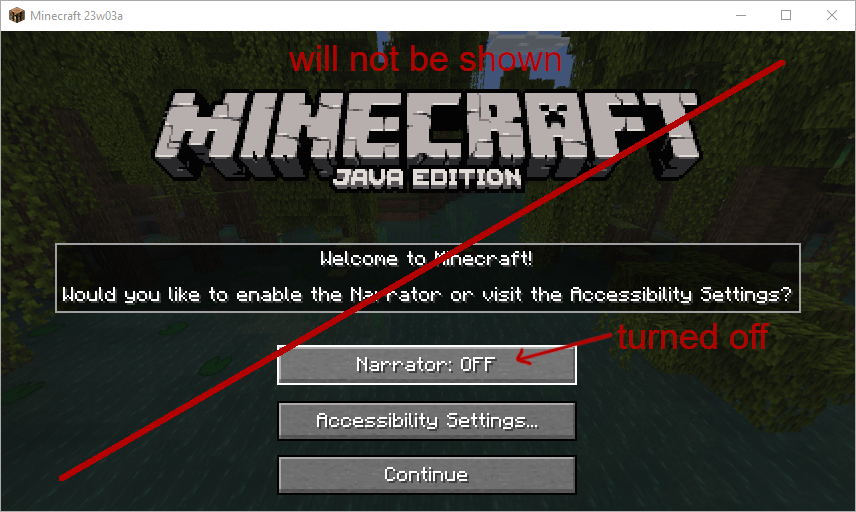
Project description from CurseForge.
Pick your setup
Disable Accessibility Screen by Minecraft version and loader
Choose the version and loader you play, then open the matching release.
Minecraft version
26.2
2 loader buildsMinecraft version
26.1.1
2 loader buildsMinecraft version
26.1
2 loader buildsMinecraft version
1.21.11
2 loader buildsMinecraft version
1.21.5
1 loader buildMinecraft version
1.21.4
1 loader buildMinecraft version
1.21.1-Snapshot
1 loader buildMinecraft version
1.21.1
1 loader buildMinecraft version
1.21
1 loader buildMinecraft version
1.20.6
2 loader buildsMinecraft version
1.20.5-Snapshot
2 loader buildsShowing the newest 12 of 21 game versions. Older files are in the list below.
Check the dependencies, then try the file in a copied instance before changing a world you care about.
Recent files
Disable Accessibility Screen versions and loaders
1.2.1+26.3
disableaccessibilityscreen-1.2.1+26.3.jar
22 Oct 2026
Client Source doesn’t say Server Source doesn’t say Dependencies No extras listed Listed on Release listing
Check the 26.3 · Fabric setup Fabric26.3 release
1.2.1+26.2
disableaccessibilityscreen-1.2.1+26.2.jar
24 Jun 2026
Client Source doesn’t say Server Source doesn’t say Dependencies No extras listed Listed on Release listing
Check the 26.2 · Fabric setup Fabric26.2 release
1.2.1+1.21.11-fabric
disableaccessibilityscreen-1.2.1+1.21.11.jar
25 Dec 2025
Client Source doesn’t say Server Source doesn’t say Dependencies No extras listed Listed on Release listing
Check the 26.1.1 · Fabric setup Fabric1.21.1126.126.1.1 release
1.2.0+1.21.5
DisableAccessibilityScreen-1.2.0+1.21.5.jar
4 Apr 2025
Client Source doesn’t say Server Source doesn’t say Dependencies No extras listed Listed on Release listing
Check the 1.21.5 · Fabric setup Fabric1.21.5 release
1.1.0+1.21.4
DisableAccessibilityScreen-1.1.0+1.21.4.jar
21 Dec 2024
Client Source doesn’t say Server Source doesn’t say Dependencies No extras listed Listed on Release listing
Check the 1.21.4 · Fabric setup Fabric1.21.4 release
1.0.1-1.21
DisableAccessibilityScreen-1.0.1.jar
19 Jun 2024
Client Source doesn’t say Server Source doesn’t say Dependencies No extras listed Listed on Release listing
Check the 1.21.1-Snapshot · Fabric setup 1.21Fabric1.21.1-Snapshot1.21.1 release
1.0.1-1.20.6
DisableAccessibilityScreen-1.0.1.jar
21 May 2024
Client Source doesn’t say Server Source doesn’t say Dependencies No extras listed Listed on Release listing
Check the 1.20.6 · Fabric setup Fabric1.20.6Quilt release
1.0.1-1.20.2
disableaccessibilityscreen-1.0.1.jar
18 Oct 2023
Client Source doesn’t say Server Source doesn’t say Dependencies No extras listed Listed on Release listing
Check the 1.20.5-Snapshot · Fabric setup 1.20.21.20.51.20.5-SnapshotFabric release
1.0.1-1.20.0
disableaccessibilityscreen-1.0.1.jar
12 Jun 2023
Client Source doesn’t say Server Source doesn’t say Dependencies No extras listed Listed on Release listing
Check the 1.20.1 · Fabric setup Fabric1.20.11.201.20-Snapshot release
1.0.1
disableaccessibilityscreen-1.0.1.jar
23 Feb 2023
Client Source doesn’t say Server Source doesn’t say Dependencies No extras listed Listed on Release listing
Check the 1.20-Snapshot · Fabric setup 1.19.4Fabric1.20-SnapshotQuilt release
1.0.0
disableaccessibilityscreen-1.0.0.jar
18 Jan 2023
Client Source doesn’t say Server Source doesn’t say Dependencies No extras listed Listed on Release listing
Check the 1.20-Snapshot · Fabric setup Fabric1.20-Snapshot release
Looking for an older file? The official CurseForge project page is in Resources.
 mod
CurseForge · Minecraft
BotC Notes
A simple on-screen notepad: press N to show or hide it, hold Alt to free your mouse and write, move or resize the note without leaving the game.
 mod
CurseForge · Minecraft
Kestramon Onboarding
A guided first-launch setup screen that picks your keybinds, video quality, audio and shader settings for you, with a custom loading screen and title screen.
 mod
CurseForge · Minecraft
OnlyMouse
OnlyMouse is an accessibility-focused Minecraft Java Edition mod that enables players to play using only a mouse, reducing the need for a physical keyboard.