Minecraft version
Back to mods 
CurseForge · Minecraft mod
WeatherDisplay
Displays the current weather in your world
Choose a version Pick your version below, then grab the matching file.
Quick answer
Which WeatherDisplay release should I use?
Latest stable file WeatherDisplay for Fabric 1.21.11
Game version 1.21.11
Loader Fabric
WeatherDisplay for Fabric 1.21.11 targets 1.21.11 with Fabric. The project page does not say whether this file belongs on the client, dedicated server, or both. No extra mods listed for this file.
Where it goes
Is WeatherDisplay required on the client, server, or both?
The project page does not say whether this file belongs on the client, dedicated server, or both.
Client Source doesn’t say
Dedicated server Source doesn’t say
Loader for this release Fabric
Required install it here Optional supported, not mandatory Not supported do not install here Source doesn’t say do not assume
The source does not explicitly classify this release as client-only or server-only.
What else does WeatherDisplay for Fabric 1.21.11 need?
WeatherDisplay for Fabric 1.21.11. Change the file and its required mods may change too.
This file does not list any required mods. Do not add a library just because a different file uses it.
This file does not list any required or optional mods.
Before you install it
Add WeatherDisplay without breaking your instance.
Built for WeatherDisplay for Fabric 1.21.11. Pick another file and the loader, install side or required mods may change.
- 01
Stick to this file
Use WeatherDisplay for Fabric 1.21.11. It targets 1.21.11 with Fabric; another release may have different loader, side or dependency requirements.
- 02
Bring the mods it needs
This file does not list any required mods. Do not add a library just because a different file uses it.
- 03
Put it on the correct side
The project page does not say whether this file belongs on the client, dedicated server, or both.
- 04
Pick the file you checked
Use the “Get this file” button beside WeatherDisplay for Fabric 1.21.11. It opens that exact file at the source.
About this project
What does WeatherDisplay add?
WeatherDisplay - Stay Informed Without Leaving Your (underground)Base!
WeatherDisplay is a simple yet essential mod that keeps you updated on the weather directly in your HUD.
Designed for players like me who live underground, in enclosed bases, or just don’t want to step outside to check if it’s raining, this mod ensures you always know the conditions above ground, without ever leaving your safe haven. Whether you're waiting for clear skies or need to time your activities perfectly, WeatherDisplay has you covered!
Options
- The displayed weather icon/text can be relocated using key: O
- The displayed weather: clear, can be disabled (only wet weather) via a assigned key
- The displayer can be hidden from the hud via a assigned key
- The displayed weather icon can be switched to text using key: I
- The displayed weather text colour can be changed using key: Y
Requirements
This mod requires fabric api
Note
for the most recent updates and version 1.20 check our website: weatherdisplay.com
Images
HUD on clear
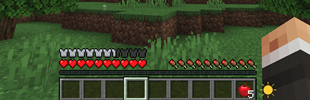
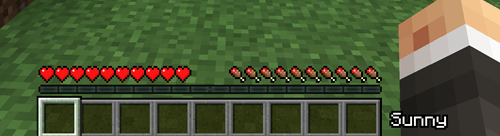
HUD on rain

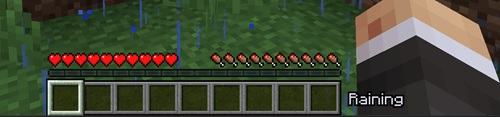
HUD on thundering
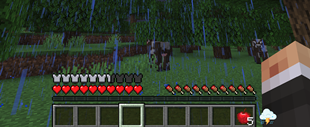
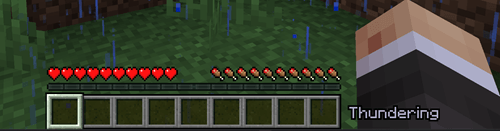
Project description from CurseForge.
Pick your setup
WeatherDisplay by Minecraft version and loader
Choose the version and loader you play, then open the matching release.
Minecraft version
1.21.8
1 loader buildMinecraft version
1.21.7
1 loader buildMinecraft version
1.21.6
1 loader buildMinecraft version
1.21.5
2 loader buildsMinecraft version
1.21.4
1 loader buildMinecraft version
1.21.1
1 loader buildMinecraft version
1.21
1 loader buildMinecraft version
1.19.3
1 loader buildMinecraft version
1.19.2
1 loader buildCheck the dependencies, then try the file in a copied instance before changing a world you care about.
Recent files
WeatherDisplay versions and loaders
WeatherDisplay for Fabric 1.21.11
WeatherDisplay 1.21.11.jar
30 Dec 2025
Client Source doesn’t say Server Source doesn’t say Dependencies No extras listed Listed on Release listing
Check the 1.21.11 · Fabric setup Fabric1.21.11 release
WeatherDisplay for Fabric 1.21.8
WeatherDisplay 1.21.8.jar
6 Aug 2025
Client Source doesn’t say Server Source doesn’t say Dependencies No extras listed Listed on Release listing
Check the 1.21.8 · Fabric setup Fabric1.21.8 release
WeatherDisplay for Fabric 1.21.7
WeatherDisplay 1.21.7.jar
30 Jun 2025
Client Source doesn’t say Server Source doesn’t say Dependencies No extras listed Listed on Release listing
Check the 1.21.7 · Fabric setup Fabric1.21.7 release
WeatherDisplay for Fabric 1.21.6
WeatherDisplay 1.21.6.jar
24 Jun 2025
Client Source doesn’t say Server Source doesn’t say Dependencies No extras listed Listed on Release listing
Check the 1.21.6 · Fabric setup Fabric1.21.6 release
weatherdisplay for NeoForge 1.21.5
weatherdisplay for 1.21.5.jar
13 Apr 2025
Client Source doesn’t say Server Source doesn’t say Dependencies No extras listed Listed on Release listing
Check the 1.21.5 · NeoForge setup 1.21.5NeoForge release
weatherdisplay for Fabric 1.21.5
WeatherDisplay 1.21.5.jar
25 Mar 2025
Client Source doesn’t say Server Source doesn’t say Dependencies No extras listed Listed on Release listing
Check the 1.21.5 · Fabric setup 1.21.5Fabric release
weatherdisplay for Fabric 1.21.4
WeatherDisplay 1.21.4.jar
9 Mar 2025
Client Source doesn’t say Server Source doesn’t say Dependencies No extras listed Listed on Release listing
Check the 1.21.4 · Fabric setup Fabric1.21.4 release
weatherdisplay for Fabric 1.21
weatherdisplay for 1.21 V1.2.0.jar
10 Sept 2024
Client Source doesn’t say Server Source doesn’t say Dependencies No extras listed Listed on Release listing
Check the 1.21 · Fabric setup 1.21Fabric release
weatherdisplay for Fabric 1.21.1
weatherdisplay for 1.21.1 V1.2.0.jar
10 Sept 2024
Client Source doesn’t say Server Source doesn’t say Dependencies No extras listed Listed on Release listing
Check the 1.21.1 · Fabric setup Fabric1.21.1 release
weatherdisplay for Fabric 1.19.3
weatherdisplay-1.19.3.jar
6 Feb 2023
Client Source doesn’t say Server Source doesn’t say Dependencies No extras listed Listed on Release listing
Check the 1.19.3 · Fabric setup 1.19.3Fabric release
weatherdisplay for Fabric 1.19.2
weatherdisplay-1.19.2.jar
6 Feb 2023
Client Source doesn’t say Server Source doesn’t say Dependencies No extras listed Listed on Release listing
Check the 1.19.2 · Fabric setup Fabric1.19.2 release
Looking for an older file? The official CurseForge project page is in Resources.
 mod
CurseForge · Minecraft
RPG Waypoints Map Addon
Map addon for RPG Waypoints and Compass, supporting custom map images!
 mod
CurseForge · Minecraft
RPG Compass and Waypoints
A customizable compass and waypoints mod
 mod
CurseForge · Minecraft
CS2 - Weapons
A mod designed to add all the weapons from Counter-Strike 2