Cloth Config API (Fabric/Forge/NeoForge) Needed by Head in the Clouds 1.0.0
requiredMatching file found Matched file: [Fabric 1.19-1.19.2] v8.3.134

CurseForge · Minecraft mod
Make it not rain over the cloud level
Quick answer
Head in the Clouds 1.0.0 targets 1.19.3, 1.19.4-Snapshot, 1.19.4 with Fabric, Quilt. The project page does not say whether this file belongs on the client, dedicated server, or both. All 1 required mods have matching files.
Where it goes
The project page does not say whether this file belongs on the client, dedicated server, or both.
The source does not explicitly classify this release as client-only or server-only.
1.0.0 on 1.19.2. Every mod below is checked against that same setup.
Install Cloth Config API (Fabric/Forge/NeoForge) first. We found matching files for this game-version and loader setup.
We only count dependency files that match this setup. A file for another loader does not fill the gap.
Before you install it
Built for Head in the Clouds 1.0.0 on 1.19.2. Pick another file and the loader, install side or required mods may change.
Use 1.0.0. It targets 1.19.3, 1.19.4-Snapshot, 1.19.4 with Fabric, Quilt; another release may have different loader, side or dependency requirements.
Install Cloth Config API (Fabric/Forge/NeoForge) first. We found matching files for this game-version and loader setup.
The project page does not say whether this file belongs on the client, dedicated server, or both.
Use the “Get this file” button beside 1.0.0. It opens that exact file at the source.
About this project
~ Nice weather is just few height meters away ~
===============================================
Can be used either client-only or client + serverside.
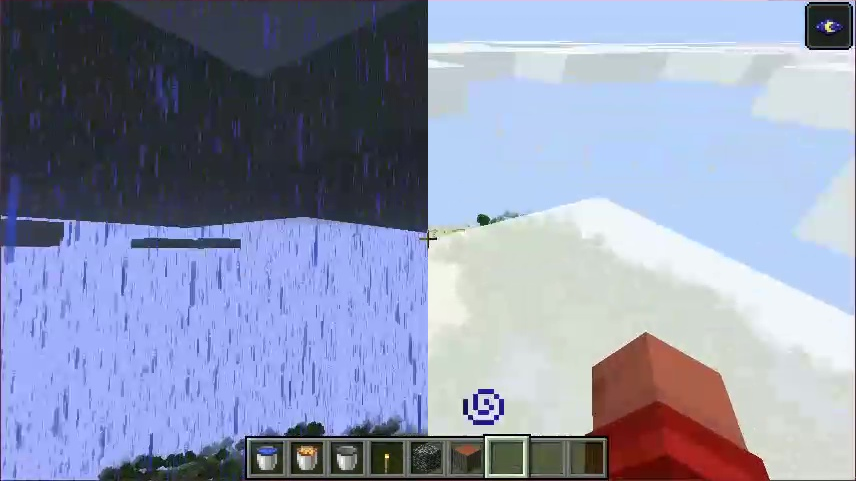
Due to limitations in the way minecraft renders rain, you will not see rain rendered below the clouds when being above them
Project description from CurseForge.
Pick your setup
Choose the version and loader you play, then open the matching release.
Showing the newest 12 of 23 game versions. Older files are in the list below.
Check the dependencies, then try the file in a copied instance before changing a world you care about.
Recent files
head_in_the_clouds-1.0.0.jar
4 Feb 2023
Looking for an older file? The official CurseForge project page is in Resources.
 mod
Cozy upgraded storage blocks that don't break the game
 mod
A lightweight utility for completely removing items via simple JSON configuration.
 mod
Break Lootr chests to drop the current player's personal loot while keeping the shared chest in place.