Minecraft version
Back to mods 
CurseForge · Minecraft mod
Head in the Clouds
Make it not rain over the cloud level
Choose a version Pick your version below, then grab the matching file.
Quick answer
Which Head in the Clouds release matches 26.2?
Best match for your filters 2.3.0+26.2
Game version 26.2
Loader NeoForge
Head in the Clouds 2.3.0+26.2 targets 26.2 with NeoForge. The project page does not say whether this file belongs on the client, dedicated server, or both. No extra mods listed for this file.
Where it goes
Is Head in the Clouds required on the client, server, or both?
The project page does not say whether this file belongs on the client, dedicated server, or both.
Client Source doesn’t say
Dedicated server Source doesn’t say
Loader for this release NeoForge
Required install it here Optional supported, not mandatory Not supported do not install here Source doesn’t say do not assume
The source does not explicitly classify this release as client-only or server-only.
What else does Head in the Clouds 2.3.0+26.2 need?
2.3.0+26.2 on 26.2. Every mod below is checked against that same setup.
This file does not list any required mods. Do not add a library just because a different file uses it.
This file does not list any required or optional mods.
Before you install it
Add Head in the Clouds without breaking your instance.
Built for Head in the Clouds 2.3.0+26.2 on 26.2. Pick another file and the loader, install side or required mods may change.
- 01
Stick to this file
Use 2.3.0+26.2. It targets 26.2 with NeoForge; another release may have different loader, side or dependency requirements.
- 02
Bring the mods it needs
This file does not list any required mods. Do not add a library just because a different file uses it.
- 03
Put it on the correct side
The project page does not say whether this file belongs on the client, dedicated server, or both.
- 04
Pick the file you checked
Use the “Get this file” button beside 2.3.0+26.2. It opens that exact file at the source.
About this project
What does Head in the Clouds add?
~ Nice weather is just few height meters away ~
===============================================
Can be used either client-only or client + serverside.
Client Rendering:
- Makes the environment sunny when above cloud level
Server Logic:
- All actions that depend on rainy weather will not work above cloud level (getting put out when on fire, using riptide tridents, extra crop ticks, ...)
- Since servers have no idea which height clouds are (this information does not exist on servers) you will have to add this information in the config file
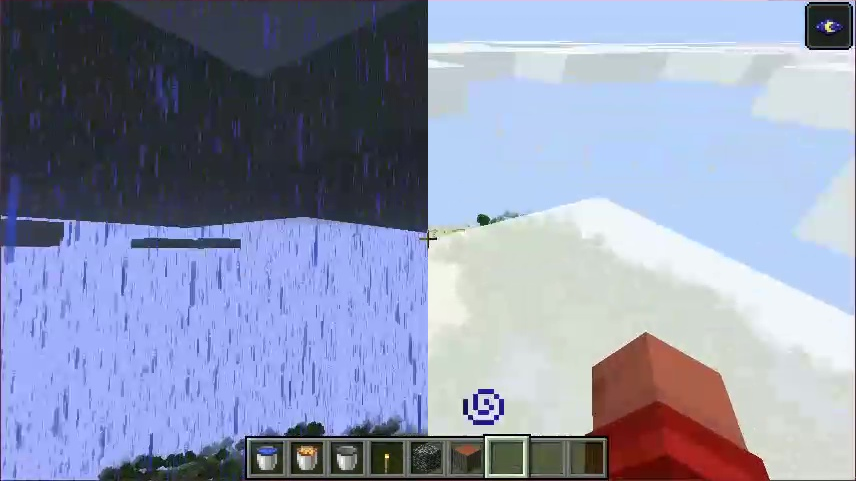
Due to limitations in the way minecraft renders rain, you will not see rain rendered below the clouds when being above them
Project description from CurseForge.
Pick your setup
Head in the Clouds by Minecraft version and loader
Choose the version and loader you play, then open the matching release.
Minecraft version
26.2
2 loader buildsMinecraft version
26.1.2
2 loader buildsMinecraft version
26.1.1
2 loader buildsMinecraft version
26.1
2 loader buildsMinecraft version
1.21.11
2 loader buildsMinecraft version
1.21.8
2 loader buildsMinecraft version
1.21.5
1 loader buildMinecraft version
1.21.4
1 loader buildMinecraft version
1.21.3
1 loader buildMinecraft version
1.21.1-Snapshot
1 loader buildMinecraft version
1.21.1
1 loader buildShowing the newest 12 of 23 game versions. Older files are in the list below.
Check the dependencies, then try the file in a copied instance before changing a world you care about.
Recent files
Head in the Clouds versions and loaders
2.3.0+26.2
HeadInTheClouds-2.3.0+26.2.jar
15 Jul 2026
Client Source doesn’t say Server Source doesn’t say Dependencies No extras listed Listed on Release listing
Check the 26.2 · NeoForge setup NeoForge26.2 release
2.3.0+26.2-fabric
HeadInTheClouds-2.3.0+26.2.jar
23 Jun 2026
Client Source doesn’t say Server Source doesn’t say Dependencies No extras listed Listed on Release listing
Check the 26.2 · Fabric setup Fabric26.2 release
Looking for an older file? The official CurseForge project page is in Resources.
 mod
CurseForge + Modrinth · Minecraft
Kinetic Minecart
This mod increases damage to moving minecarts; the faster they move, the higher the damage, with virtually no damage limit!
 mod
CurseForge · Minecraft
TaxiaCraft Bee Jar
TaxiaCraft Bee Jar is a lightweight Fabric beekeeping utility that makes capturing, transporting and relocating bees simple without turning the mechanic into a free resource generator.
 mod
CurseForge · Minecraft
Biblioteca
A periodic Y axis for Minecraft dimensions.