EpheroLib Needed by Server Browser - In Game Server Listings serverbrowser-fabric-1.4.3-1.21.1.jar
requiredMatching file found Matched file: EpheroLib-FABRIC-1.2.0-1.21.1.jar
CurseForge · Minecraft mod
Server Browser is a mod that adds a server list in the multiplayer screen, if configured with a modpack, it lets you find a modded server to play on more easily! [Fabric/Forge/NeoForge]
Quick answer
Server Browser - In Game Server Listings serverbrowser-fabric-1.4.3-1.21.1.jar targets 1.21.1 with Fabric. The project page does not say whether this file belongs on the client, dedicated server, or both. All 1 required mods have matching files.
Where it goes
The project page does not say whether this file belongs on the client, dedicated server, or both.
The source does not explicitly classify this release as client-only or server-only.
serverbrowser-fabric-1.4.3-1.21.1.jar. Change the file and its required mods may change too.
Install EpheroLib first. We found matching files for this game-version and loader setup.
We only count dependency files that match this setup. A file for another loader does not fill the gap.
Before you install it
Built for Server Browser - In Game Server Listings serverbrowser-fabric-1.4.3-1.21.1.jar. Pick another file and the loader, install side or required mods may change.
Use serverbrowser-fabric-1.4.3-1.21.1.jar. It targets 1.21.1 with Fabric; another release may have different loader, side or dependency requirements.
Install EpheroLib first. We found matching files for this game-version and loader setup.
The project page does not say whether this file belongs on the client, dedicated server, or both.
Use the “Get this file” button beside serverbrowser-fabric-1.4.3-1.21.1.jar. It opens that exact file at the source.
About this project

Are you looking for a modded server to play on for the pack you just downloaded? Server Browser makes it easy to find a server to play on!
A mod designed for modpack authors to make it easier for their users to find servers to play on!
If you are a server owner, you can register it here
If you'd like to make a tag request for a modpack (recommended only if you have community servers), do it here
This menu can be gotten to by going to the multiplayer screen, and in the top left clicking 'Server Browser'
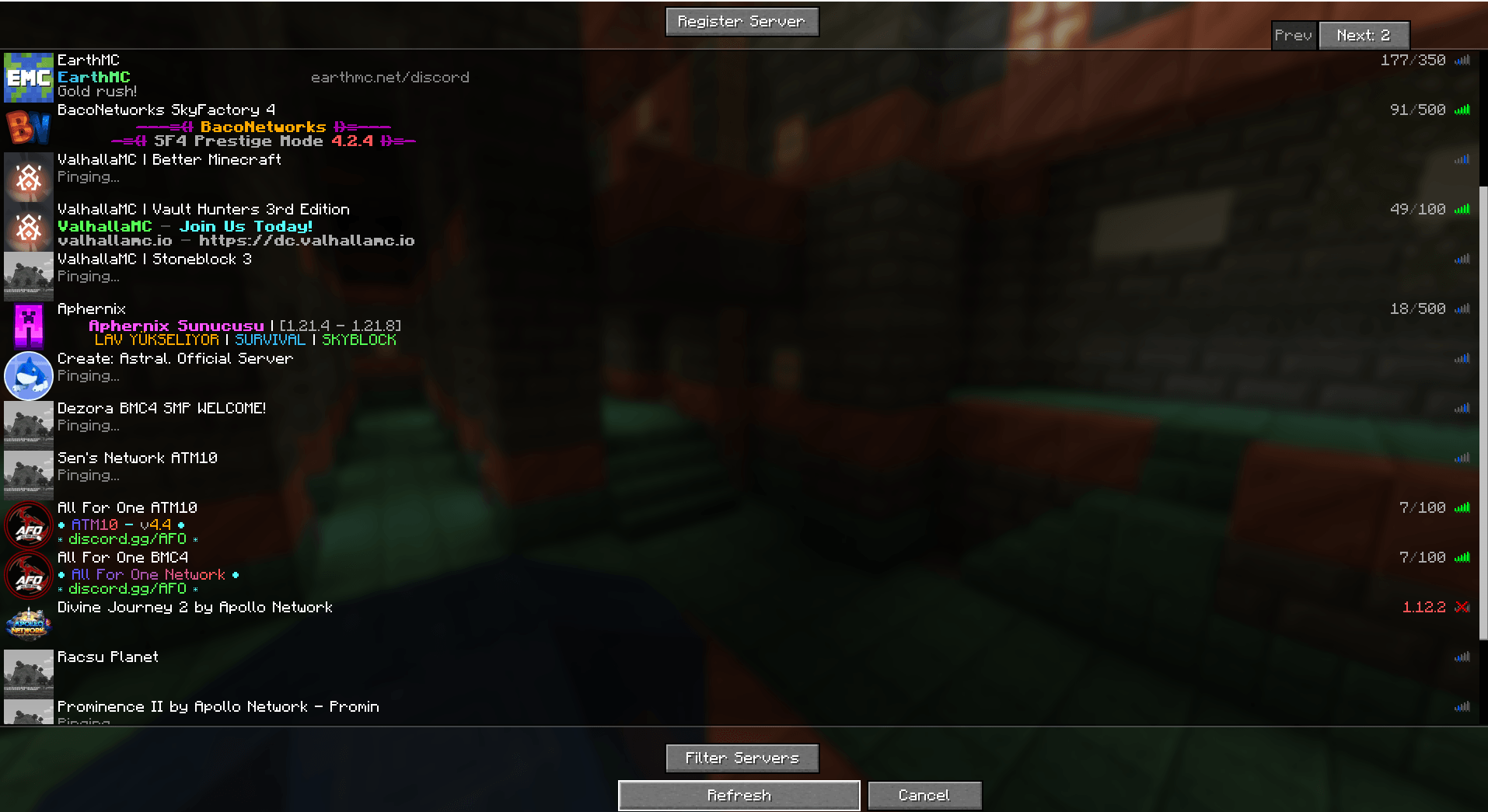 Server Filtering
if you wanted to filter a server by various types, you can do that!

ServerBrowser includes features for Modpack authors to make it easier to manage as well! Blacklisted servers will prevent what was entered into the array from appearing in the ServerBrowser, it will not remove anything from a players 'favorite' servers (the regular multiplayer screen)

The config allows for a pre determined modpack filter that will remove any other modpacks from the tag list. resulting in something like this:

Finally, if you run official servers for your modpack, you can also add them to appear at the top of the players 'favorites' list.

Project description from CurseForge.
Pick your setup
Choose the version and loader you play, then open the matching release.
Check the dependencies, then try the file in a copied instance before changing a world you care about.
Recent files
18 Nov 2025
28 Sept 2025
25 Aug 2025
25 Aug 2025
12 Aug 2025
12 Aug 2025
25 Jun 2025
11 Apr 2025
11 Apr 2025
11 Apr 2025
4 Apr 2025
4 Apr 2025
Looking for an older file? The official CurseForge project page is in Resources.
 mod
modShoulder Surfing Reloaded camera fixes: overhead view, Epic Fight and Better Lockon lock-on, Better Combat swings, TaCZ/Iron's Spells/Spell Engine crosshair aim. Forge 1.20.1, NeoForge and Fabric 1.21.1.
 mod
modAdds a hilarious yet highly realistic bodily needs system, complete with fully functional interactive toilets, urinals, and 3D spatial audio.
 mod
modCobblemon Addon - Make Plushies of your Pokemon