Minecraft version
Back to mods 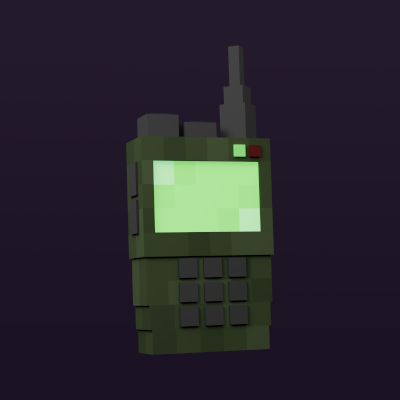
CurseForge · Minecraft mod
Walkie-Talkie
Adds two-way radios with different upgrades.
Choose a version Pick your version below, then grab the matching file.
This page is having a moment, so a few details may be a little behind.
Quick answer
Which Walkie-Talkie release should I use?
Latest stable file [FORGE][1.16.5] Walkie-Talkie 1.3.1
Game version 1.16.5
Loader Forge
Walkie-Talkie [FORGE][1.16.5] Walkie-Talkie 1.3.1 targets 1.16.5 with Forge. The project page does not say whether it belongs on the client. The project page does not say whether it belongs on the dedicated server. No extra mods listed for this file.
Where it goes
Is Walkie-Talkie required on the client, server, or both?
The project page does not say whether it belongs on the client. The project page does not say whether it belongs on the dedicated server.
Client Source doesn’t say
Dedicated server Source doesn’t say
Loader for this release Forge
Required install it here Optional supported, not mandatory Not supported do not install here Source doesn’t say do not assume
The source does not explicitly classify this release as client-only or server-only.
What else does Walkie-Talkie [FORGE][1.16.5] Walkie-Talkie 1.3.1 need?
[FORGE][1.16.5] Walkie-Talkie 1.3.1. Change the file and its required mods may change too.
This file does not list any required mods. Do not add a library just because a different file uses it.
This file does not list any required or optional mods.
Before you install it
Add Walkie-Talkie without breaking your instance.
Built for Walkie-Talkie [FORGE][1.16.5] Walkie-Talkie 1.3.1. Pick another file and the loader, install side or required mods may change.
- 01
Stick to this file
Use [FORGE][1.16.5] Walkie-Talkie 1.3.1. It targets 1.16.5 with Forge; another release may have different loader, side or dependency requirements.
- 02
Bring the mods it needs
This file does not list any required mods. Do not add a library just because a different file uses it.
- 03
Put it on the correct side
The project page does not say whether it belongs on the client. The project page does not say whether it belongs on the dedicated server.
- 04
Pick the file you checked
Use the “Get this file” button beside [FORGE][1.16.5] Walkie-Talkie 1.3.1. It opens that exact file at the source.
About this project
What does Walkie-Talkie add?
Minecraft Walkie-Talkie Mod
Warning
This is not an official addon. Please don't go to the Simple Voice Chat discord server for support! Instead, please use GitHub issues for support. I'll try to provide support as soon as possible but there is no guarantee for how long it will take.
This mod requires Simple Voice Chat and Architectury API
If you use Fabric, this mod require Fabric API.
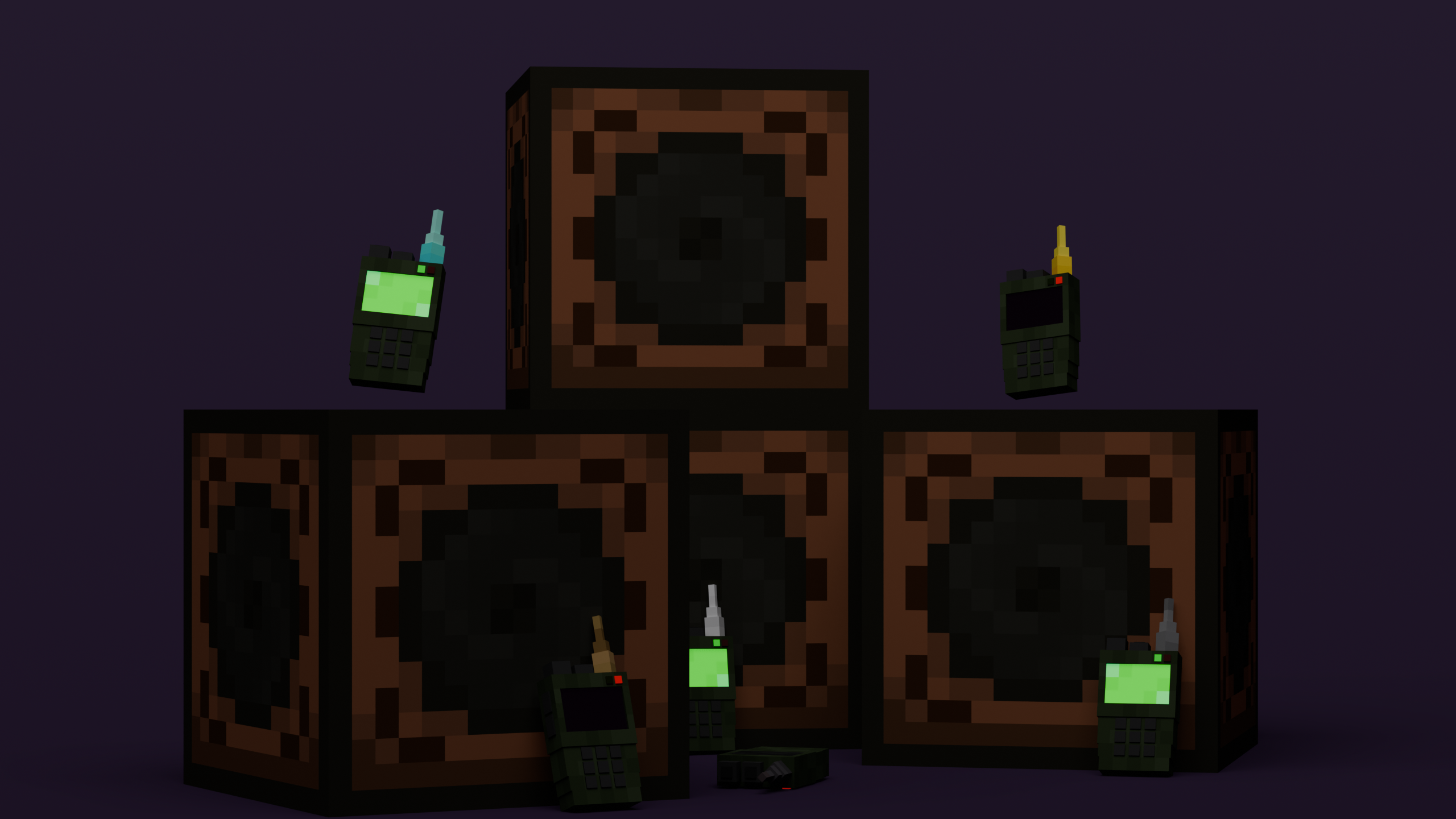
This mod adds two-way radios with different upgrades.
Versions maintained
| Minecraft Version | Fabric | Forge |
|---|---|---|
| 1.20.4 | ✅ | ❌ |
| 1.20.2 | ✅ | ✅ |
| 1.20.1 | ✅ | ✅ |
| 1.19.4 | ❌ | ❌ |
| 1.19.3 | ❌ | ❌ |
| 1.19.2 | ✅ | ✅ |
| 1.18.2 | ✅ | ✅ |
| 1.16.5 | ❌ | ✅ |
How to use
Walkie-Talkie:
- Right-click to open the Walkie-Talkie menu
- Turn on the walkie-talkie
- To speak, make sure the walkie-talkie is in your hand
- To listen, make sure the walkie-talkie is in your hotbar
Speaker:
- Right-click on the speaker to open menu
- Turn on the speaker
Features
- An interface for configuring the radio
- Select a radio channel
- Turn off the microphone (of the walkie-talkie)
- Turn off the microphone (of the walkie-talkie)
- Limited distance
- Upgrade to extend the limit
- Add speaker block
- Volume category for speakers
- Keybind to activate/deactivate the walkie-talkie
Upgrades
- Wood: 128 block distance
- Stone: 256 block distance
- Iron: 512 block distance
- Gold: 1024 block distance
- Diamond: 2048 block distance
- Netherite: 4096 block distance
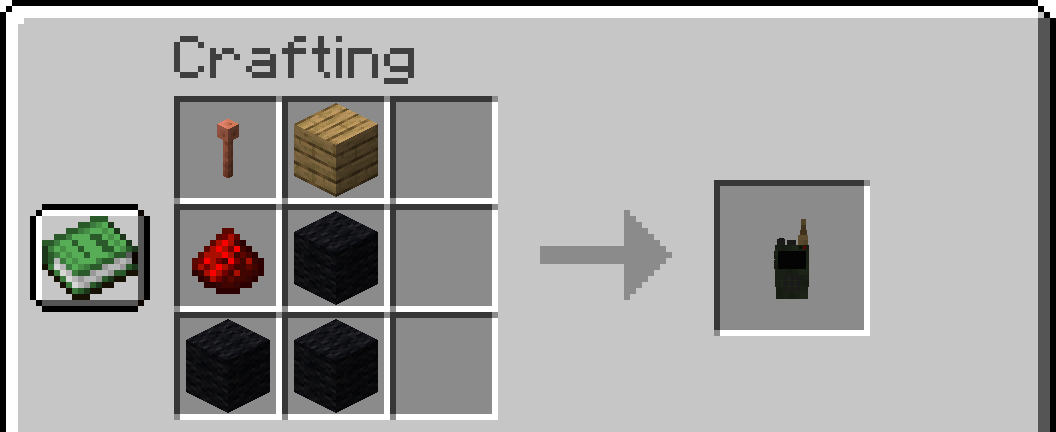
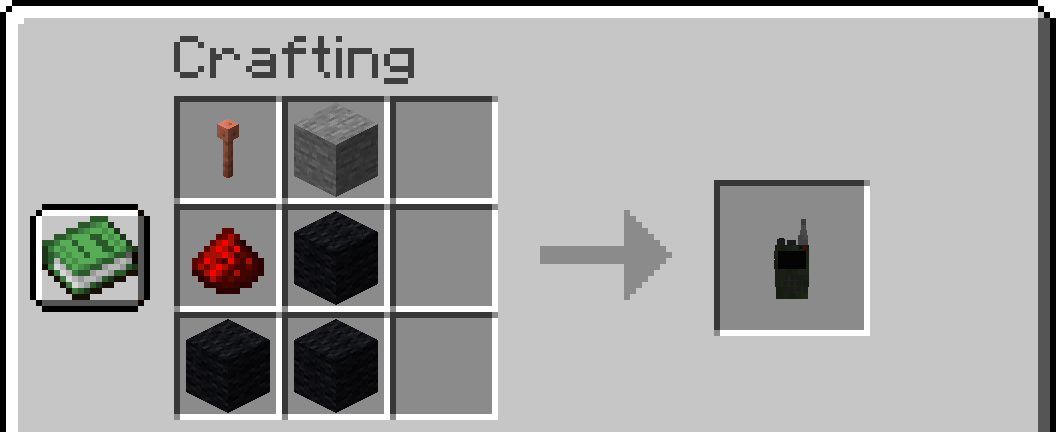
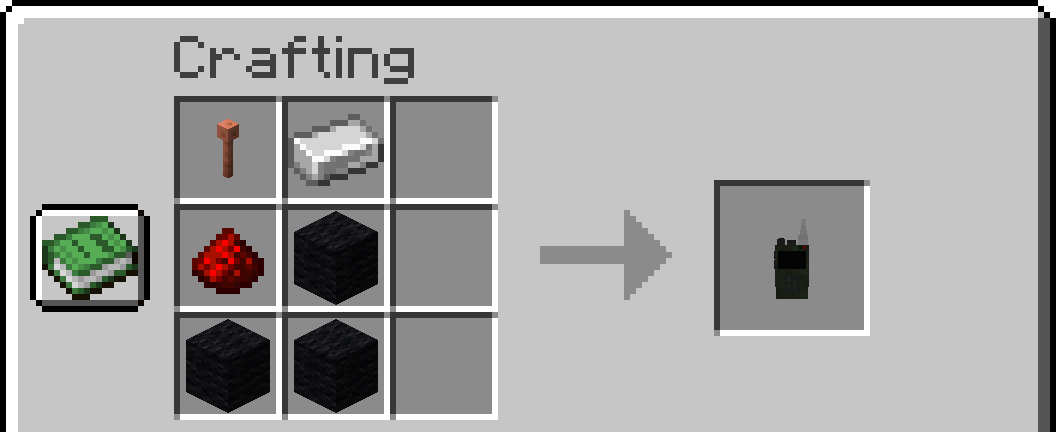
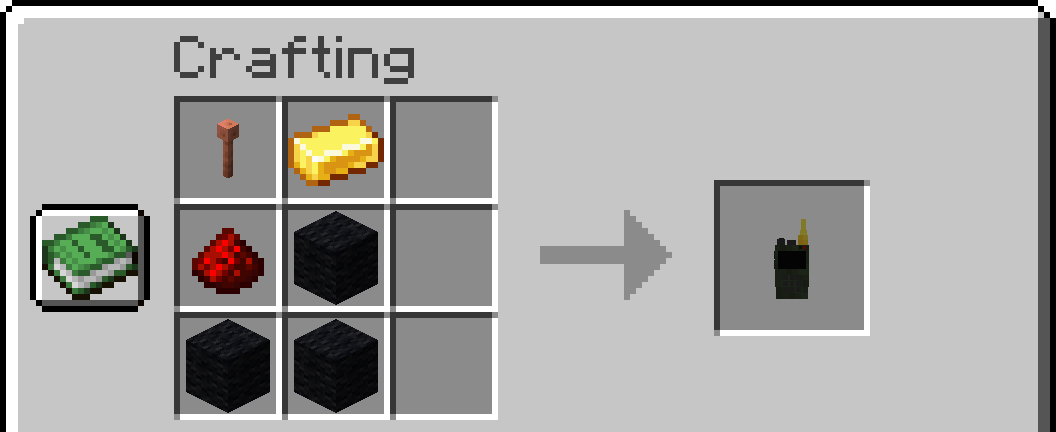
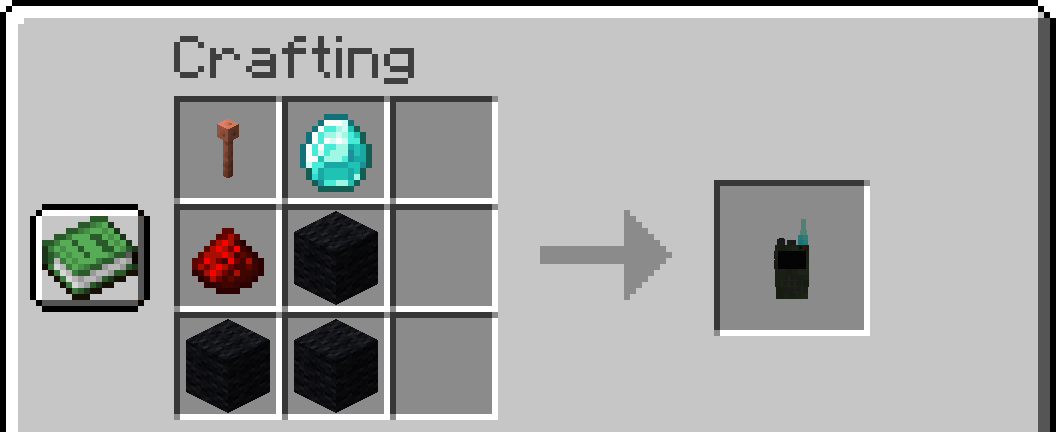
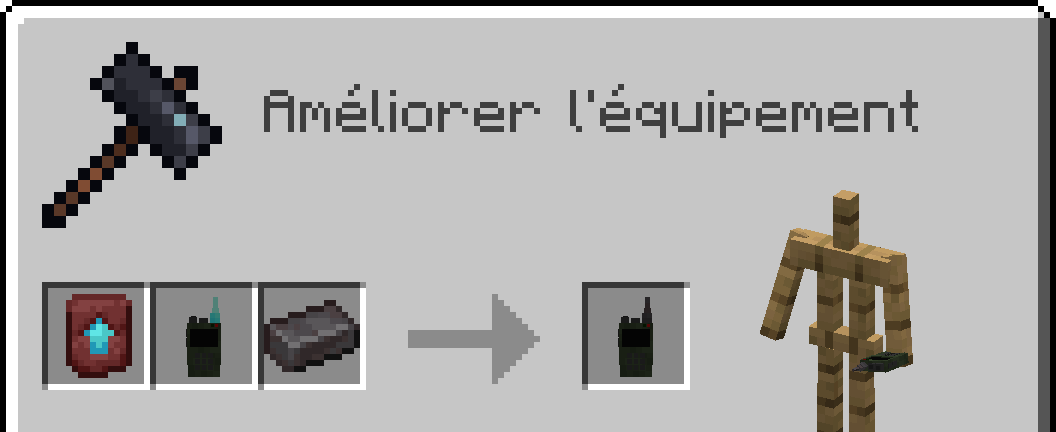
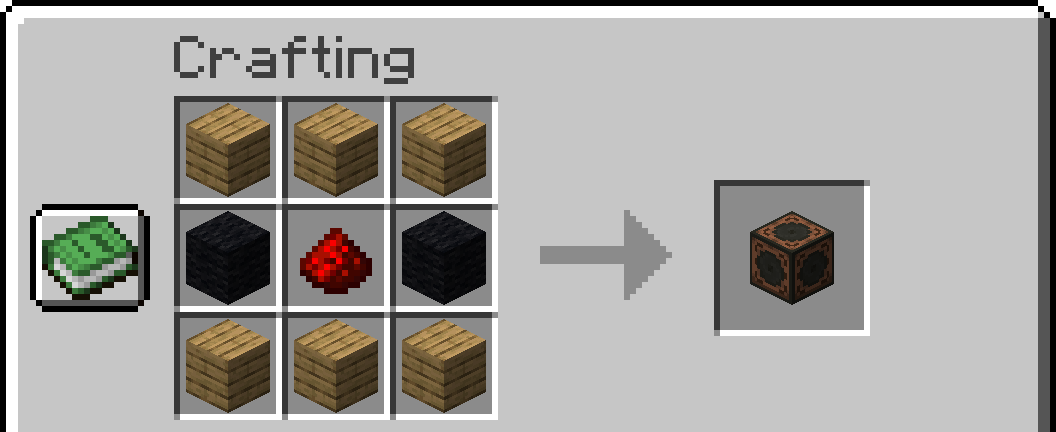
Crafts:
Notes: Any type of wood and wool is allowed. 1.16.5 replaced lightning rod with iron bars
Wooden Walkie-Talkie
Stone Walkie-Talkie
Iron Walkie-Talkie
Gold Walkie-Talkie
Diamond Walkie-Talkie
Netherite Walkie-Talkie
Speaker
Config
- Max Channel
- Speaker Distance
- Speaker Voice Duplication
- Walkie-Talkie Range
- Cross dimensional behavior
Credits
Textures and models :
- 4irwan
Translators :
- Russian: Heimdallr-1
- German: Kampftroll
SFX :
- JustinBW
Mod :
LICENSE
Project description from CurseForge.
Pick your setup
Walkie-Talkie by Minecraft version and loader
Choose the version and loader you play, then open the matching release.
Minecraft version
1.20.2
2 loader buildsMinecraft version
1.20.1
2 loader buildsMinecraft version
1.19.4
2 loader buildsMinecraft version
1.19.3
2 loader buildsMinecraft version
1.19.2
2 loader buildsMinecraft version
1.18.2
2 loader buildsMinecraft version
1.16.5
2 loader buildsCheck the dependencies, then try the file in a copied instance before changing a world you care about.
Recent files
Walkie-Talkie versions and loaders
[FORGE][1.16.5] Walkie-Talkie 1.3.1
walkietalkie-forge-1.16.5-1.3.1.jar
27 Mar 2024
Client Source doesn’t say Server Source doesn’t say Dependencies No extras listed Listed on Release listing
Check the 1.16.5 · Forge setup 1.16.5Forge release
[FABRIC][1.20.4] Walkie-Talkie 1.3.0
walkietalkie-fabric-1.20.4-1.3.0.jar
24 Feb 2024
Client Source doesn’t say Server Source doesn’t say Dependencies 3 required · 3 unchecked Listed on Release listing
Check the 1.20.4 · Fabric setup Fabric1.20.4 release
[FORGE][1.20.2] Walkie-Talkie 1.3.0
walkietalkie-forge-1.20.2-1.3.0.jar
24 Feb 2024
Client Source doesn’t say Server Source doesn’t say Dependencies 2 required · 2 unchecked Listed on Release listing
Check the 1.20.2 · Forge setup 1.20.2Forge release
[FABRIC][1.20.2] Walkie-Talkie 1.3.0
walkietalkie-fabric-1.20.2-1.3.0.jar
24 Feb 2024
Client Source doesn’t say Server Source doesn’t say Dependencies 3 required · 3 unchecked Listed on Release listing
Check the 1.20.2 · Fabric setup 1.20.2Fabric release
[FORGE][1.20.1] Walkie-Talkie 1.3.0
walkietalkie-forge-1.20.1-1.3.0.jar
24 Feb 2024
Client Source doesn’t say Server Source doesn’t say Dependencies 2 required · 2 unchecked Listed on Release listing
Check the 1.20.1 · Forge setup 1.20.1Forge release
[FABRIC][1.20.1] Walkie-Talkie 1.3.0
walkietalkie-fabric-1.20.1-1.3.0.jar
24 Feb 2024
Client Source doesn’t say Server Source doesn’t say Dependencies 3 required · 3 unchecked Listed on Release listing
Check the 1.20.1 · Fabric setup Fabric1.20.1 release
[FORGE][1.19.2] Walkie-Talkie 1.3.0
walkietalkie-forge-1.19.2-1.3.0.jar
24 Feb 2024
Client Source doesn’t say Server Source doesn’t say Dependencies 2 required · 2 unchecked Listed on Release listing
Check the 1.19.2 · Forge setup 1.19.2Forge release
[FABRIC][1.19.2] Walkie-Talkie 1.3.0
walkietalkie-fabric-1.19.2-1.3.0.jar
24 Feb 2024
Client Source doesn’t say Server Source doesn’t say Dependencies 3 required · 3 unchecked Listed on Release listing
Check the 1.19.2 · Fabric setup Fabric1.19.2 release
[FORGE][1.18.2] Walkie-Talkie 1.3.0
walkietalkie-forge-1.18.2-1.3.0.jar
24 Feb 2024
Client Source doesn’t say Server Source doesn’t say Dependencies 2 required · 2 unchecked Listed on Release listing
Check the 1.18.2 · Forge setup 1.18.2Forge release
[FABRIC][1.18.2] Walkie-Talkie 1.3.0
walkietalkie-fabric-1.18.2-1.3.0.jar
24 Feb 2024
Client Source doesn’t say Server Source doesn’t say Dependencies 3 required · 3 unchecked Listed on Release listing
Check the 1.18.2 · Fabric setup Fabric1.18.2 release
[FORGE][1.16.5] Walkie-Talkie 1.3.0
walkietalkie-forge-1.16.5-1.3.0.jar
24 Feb 2024
Client Source doesn’t say Server Source doesn’t say Dependencies 2 required · 2 unchecked Listed on Release listing
Check the 1.16.5 · Forge setup 1.16.5Forge release
[FORGE][1.16.5] Walkie-Talkie 1.2.2
walkietalkie-forge-1.16.5-1.2.2.jar
27 Dec 2023
Client Source doesn’t say Server Source doesn’t say Dependencies 2 required · 2 unchecked Listed on Release listing
Check the 1.16.5 · Forge setup 1.16.5Forge release
Looking for an older file? The official CurseForge project page is in Resources.
 mod
mod CurseForge + Modrinth · Minecraft
Vistas
Allows the addition of new title screen panoramas
 mod
mod CurseForge · Minecraft
Stellar Decay
"Stellar Decay" is a community-driven SlashBlade add-on named after its first two cosmos and wither-themed swords, allowing players to submit their own weapon designs for inclusion.
 mod
mod CurseForge · Minecraft
Culling Games (CG)
This mod is based off the culling games from jjk and is very early in its development.