Minecraft version
Back to mods 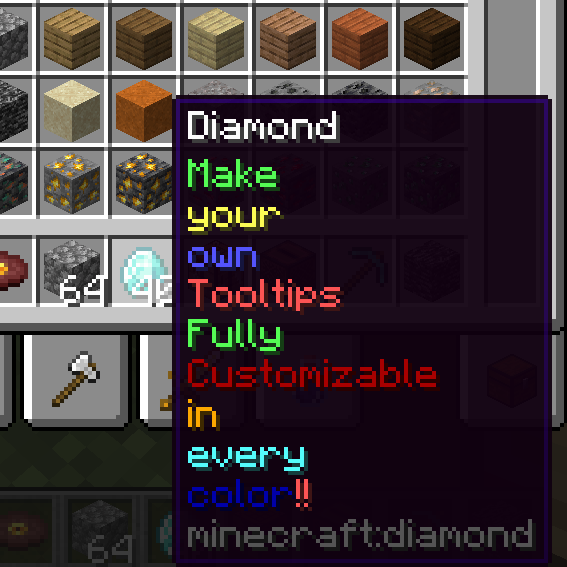
CurseForge · Minecraft mod
Custom Tooltips
Customize and create your own Tooltips for any item
Choose a version Pick your version below, then grab the matching file.
Quick answer
Which Custom Tooltips release should I use?
Latest stable file customtooltips-1.18.2-1.1.0.jar
Game version 1.18.2
Loader Forge
Custom Tooltips customtooltips-1.18.2-1.1.0.jar targets 1.18.2 with Forge. The project page does not say whether this file belongs on the client, dedicated server, or both. No extra mods listed for this file.
Where it goes
Is Custom Tooltips required on the client, server, or both?
The project page does not say whether this file belongs on the client, dedicated server, or both.
Client Source doesn’t say
Dedicated server Source doesn’t say
Loader for this release Forge
Required install it here Optional supported, not mandatory Not supported do not install here Source doesn’t say do not assume
The source does not explicitly classify this release as client-only or server-only.
What else does Custom Tooltips customtooltips-1.18.2-1.1.0.jar need?
customtooltips-1.18.2-1.1.0.jar. Change the file and its required mods may change too.
This file does not list any required mods. Do not add a library just because a different file uses it.
This file does not list any required or optional mods.
Before you install it
Add Custom Tooltips without breaking your instance.
Built for Custom Tooltips customtooltips-1.18.2-1.1.0.jar. Pick another file and the loader, install side or required mods may change.
- 01
Stick to this file
Use customtooltips-1.18.2-1.1.0.jar. It targets 1.18.2 with Forge; another release may have different loader, side or dependency requirements.
- 02
Bring the mods it needs
This file does not list any required mods. Do not add a library just because a different file uses it.
- 03
Put it on the correct side
The project page does not say whether this file belongs on the client, dedicated server, or both.
- 04
Pick the file you checked
Use the “Get this file” button beside customtooltips-1.18.2-1.1.0.jar. It opens that exact file at the source.
About this project
What does Custom Tooltips add?
Make your own Tooltips via Json Files in the Config Folder.
Intended for modpacks.
To better understand the structure of the files the mod generates an example File on Startup.
Here are some basics:
If you want your own Default Settings the structure of the JSON must be the following:
{ "default":{
"color": "green",
"state": "replace"
},
"tooltips": [
//write your tooltips here
]
}
In the default settings you can define the default color and the default position where the tooltips are added, optionally you can replace existing tooltips. These attributes can also be defined individiually in every tooltip.
If you don't want to set your own Default Settings just write the array:
[
//write your tooltips here
]
<span style="font-family: arial, helvetica, sans-serif;"> </span>
The structure of every single tooltip has a targeted item, or item tag and a text component:
{
"item": "minecraft:diamond",
"text": {"tooltip": "write your text here"}
},
for more complex tooltips you can set the "text" field as an array to have different colors in your tooltip:
{
"tag": "minecraft:planks",
"text": [
{"tooltip_line": "Complex tooltip", "color": "blue"},
{"tooltip": "Tooltip", "color": "#ff7029"}
],
"state": "top"
}
With "tooltip_line" the following tooltip will be one line below.
With color you can specify an RGB code or alternativly some colors can be written.
Project description from CurseForge.
Pick your setup
Custom Tooltips by Minecraft version and loader
Choose the version and loader you play, then open the matching release.
Check the dependencies, then try the file in a copied instance before changing a world you care about.
Recent files
Custom Tooltips versions and loaders
customtooltips-1.18.2-1.1.0.jar
17 Apr 2023
Client Source doesn’t say Server Source doesn’t say Dependencies No extras listed Listed on Release listing
Check the 1.18.2 · Forge setup 1.18.2Forge release
customtooltips-1.18.2-1.0.1.jar
17 Apr 2023
Client Source doesn’t say Server Source doesn’t say Dependencies No extras listed Listed on Release listing
Check the 1.18.2 · Forge setup 1.18.2Forge release
customtooltips-1.18.2-1.0.0.jar
16 Apr 2023
Client Source doesn’t say Server Source doesn’t say Dependencies No extras listed Listed on Release listing
Check the 1.18.2 · Forge setup 1.18.2Forge release
customtooltips-1.18.2-0.0.2.jar
15 Apr 2023
Client Source doesn’t say Server Source doesn’t say Dependencies No extras listed Listed on Release listing
Check the 1.18.2 · Forge setup 1.18.2Forge release
customtooltips-1.18.2-0.0.1.jar
14 Apr 2023
Client Source doesn’t say Server Source doesn’t say Dependencies No extras listed Listed on Release listing
Check the 1.18.2 · Forge setup 1.18.2Forge release
Looking for an older file? The official CurseForge project page is in Resources.
 mod
CurseForge · Minecraft
IsoMap
A minimalist 2.5D minimap with a free camera, cave view, waypoints with tags, death markers and pings.
 mod
CurseForge · Minecraft
ChatPlus Staff Tools
ChatPlus 2.7.0 with a right-click staff menu, player lookups and confirm-before-send. Unofficial fork.
 mod
CurseForge · Minecraft
Curios Backpack Slot
Adds a dedicated backpack slot to Curios, allowing you to equip backpacks separately from other accessories.