Minecraft version
Back to mods 
CurseForge · Minecraft mod
K-Golems
Adds golems that can perform a variety of tasks
Choose a version Pick your version below, then grab the matching file.
Quick answer
Which K-Golems release matches 1.19?
Best match for your filters k-golems-0.0.17-1.19.2.jar
Game version 1.19.2, 1.19.1, 1.19
Loader Forge
k-golems-0.0.17-1.19.2.jar targets 1.19.2, 1.19.1, 1.19 with Forge. The project page does not say whether this file belongs on the client, dedicated server, or both. No extra mods listed for this file.
Where it goes
Is K-Golems required on the client, server, or both?
The project page does not say whether this file belongs on the client, dedicated server, or both.
Client Source doesn’t say
Dedicated server Source doesn’t say
Loader for this release Forge
Required install it here Optional supported, not mandatory Not supported do not install here Source doesn’t say do not assume
The source does not explicitly classify this release as client-only or server-only.
What else does k-golems-0.0.17-1.19.2.jar need?
k-golems-0.0.17-1.19.2.jar on 1.19. Every mod below is checked against that same setup.
This file does not list any required mods. Do not add a library just because a different file uses it.
This file does not list any required or optional mods.
Before you install it
Add K-Golems without breaking your instance.
Built for k-golems-0.0.17-1.19.2.jar on 1.19. Pick another file and the loader, install side or required mods may change.
- 01
Stick to this file
Use k-golems-0.0.17-1.19.2.jar. It targets 1.19.2, 1.19.1, 1.19 with Forge; another release may have different loader, side or dependency requirements.
- 02
Bring the mods it needs
This file does not list any required mods. Do not add a library just because a different file uses it.
- 03
Put it on the correct side
The project page does not say whether this file belongs on the client, dedicated server, or both.
- 04
Pick the file you checked
Use the “Get this file” button beside k-golems-0.0.17-1.19.2.jar. It opens that exact file at the source.
About this project
What does K-Golems add?
This mod adds a small golem type that can perform several kinds of tasks:
- pick up items;
- cut wood;
- maintain a farm;
- drop items;
- break blocks;
- shear entities;
- transfer items;
- place blocks;
- use items;
- breed animals.
Golem item recipe:

Once you place a golem, you can right-click it to open configuration screen. There you can select a task for golem to perform. Once you selected a task, you must specify positions for the task using a Position Scepter:
To set a single position, right-click a block with Position Scepter and then click the golem.
To set start and end position, Shift + right click two blocks with Command Scepter one after another and then Shift + right click the golem.
Task details:
- picking up items - a golem will pick up items within specified area and put it into the container at the specified position;
- cutting wood - a golem will break columns of log blocks with an axe within specified positions. If a single position is specified, golem will go there when there is no wood to chop;
- maintaining a farm - a golem will break pumpkins, melons, crops, sugar cane, nether warts and replant them within specified positions. If a single position is set, golem will go there if there are no crops to harvest;
- dropping items - a golem will take items from an item container and drop them at a specified position;
- breaking blocks - a golem will break blocks with a tool, sword or shears within specified positions;
- shearing entities - a golem will shear entities within specified positions. If a single position is specified, golem will go there when no entities are shearable;
- transferring items - a golem will move items from one container to another;
- placing blocks - a golem will take blocks from an inventory and place them at specified area;
- using items - a golem will use provided item in a specified area;
- breeding animals - a golem will breed animals with items in his hand within a specified area.
Some of the tasks require a golem to have a tool, which you can give by right-clicking it.
For picking up items, transferring items, placing blocks, using items and breaking blocks you can give the golem an item filter configured with specific items or blocks to match. Item filter recipe - coal/charcoal + paper.
To retrieve an item from golem, right-click it with an empty hand.
Dispensers can equip golems with tools.
Golems require upkeep in the form of water and energy. They are provided through Energy Pylons - insert water bottles and food into them, and they will be converted to energy and water. Pylon range is 16 blocks, and energy and water values can be changed in the config. Pylon can be redstone-controlled.
You can change items that provide water by making a datapack:
-data
-k_golems
-tags
-items
liquids.json

You can also make a regeneration pad, which heals any living creature walking on it:
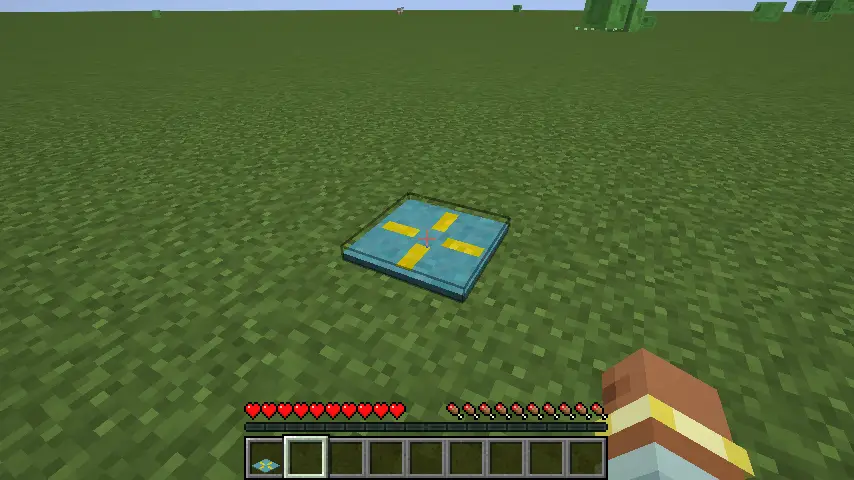
It needs healing potions to work, which can be inserted via UI or hopper.
Pad recipe:

Credit to raffle0 for new golem textures.
You can set an alternative golem texture in the config (made by Feellian):

Project description from CurseForge.
Pick your setup
K-Golems by Minecraft version and loader
Choose the version and loader you play, then open the matching release.
Minecraft version
1.19.2
1 loader buildMinecraft version
1.19.1
1 loader buildMinecraft version
1.19
1 loader buildCheck the dependencies, then try the file in a copied instance before changing a world you care about.
Recent files
K-Golems versions and loaders
k-golems-0.0.17-1.19.2.jar
6 Jun 2024
Client Source doesn’t say Server Source doesn’t say Dependencies No extras listed Listed on Release listing
Check the 1.19 · Forge setup 1.19.2Forge1.19.11.19 release
k-golems-0.0.16-1.19.2.jar
3 Jun 2024
Client Source doesn’t say Server Source doesn’t say Dependencies 1 required · 1 unchecked Listed on Release listing
Check the 1.19 · Forge setup 1.19.2Forge1.19.11.19 release
k-golems-0.0.15-1.19.2.jar
26 May 2024
Client Source doesn’t say Server Source doesn’t say Dependencies No extras listed Listed on Release listing
Check the 1.19 · Forge setup 1.19.2Forge1.19.11.19 release
k-golems-0.0.14-1.19.2.jar
12 Nov 2023
Client Source doesn’t say Server Source doesn’t say Dependencies 1 required · 1 unchecked Listed on Release listing
Check the 1.19 · Forge setup 1.19.2Forge1.19.11.19 release
k-golems-0.0.13-1.19.2.jar
1 Oct 2023
Client Source doesn’t say Server Source doesn’t say Dependencies 1 required · 1 unchecked Listed on Release listing
Check the 1.19 · Forge setup 1.19.2Forge1.19.11.19 release
k-golems-0.0.12-1.19.2.jar
27 Sept 2023
Client Source doesn’t say Server Source doesn’t say Dependencies 1 required · 1 unchecked Listed on Release listing
Check the 1.19 · Forge setup 1.19.2Forge1.19.11.19 release
k-golems-0.0.11-1.19.2.jar
24 Sept 2023
Client Source doesn’t say Server Source doesn’t say Dependencies 1 required · 1 unchecked Listed on Release listing
Check the 1.19 · Forge setup 1.19.2Forge1.19.11.19 release
k-golems-0.0.9-1.19.2.jar
20 Sept 2023
Client Source doesn’t say Server Source doesn’t say Dependencies 1 required · 1 unchecked Listed on Release listing
Check the 1.19 · Forge setup 1.19.2Forge1.19.11.19 release
k-golems-0.0.8-1.19.2.jar
17 Sept 2023
Client Source doesn’t say Server Source doesn’t say Dependencies 1 required · 1 unchecked Listed on Release listing
Check the 1.19 · Forge setup 1.19.2Forge1.19.11.19 release
k-golems-0.0.6-1.19.2.jar
10 Sept 2023
Client Source doesn’t say Server Source doesn’t say Dependencies 1 required · 1 unchecked Listed on Release listing
Check the 1.19 · Forge setup 1.19.2Forge1.19.11.19 release
Looking for an older file? The official CurseForge project page is in Resources.