
Minecraft version
Back to mods 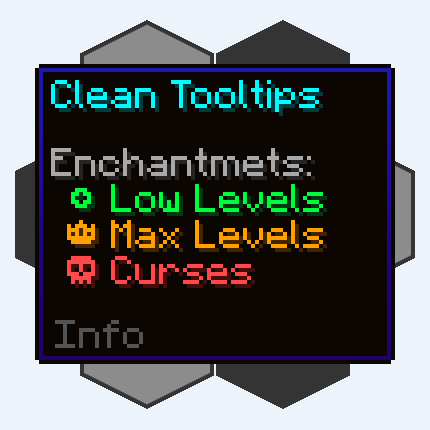
CurseForge · Minecraft mod
Clean Tooltips
Improving Tooltips by creating a clean and consistent look! Durability Tooltip & more!
Choose a version Pick your version below, then grab the matching file.
Quick answer
Which Clean Tooltips release matches 1.19.4 Forge?
Best match for your filters clean_tooltips-1.0-forge-1.19.4.jar
Game version 1.19.4
Loader Forge
Clean Tooltips clean_tooltips-1.0-forge-1.19.4.jar targets 1.19.4 with Forge. The project page does not say whether this file belongs on the client, dedicated server, or both. No extra mods listed for this file.
Where it goes
Is Clean Tooltips required on the client, server, or both?
The project page does not say whether this file belongs on the client, dedicated server, or both.
Client Source doesn’t say
Dedicated server Source doesn’t say
Loader for this release Forge
Required install it here Optional supported, not mandatory Not supported do not install here Source doesn’t say do not assume
The source does not explicitly classify this release as client-only or server-only.
What else does Clean Tooltips clean_tooltips-1.0-forge-1.19.4.jar need?
clean_tooltips-1.0-forge-1.19.4.jar on 1.19.4 Forge. Every mod below is checked against that same setup.
This file does not list any required mods. Do not add a library just because a different file uses it.
This file does not list any required or optional mods.
Before you install it
Add Clean Tooltips without breaking your instance.
Built for Clean Tooltips clean_tooltips-1.0-forge-1.19.4.jar on 1.19.4 Forge. Pick another file and the loader, install side or required mods may change.
- 01
Stick to this file
Use clean_tooltips-1.0-forge-1.19.4.jar. It targets 1.19.4 with Forge; another release may have different loader, side or dependency requirements.
- 02
Bring the mods it needs
This file does not list any required mods. Do not add a library just because a different file uses it.
- 03
Put it on the correct side
The project page does not say whether this file belongs on the client, dedicated server, or both.
- 04
Pick the file you checked
Use the “Get this file” button beside clean_tooltips-1.0-forge-1.19.4.jar. It opens that exact file at the source.
About this project
What does Clean Tooltips add?
Clean Tooltips

Ever felt like the default tooltips could be fancied up a bit? Then this is exactly what you're looking for.
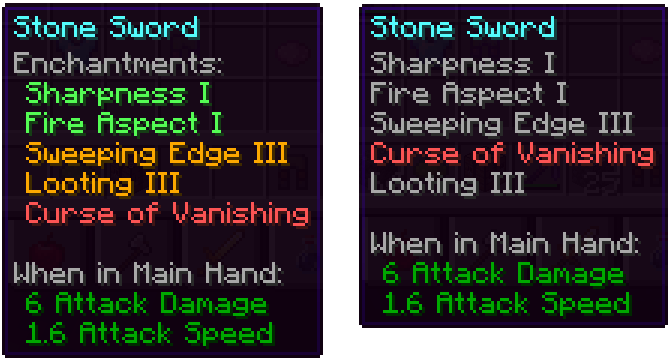
Mainly the mod overhauls the way enchantments get displayed in the tooltip:
- they now have their own "Enchantents:" subcategory
- color coding to easier tell apart good enchantments (green) and curses (red)
- max level enchantments will be displayed in gold
- curses are always ordered at the bottom of the list
With the mod installed: Without the mod installed (Vanila):
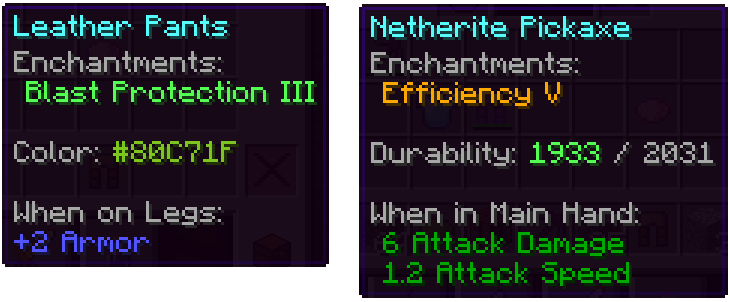
Besides that, other parts got also improved:
- the color line on dyed items now actually shows the used color
- damaged items show their remaining durability in the tooltip
We have many more ideas on how tooltips could be improved for future updates. Besides adding new features, the next updates will also add many configurability options.


Project description from CurseForge.
Pick your setup
Clean Tooltips by Minecraft version and loader
Choose the version and loader you play, then open the matching release.
Minecraft version
1.21.7
2 loader buildsMinecraft version
1.21.1
2 loader buildsMinecraft version
1.21
2 loader buildsMinecraft version
1.20.6
2 loader buildsMinecraft version
1.20.4
2 loader buildsMinecraft version
1.20.1
2 loader buildsMinecraft version
1.20
2 loader buildsMinecraft version
1.19.4
2 loader buildsMinecraft version
1.19.2
2 loader buildsCheck the dependencies, then try the file in a copied instance before changing a world you care about.
Recent files
Clean Tooltips versions and loaders
clean_tooltips-1.0-forge-1.19.4.jar
6 Jun 2023
Client Source doesn’t say Server Source doesn’t say Dependencies No extras listed Listed on Release listing
Check the 1.19.4 · Forge setup 1.19.4Forge release
Looking for an older file? The official CurseForge project page is in Resources.