Minecraft version
Back to mods 
CurseForge · Minecraft mod
Expanded Tooltips (Forge)
A simple mod allowing for custom item descriptions.
Choose a version Pick your version below, then grab the matching file.
Quick answer
Which Expanded Tooltips (Forge) release matches 1.19.2 Forge?
Best match for your filters Expanded Tooltips (Forge) 1.19.2-1.1.0
Game version 1.19.2, 1.19.3
Loader Forge
Expanded Tooltips (Forge) 1.19.2-1.1.0 targets 1.19.2, 1.19.3 with Forge. The project page does not say whether this file belongs on the client, dedicated server, or both. No extra mods listed for this file.
Where it goes
Is Expanded Tooltips (Forge) required on the client, server, or both?
The project page does not say whether this file belongs on the client, dedicated server, or both.
Client Source doesn’t say
Dedicated server Source doesn’t say
Loader for this release Forge
Required install it here Optional supported, not mandatory Not supported do not install here Source doesn’t say do not assume
The source does not explicitly classify this release as client-only or server-only.
What else does Expanded Tooltips (Forge) 1.19.2-1.1.0 need?
Expanded Tooltips (Forge) 1.19.2-1.1.0 on 1.19.2 Forge. Every mod below is checked against that same setup.
This file does not list any required mods. Do not add a library just because a different file uses it.
This file does not list any required or optional mods.
Before you install it
Add Expanded Tooltips (Forge) without breaking your instance.
Built for Expanded Tooltips (Forge) 1.19.2-1.1.0 on 1.19.2 Forge. Pick another file and the loader, install side or required mods may change.
- 01
Stick to this file
Use Expanded Tooltips (Forge) 1.19.2-1.1.0. It targets 1.19.2, 1.19.3 with Forge; another release may have different loader, side or dependency requirements.
- 02
Bring the mods it needs
This file does not list any required mods. Do not add a library just because a different file uses it.
- 03
Put it on the correct side
The project page does not say whether this file belongs on the client, dedicated server, or both.
- 04
Pick the file you checked
Use the “Get this file” button beside Expanded Tooltips (Forge) 1.19.2-1.1.0. It opens that exact file at the source.
About this project
What does Expanded Tooltips (Forge) add?
Expanded Tooltips
This is the Forge version of this mod. Fabric/Quilt version link.
Expanded Tooltips is an open-source, client-sided mod for Minecraft allowing for custom item descriptions on all vanilla and modded blocks and items.
Description
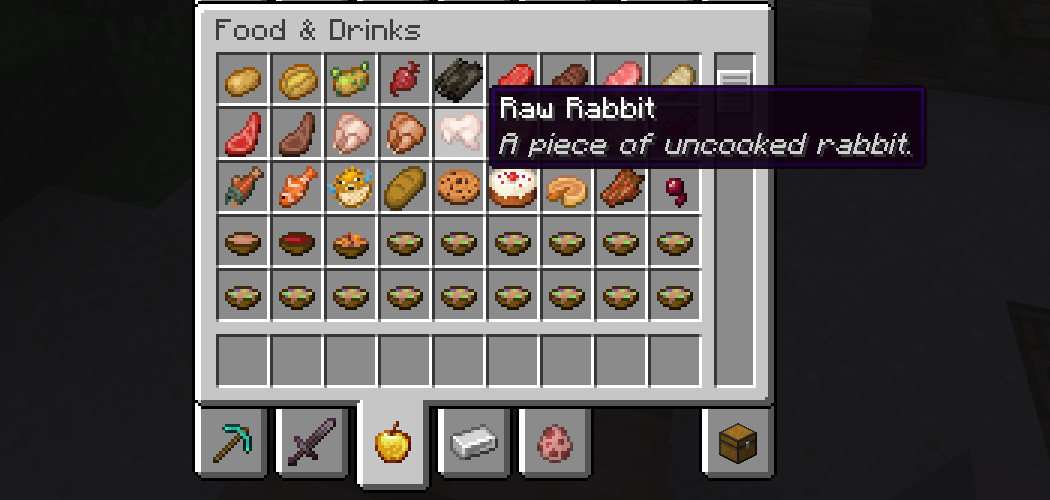
The mod comes with default tooltips for all blocks and items, as shown above and by examples in the Gallery tab. However, language files can be used to configure the mod, from adding support for modded blocks and items to creating tooltips for other languages! The mod is also open-source, and if you would like to request an official translation you can use the issues on the GitHub.
How to Add Tooltips

Right click & Open image in new tab if the image is too small
All tooltips should be created inside the language file for the language they are being written in, under the directory assets/expanded_tooltips/lang.
To modify an existing tooltip, add an entry similar to the first one in the picture, with sentences separated by a space and \n. It will automatically override the one added by the mod.
Adding a new tooltip works almost identically to modification. The only difference is to change the id to the id of a new modded block or item.
Project description from CurseForge.
Pick your setup
Expanded Tooltips (Forge) by Minecraft version and loader
Choose the version and loader you play, then open the matching release.
Minecraft version
1.19.4
3 loader buildsMinecraft version
1.19.3
1 loader buildMinecraft version
1.19.2
1 loader buildCheck the dependencies, then try the file in a copied instance before changing a world you care about.
Recent files
Expanded Tooltips (Forge) versions and loaders
Expanded Tooltips (Forge) 1.19.2-1.1.0
expanded_tooltips-1.19.2-1.1.0-forge.jar
12 Aug 2023
Client Source doesn’t say Server Source doesn’t say Dependencies No extras listed Listed on Release listing
Check the 1.19.2 · Forge setup 1.19.2Forge1.19.3 release
Expanded Tooltips (Forge) 1.19.2-1.0.0
expanded_tooltips-1.19.2-1.0.0.jar
6 Aug 2023
Client Source doesn’t say Server Source doesn’t say Dependencies No extras listed Listed on Release listing
Check the 1.19.2 · Forge setup 1.19.2Forge release
Looking for an older file? The official CurseForge project page is in Resources.
 mod
CurseForge · Minecraft
Wintery Atmosphere
Adds snow particles falling from snow blocks and powder snow blocks when there's air or transparent blocks underneath.
 mod
CurseForge · Minecraft
Roguelite Advancements
Advancement now give permanent player buffs. Health, Damage, Reach, Step Assist, Pick up radius and much more.
 mod
Modrinth · Minecraft
Rotatable Observer
Change the output direction of vanilla Observers by right-clicking them.