Architectury API Needed by Simple Mod Config Forge 0.0.3
requiredMatching file found Matched file: [Forge 1.20(.1)] v9.2.14

CurseForge · Minecraft mod
A minecraft modding framework for creating configuration files for both client and server
Quick answer
Simple Mod Config Forge 0.0.3 targets 1.20.1, 1.20 with Forge. The project page does not say whether this file belongs on the client, dedicated server, or both. All 1 required mods have matching files.
Where it goes
The project page does not say whether this file belongs on the client, dedicated server, or both.
The source does not explicitly classify this release as client-only or server-only.
Forge 0.0.3 on 1.20.1 Forge. Every mod below is checked against that same setup.
Install Architectury API first. We found matching files for this game-version and loader setup.
We only count dependency files that match this setup. A file for another loader does not fill the gap.
Before you install it
Built for Simple Mod Config Forge 0.0.3 on 1.20.1 Forge. Pick another file and the loader, install side or required mods may change.
Use Forge 0.0.3. It targets 1.20.1, 1.20 with Forge; another release may have different loader, side or dependency requirements.
Install Architectury API first. We found matching files for this game-version and loader setup.
The project page does not say whether this file belongs on the client, dedicated server, or both.
Use the “Get this file” button beside Forge 0.0.3. It opens that exact file at the source.
About this project

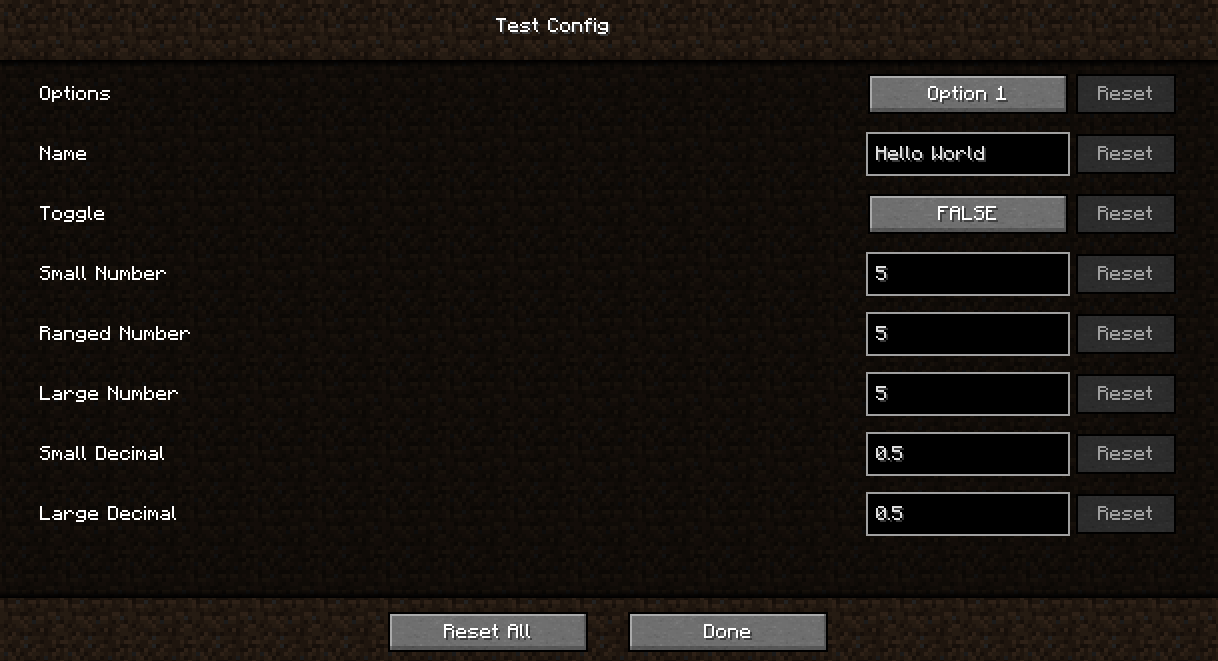
Simple Config is a minecraft configuration library. This helps minecraft mod developers easily create a configs in minecraft.
This mod is built with no modding platform in mind. Meaning it can be integrated in **_Forge_**, **_Fabric_**, **_Quilt_**, and any other minecraft modding platforms that popup throughout the years.
Add the Modrith Maven to your build.gradle file
repositories { // Add the modrinth maven maven { url = "" rel="noopener nofollow" target="_blank">https://api.modrinth.com/maven" } }
Then add Simple Mod Config to your dependencies. You can find the right version on our Modrinth page
Add the version to your gradle.properties files
simpleconfig=0.0.1 #put your version here
dependencies { // Adding a Simple Mod Config dependency for fabric, quilt and architectury modImplementation include("maven.modrinth:simple-mod-config:${project.simpleconfig}") }
dependencies { // Adding a Simple Mod Config dependency for forge implementation fg.deobf("maven.modrinth:simple-mod-config:${project.simpleconfig}") }
Project description from CurseForge.
Pick your setup
Choose the version and loader you play, then open the matching release.
Check the dependencies, then try the file in a copied instance before changing a world you care about.
Recent files
simple-mod-config-1.20-forge-0.0.3.jar
4 Jul 2023
Looking for an older file? The official CurseForge project page is in Resources.
 mod
A powerful library that its core for all my mods.
 mod
Replaces the static vanilla main menu with a panoramic view of your actual in-game locations.
 mod
The Boreal is a mod that adds a whole new boreal-themed dimension, which new blocks, items, mobs, new weapons, awesome terrain and a lot more.