WorldEdit Needed by CurveBuilding 0.7.0-alpha.1 for Fabric 26.1 - 26.3
requiredMatching file found Matched file: WorldEdit 7.4.5 (NeoForge/Fabric for MC 26.2)

CurseForge · Minecraft mod
The tool plugin for building curves
Quick answer
CurveBuilding 0.7.0-alpha.1 for Fabric 26.1 - 26.3 targets 26.1, 26.1.1, 26.1.2 with Fabric. The project page does not say whether this file belongs on the client, dedicated server, or both. All 2 required mods have matching files.
Where it goes
The project page does not say whether this file belongs on the client, dedicated server, or both.
The source does not explicitly classify this release as client-only or server-only.
CurveBuilding 0.7.0-alpha.1 for Fabric 26.1 - 26.3 on 26.2. Every mod below is checked against that same setup.
Install WorldEdit, Fabric API first. We found matching files for this game-version and loader setup.
We only count dependency files that match this setup. A file for another loader does not fill the gap.
Before you install it
Built for CurveBuilding 0.7.0-alpha.1 for Fabric 26.1 - 26.3 on 26.2. Pick another file and the loader, install side or required mods may change.
Use CurveBuilding 0.7.0-alpha.1 for Fabric 26.1 - 26.3. It targets 26.1, 26.1.1, 26.1.2 with Fabric; another release may have different loader, side or dependency requirements.
Install WorldEdit, Fabric API first. We found matching files for this game-version and loader setup.
The project page does not say whether this file belongs on the client, dedicated server, or both.
Use the “Get this file” button beside CurveBuilding 0.7.0-alpha.1 for Fabric 26.1 - 26.3. It opens that exact file at the source.
About this project
The best tool for building curves
Make curved structures using commands and WorldEdit.
This mod requires WorldEdit
Copy curvebuilding-fabric-*.jar to mod directory.
If you are using bukkit server, please download the plugin version.
If you have suggestions for other versions or features, please comment on the Discussions.
//pos set <pos type> - Sets a connection point at your current position (ver 0.5.x or earlier)
//bcpos set <pos type> - Sets a connection point at your current position (ver 0.6.x or later)
A connection point is a coordinate that a curve must pass through. Specify "pos type" in the format of a single number or a number followed by f or b, such as 1, 1b, 2, 2f, 2b, 3, 3f, 3b, and so on.
Each curve set has two connection points (starting and ending points) and two control points (starting point's control point and ending point's control point). You can specify the starting point's control point by adding "f", and the ending point's control point by adding "b".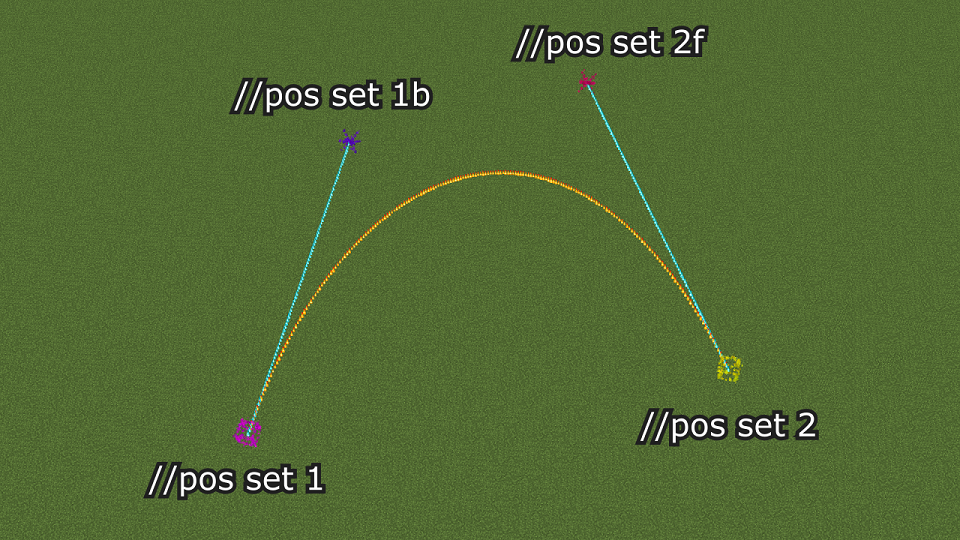
When making a curve with continuously connected curves, the connection points between the start and end points throughout have both "f" and "b" control points.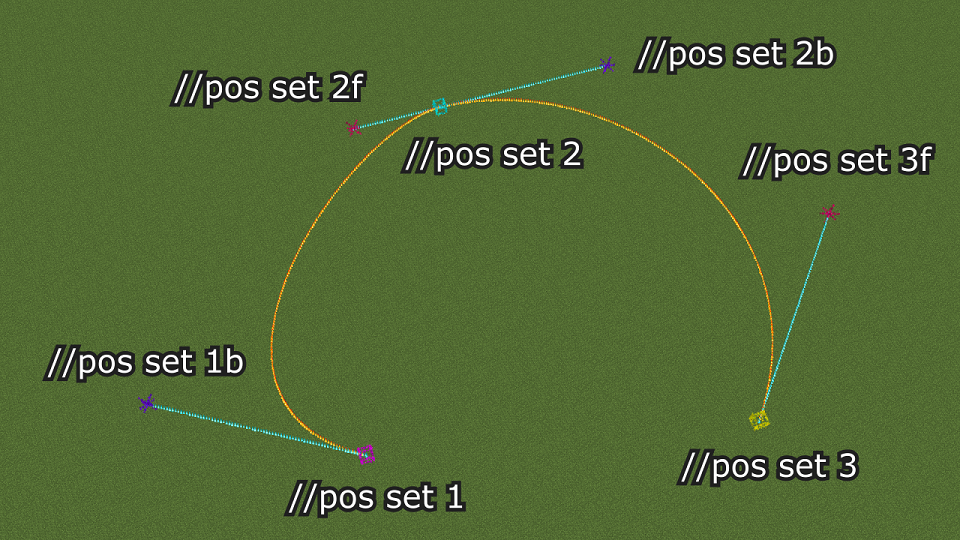
//bcpos clear <pos type> - Delete the specified connection or control point (ver 0.5.x or earlier)
//bcpos clear <pos type> - Delete the specified connection or control point (ver 0.6.x or later)
//bcpos clearall - Delete all connection and control points (ver 0.5.x or earlier)
//bcpos clearall - Delete all connection and control points (ver 0.6.x or later)
//bc [-options] [n] [m] - After making all the connection and control points and selecting the structure to curve using worldEdit, use this command to make the curve
The following settings are available for [-options].
-a: Replace only air blocks with the curve
-x: Read the region in X-direction
-z: Read the region in Z-direction
Regions can be plane or solid. Face the front of the region and check Facing on the Debug screen first.
If Facing is Z (Towards positive Z or Towards negative Z), enter //bc -z when making the curve. If Facing is X (Towards positive X or Towards negative X), enter //bc -x when making the curve. If Facing is negative (Towards negative X or Towards negative Z), the orientation in which the selected structure is placed will be reversed.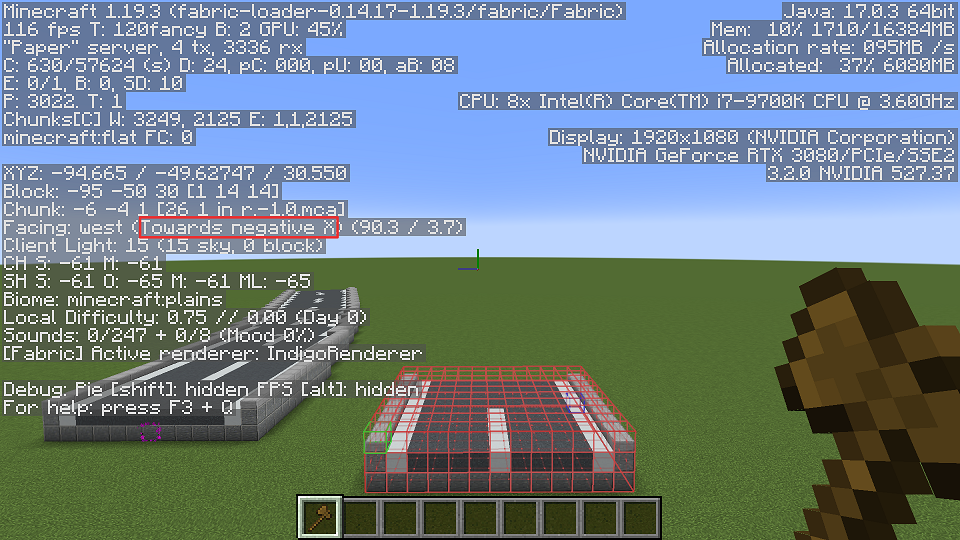
Project description from CurseForge.
Pick your setup
Choose the version and loader you play, then open the matching release.
Check the dependencies, then try the file in a copied instance before changing a world you care about.
Recent files
curvebuilding-fabric-0.7.0-alpha.1+26.1-26.3.jar
27 Oct 2026
Looking for an older file? The official CurseForge project page is in Resources.
 mod
It brings new tools, a new gem and a new armor the armor comes a little bit later.
 mod
Extend Waystones with compressed and decompressed item payments and combined item costs.
 mod
Data-driven NPCs with branching dialogues, quests and spawn rules – in-game editor, JSON, server-side.