Minecraft version
Back to mods 
CurseForge · Minecraft mod
SuperOreBlock
SuperOreBlocks introduces a new way to store and manage your valuable resources more efficiently in Minecraft.
Choose a version Pick your version below, then grab the matching file.
Quick answer
Which SuperOreBlock release should I use?
Latest stable file [NeoForge] SuperOreBlock - MC 26.1.2 - 2.0.1
Game version 26.1, 26.1.1, 26.1.2
Loader NeoForge
SuperOreBlock [NeoForge] SuperOreBlock - MC 26.1.2 - 2.0.1 targets 26.1, 26.1.1, 26.1.2 with NeoForge. The project page does not say whether this file belongs on the client, dedicated server, or both. No extra mods listed for this file.
Where it goes
Is SuperOreBlock required on the client, server, or both?
The project page does not say whether this file belongs on the client, dedicated server, or both.
Client Source doesn’t say
Dedicated server Source doesn’t say
Loader for this release NeoForge
Required install it here Optional supported, not mandatory Not supported do not install here Source doesn’t say do not assume
The source does not explicitly classify this release as client-only or server-only.
What else does SuperOreBlock [NeoForge] SuperOreBlock - MC 26.1.2 - 2.0.1 need?
[NeoForge] SuperOreBlock - MC 26.1.2 - 2.0.1. Change the file and its required mods may change too.
This file does not list any required mods. Do not add a library just because a different file uses it.
This file does not list any required or optional mods.
Before you install it
Add SuperOreBlock without breaking your instance.
Built for SuperOreBlock [NeoForge] SuperOreBlock - MC 26.1.2 - 2.0.1. Pick another file and the loader, install side or required mods may change.
- 01
Stick to this file
Use [NeoForge] SuperOreBlock - MC 26.1.2 - 2.0.1. It targets 26.1, 26.1.1, 26.1.2 with NeoForge; another release may have different loader, side or dependency requirements.
- 02
Bring the mods it needs
This file does not list any required mods. Do not add a library just because a different file uses it.
- 03
Put it on the correct side
The project page does not say whether this file belongs on the client, dedicated server, or both.
- 04
Pick the file you checked
Use the “Get this file” button beside [NeoForge] SuperOreBlock - MC 26.1.2 - 2.0.1. It opens that exact file at the source.
About this project
What does SuperOreBlock add?
Too many ores? Overwhelmed by iron or gold farms?
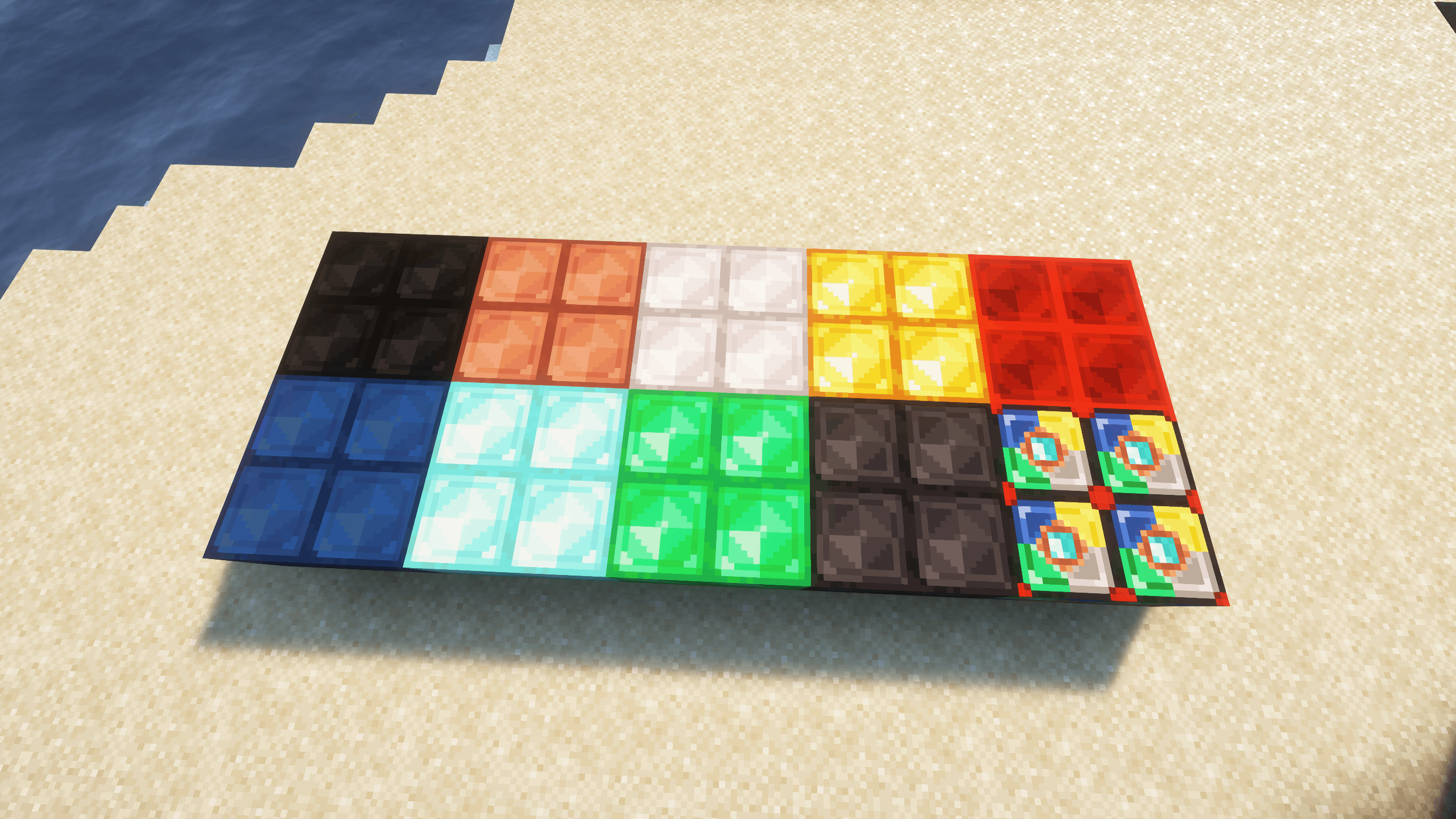
This mod is here to help! SuperOreBlocks introduces a new way to store and manage your valuable resources more efficiently in Minecraft.
You can also use these blocks to craft new items, with the Exclusive Weapons, Armor and Tools mod.
Do you need a server to play with your friends?
If you are looking for a server to play any mod or modpack with your friends, Bisect Hosting is your solution! They have the best quality-price Minecraft servers, and if you click on this link you will get a 25% discount, using the code "Lupin".

New Super Blocks for the following ores:
- Coal
- Copper
- Iron
- Gold
- Lapis Lazuli
- Redstone
- Emerald
- Diamond
- Netherite
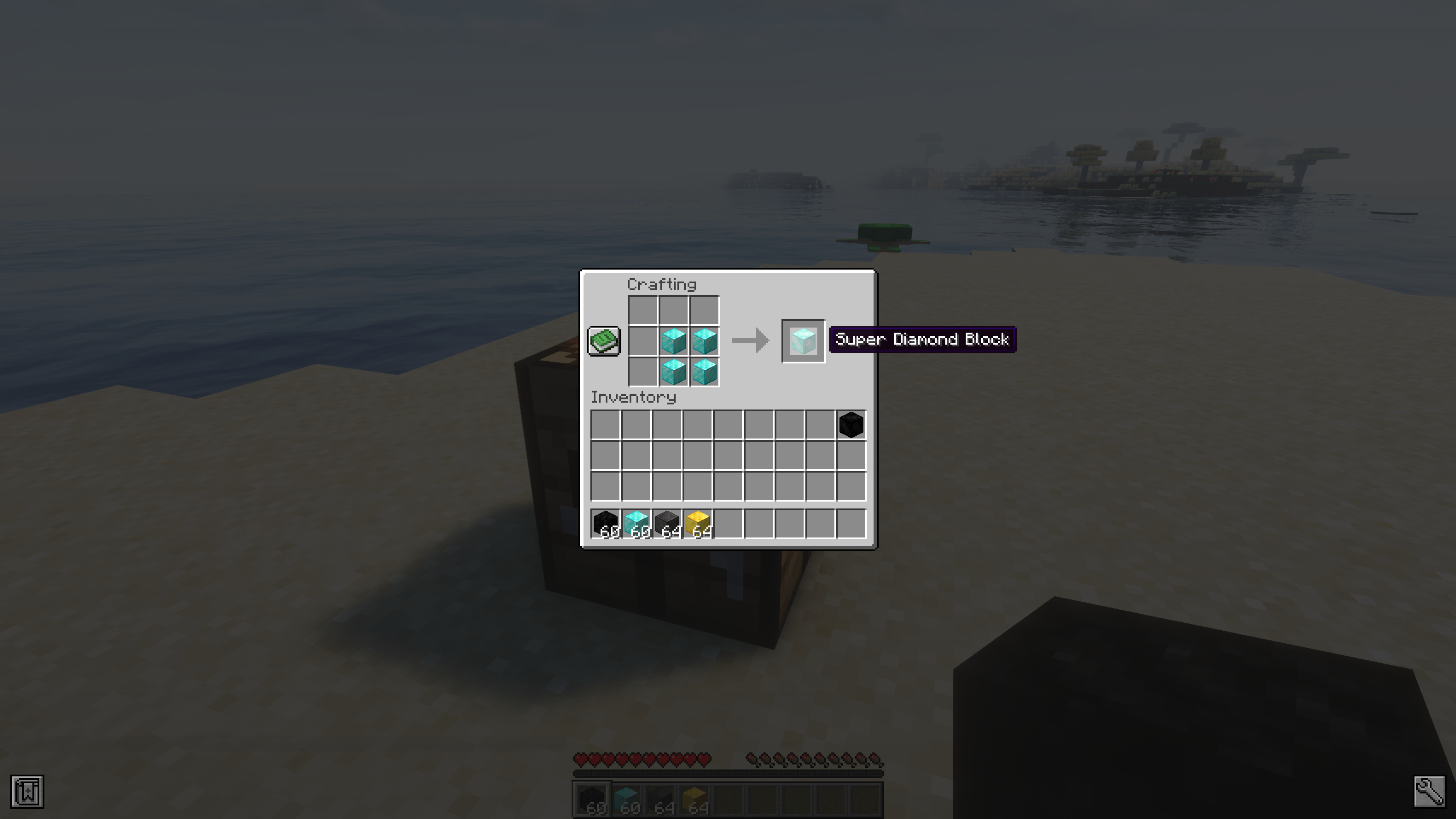
Simple crafting: Combine 4 regular ore blocks to create a Super Block of that ore.
Smart storage: Great for saving inventory space or organizing output from auto-farms and mining sessions.
Reversible crafting: You can convert any Super Block back into 4 standard ore blocks at any time.

Does it work on servers?
Sure! It works perfectly! Remember that the best way to play with mods and friends is with BisectHosting, and by clicking on this link you can get a 25% discount.
Can this mod be used in modpacks?
Of course! As long as it is published only on Modrinth or CurseForge. Uploading it to any other platform would be violating our rights and is not allowed at all.
However, we are really grateful if you consider adding it to your Modrinth or CurseForge modpack. If you need any small changes or have any questions, contact us!
Can I record a video of this mod and show it on my channel?
Sure, you are free to play this mod or any of our modpacks on your channel and make a video about it, in fact, we would be very grateful for it!



Project description from CurseForge.
Pick your setup
SuperOreBlock by Minecraft version and loader
Choose the version and loader you play, then open the matching release.
Minecraft version
26.1.1
2 loader buildsMinecraft version
26.1
2 loader buildsMinecraft version
1.21.1
2 loader buildsMinecraft version
1.21
2 loader buildsMinecraft version
1.20.1
2 loader buildsCheck the dependencies, then try the file in a copied instance before changing a world you care about.
Recent files
SuperOreBlock versions and loaders
[NeoForge] SuperOreBlock - MC 26.1.2 - 2.0.1
SOB-NeoForge-26.1.2-2.0.1.jar
1 Jun 2026
Client Source doesn’t say Server Source doesn’t say Dependencies No extras listed Listed on Release listing
Check the 26.1.2 · NeoForge setup NeoForge26.126.1.126.1.2 release
[Fabric] SuperOreBlock - MC 26.1.2 - 2.0.1
SOB-Fabric-26.1.2-2.0.1.jar
1 Jun 2026
Client Source doesn’t say Server Source doesn’t say Dependencies No extras listed Listed on Release listing
Check the 26.1.2 · Fabric setup Fabric26.126.1.126.1.2 release
[NeoForge] SuperOreBlock - MC 1.21.1 - 1.0.0
SOB-NeoForge-1.21.1-1.0.0.jar
16 Jun 2025
Client Source doesn’t say Server Source doesn’t say Dependencies No extras listed Listed on Release listing
Check the 1.21.1 · NeoForge setup 1.21NeoForge1.21.1 release
[Fabric] SuperOreBlock - MC 1.21.1 - 1.0.0
SOB-Fabric-1.21.1-1.0.0.jar
16 Jun 2025
Client Source doesn’t say Server Source doesn’t say Dependencies No extras listed Listed on Release listing
Check the 1.21.1 · Fabric setup 1.21Fabric1.21.1 release
[Forge] SuperOreBlock - MC 1.20.1 - 1.0.0
SOB-Forge-1.20.1-1.0.0.jar
16 Jun 2025
Client Source doesn’t say Server Source doesn’t say Dependencies No extras listed Listed on Release listing
Check the 1.20.1 · Forge setup 1.20.1Forge release
[Fabric] SuperOreBlock - MC 1.20.1 - 1.0.0
SOB-Fabric-1.20.1-1.0.0.jar
16 Jun 2025
Client Source doesn’t say Server Source doesn’t say Dependencies No extras listed Listed on Release listing
Check the 1.20.1 · Fabric setup Fabric1.20.1 release
Looking for an older file? The official CurseForge project page is in Resources.
 mod
mod CurseForge · Minecraft
XiaoXiang - Black Tech
The machines of a cultivation world, built on Xiaoxiang Cultivation World: spirit stones unwound into power and power condensed back, eight machines with their own windows and sounds, relays, a building set and a Codex.
 mod
mod CurseForge · Minecraft
AE2 Unofficial Extended Life Modern
A Fork of a Minecraft Mod about Matter, Energy and using them to conquer the world!
 mod
mod CurseForge · Minecraft
Alexis 64's Food
200 Food, 3D Crops, Extra Flavours, Jams, Juices and Pets