Minecraft version
Back to mods 
CurseForge · Minecraft mod
Bagus Lib
This mod is using baguchi's mod and you can use too!
Choose a version Pick your version below, then grab the matching file.
Quick answer
Which Bagus Lib release should I use?
Latest stable file bagus_lib-26.3-28.5.0.jar
Game version 26.3
Loader NeoForge
Bagus Lib bagus_lib-26.3-28.5.0.jar targets 26.3 with NeoForge. The project page does not say whether this file belongs on the client, dedicated server, or both. No extra mods listed for this file.
Where it goes
Is Bagus Lib required on the client, server, or both?
The project page does not say whether this file belongs on the client, dedicated server, or both.
Client Source doesn’t say
Dedicated server Source doesn’t say
Loader for this release NeoForge
Required install it here Optional supported, not mandatory Not supported do not install here Source doesn’t say do not assume
The source does not explicitly classify this release as client-only or server-only.
What else does Bagus Lib bagus_lib-26.3-28.5.0.jar need?
bagus_lib-26.3-28.5.0.jar. Change the file and its required mods may change too.
This file does not list any required mods. Do not add a library just because a different file uses it.
This file does not list any required or optional mods.
Before you install it
Add Bagus Lib without breaking your instance.
Built for Bagus Lib bagus_lib-26.3-28.5.0.jar. Pick another file and the loader, install side or required mods may change.
- 01
Stick to this file
Use bagus_lib-26.3-28.5.0.jar. It targets 26.3 with NeoForge; another release may have different loader, side or dependency requirements.
- 02
Bring the mods it needs
This file does not list any required mods. Do not add a library just because a different file uses it.
- 03
Put it on the correct side
The project page does not say whether this file belongs on the client, dedicated server, or both.
- 04
Pick the file you checked
Use the “Get this file” button beside bagus_lib-26.3-28.5.0.jar. It opens that exact file at the source.
About this project
What does Bagus Lib add?
Summary
This mod is using baguchi's mod and you can use too!
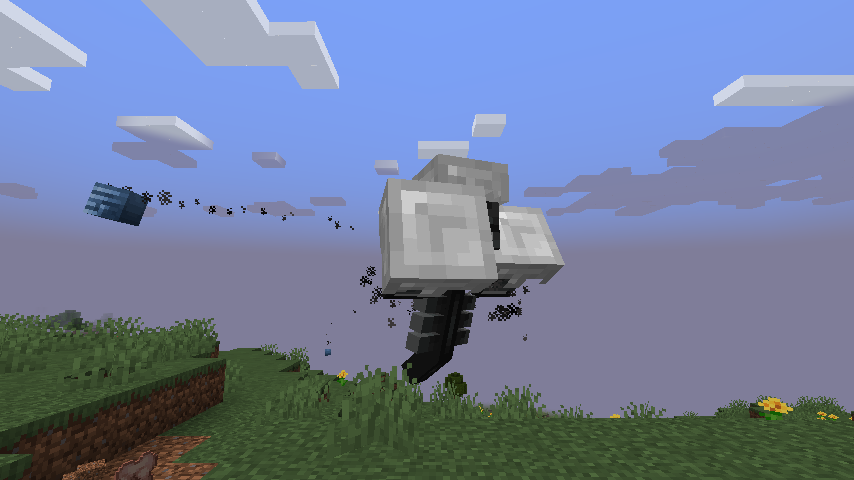
Bagus Lib Include Entity Util and camera util also usefull for developer!
This build include this:
camera util
IArmor make allow the more extend customiztably for dev!
Custom Armor layer(IArmor need it and allow the armor render even non Humaroid Model!)
Also BuiltIn Camera Shake Support for Vanilla mob!(for 1.3~)
animation support melee ai
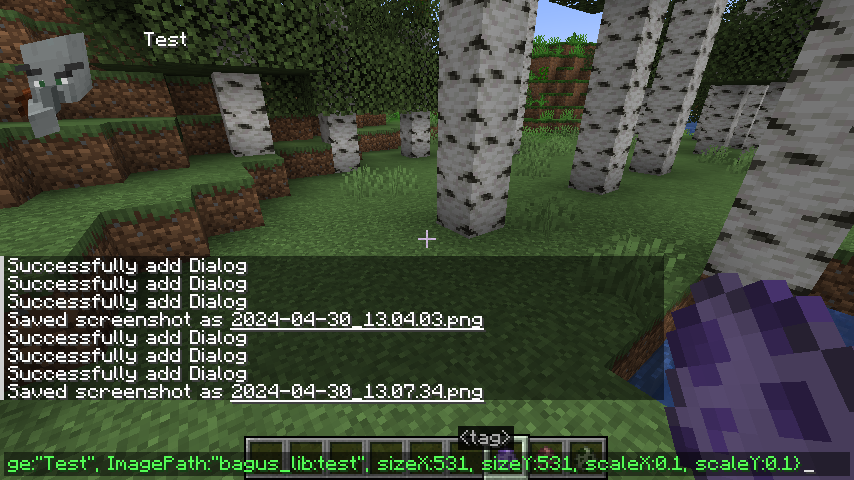
dialog util and dialog command(8.8.2~)
grobal entity animation(almost entity now can animate)
Developers who want to use Bagus Lib You can Read The Wiki.
Example to how would be work:
Project description from CurseForge.
Pick your setup
Bagus Lib by Minecraft version and loader
Choose the version and loader you play, then open the matching release.
Minecraft version
26.2
1 loader buildMinecraft version
26.1.2
1 loader buildMinecraft version
26.1.1
1 loader buildMinecraft version
26.1-snapshot
1 loader buildMinecraft version
26.1
1 loader buildMinecraft version
1.21.11
1 loader buildMinecraft version
1.21.1
1 loader buildCheck the dependencies, then try the file in a copied instance before changing a world you care about.
Recent files
Bagus Lib versions and loaders
bagus_lib-26.3-28.5.0.jar
2 Oct 2026
Client Source doesn’t say Server Source doesn’t say Dependencies No extras listed Listed on Release listing
Check the 26.3 · NeoForge setup NeoForge26.3 release
bagus_lib-26.3-28.4.0.jar
30 Sept 2026
Client Source doesn’t say Server Source doesn’t say Dependencies No extras listed Listed on Release listing
Check the 26.3 · NeoForge setup NeoForge26.3 release
bagus_lib-26.3-28.3.0.jar
28 Sept 2026
Client Source doesn’t say Server Source doesn’t say Dependencies No extras listed Listed on Release listing
Check the 26.3 · NeoForge setup NeoForge26.3 release
bagus_lib-26.3-28.2.0.jar
16 Sept 2026
Client Source doesn’t say Server Source doesn’t say Dependencies No extras listed Listed on Release listing
Check the 26.3 · NeoForge setup NeoForge26.3 release
bagus_lib-26.3-28.1.0.jar
15 Sept 2026
Client Source doesn’t say Server Source doesn’t say Dependencies No extras listed Listed on Release listing
Check the 26.3 · NeoForge setup NeoForge26.3 release
bagus_lib-26.3-28.0.0.jar
15 Sept 2026
Client Source doesn’t say Server Source doesn’t say Dependencies No extras listed Listed on Release listing
Check the 26.3 · NeoForge setup NeoForge26.3 release
bagus_lib-1.21.1-13.27.0.jar
14 Sept 2026
Client Source doesn’t say Server Source doesn’t say Dependencies No extras listed Listed on Release listing
Check the 1.21.1 · NeoForge setup 1.21.1NeoForge release
bagus_lib-26.2-27.7.0.jar
18 Aug 2026
Client Source doesn’t say Server Source doesn’t say Dependencies No extras listed Listed on Release listing
Check the 26.2 · NeoForge setup NeoForge26.2 release
bagus_lib-26.1.2-26.5.0.jar
18 Aug 2026
Client Source doesn’t say Server Source doesn’t say Dependencies No extras listed Listed on Release listing
Check the 26.1.2 · NeoForge setup NeoForge26.1.2 release
bagus_lib-1.21.1-13.26.0.jar
18 Aug 2026
Client Source doesn’t say Server Source doesn’t say Dependencies No extras listed Listed on Release listing
Check the 1.21.1 · NeoForge setup 1.21.1NeoForge release
bagus_lib-26.2-27.6.0.jar
8 Aug 2026
Client Source doesn’t say Server Source doesn’t say Dependencies No extras listed Listed on Release listing
Check the 26.2 · NeoForge setup NeoForge26.2 release
bagus_lib-26.2-27.5.0.jar
6 Aug 2026
Client Source doesn’t say Server Source doesn’t say Dependencies No extras listed Listed on Release listing
Check the 26.2 · NeoForge setup NeoForge26.2 release
Looking for an older file? The official CurseForge project page is in Resources.
 mod
mod CurseForge · Minecraft
ArcadiaDungeon
Fully configurable dungeon system for NeoForge servers. Adaptive bosses, multi-phase fights, enemy waves, weekly leaderboard and full in-game admin GUI. JSON-driven, no coding required.
 mod
mod CurseForge · Minecraft
Terrassic
Survive among dinosaurs in the Cretaceous. Tame companions, raise hatchlings, ride across prehistoric landscapes, and build a camp of your own.
 mod
mod CurseForge · Minecraft
StatureFy
Client-side visual body-profile mod offering Vanilla and Chibi profiles without altering player hitboxes.