Vocalized Needed by Spotting-Forge-1.20.1-1.0.1.jar
requiredMatching file found Matched file: Vocalized-Forge-1.20.1-1.0.1.jar

CurseForge · Minecraft mod
Allows players to "spot" living entities, making them glow.
Quick answer
Spotting-Forge-1.20.1-1.0.1.jar targets 1.20.1, 1.20 with Forge. The project page does not say whether this file belongs on the client, dedicated server, or both. All 1 required mods have matching files.
Where it goes
The project page does not say whether this file belongs on the client, dedicated server, or both.
The source does not explicitly classify this release as client-only or server-only.
Spotting-Forge-1.20.1-1.0.1.jar. Change the file and its required mods may change too.
Install Vocalized first. We found matching files for this game-version and loader setup.
We only count dependency files that match this setup. A file for another loader does not fill the gap.
Before you install it
Built for Spotting-Forge-1.20.1-1.0.1.jar. Pick another file and the loader, install side or required mods may change.
Use Spotting-Forge-1.20.1-1.0.1.jar. It targets 1.20.1, 1.20 with Forge; another release may have different loader, side or dependency requirements.
Install Vocalized first. We found matching files for this game-version and loader setup.
The project page does not say whether this file belongs on the client, dedicated server, or both.
Use the “Get this file” button beside Spotting-Forge-1.20.1-1.0.1.jar. It opens that exact file at the source.
About this project
Spotting allows players to "spot" living entities, making them glow. Also, shout out "XXX over there" to help remind the other players.
A player spotted an ender dragon:
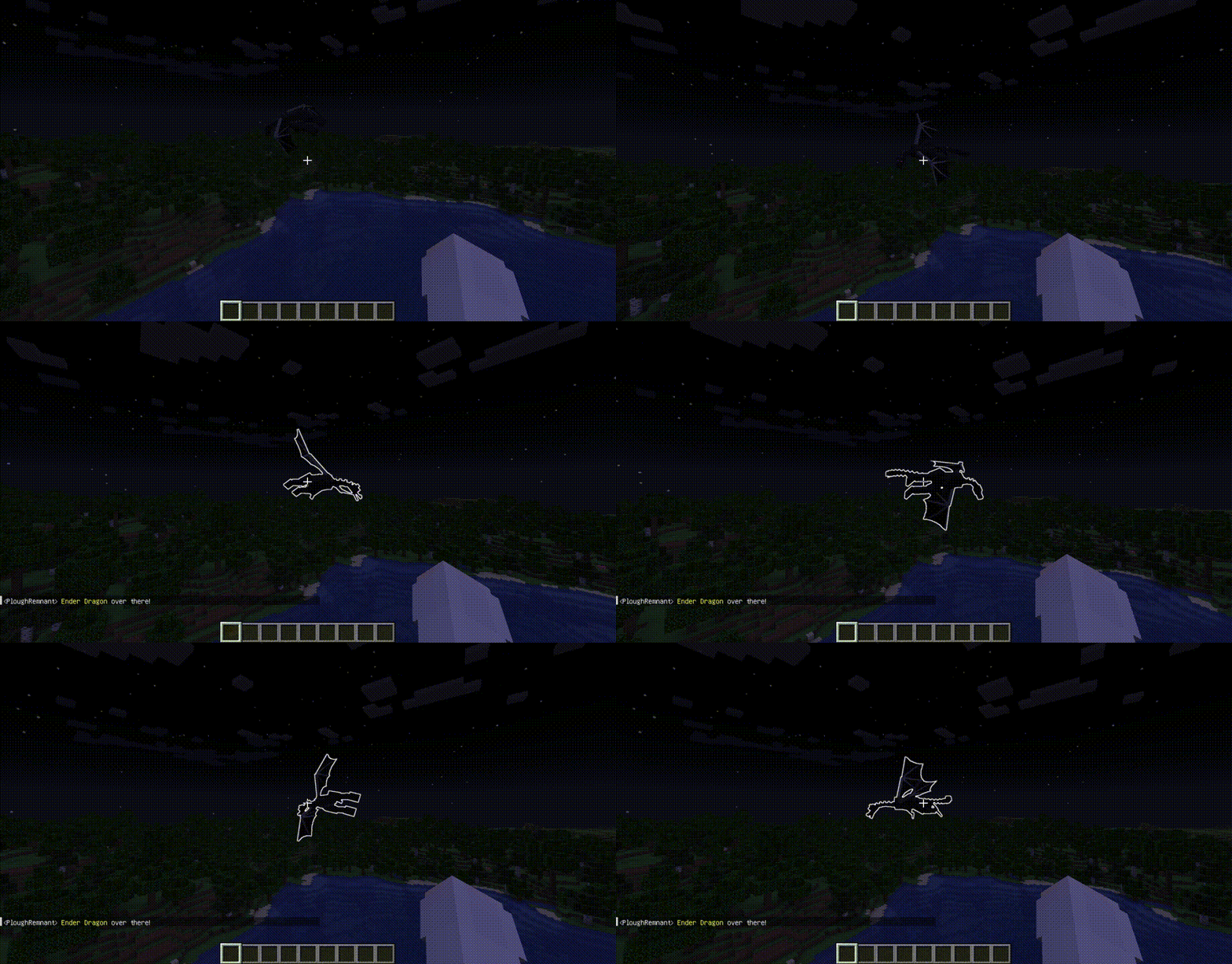
The default tracing range of spotting.
The default CD(tick) of spotting, only applied after a successful spotting.
The default time(tick) of glowing after being spotted.
MUYU_Twilighter for helping me learn about BattleField I's relevant mechanism;
Amazon Polly for providing TTS service, which helped generate the voice messages used.
FreePik for the logo design.
The mod requires Vocalized;
You DEFINITELY CAN add the mod to your modpack.
Project description from CurseForge.
Pick your setup
Choose the version and loader you play, then open the matching release.
Check the dependencies, then try the file in a copied instance before changing a world you care about.
Recent files
9 Mar 2024
Looking for an older file? The official CurseForge project page is in Resources.
 mod
A Modern falling Meteor mod, highly configurable, pretty and with spirt of the old ones!
 mod
just for better gamplay for me and my friends . but if you want to install it, know that the mod adds new bosses and drills
 mod
A Minecraft jobs and professions mod featuring action-based XP, profession leveling, unique skill, and unlockable perks.