Minecraft version
Back to mods 
CurseForge · Minecraft mod
rpcDrive
RedPower 2 - ComputerCraft disk drive compatibility add-on.
Choose a version Pick your version below, then grab the matching file.
Quick answer
Which rpcDrive release should I use?
Latest stable file rpcDrive 0.1.0
Game version 1.4.7
Loader Forge
rpcDrive 0.1.0 targets 1.4.7 with Forge. The project page does not say whether this file belongs on the client, dedicated server, or both. No extra mods listed for this file.
Where it goes
Is rpcDrive required on the client, server, or both?
The project page does not say whether this file belongs on the client, dedicated server, or both.
Client Source doesn’t say
Dedicated server Source doesn’t say
Loader for this release Forge
Required install it here Optional supported, not mandatory Not supported do not install here Source doesn’t say do not assume
The source does not explicitly classify this release as client-only or server-only.
What else does rpcDrive 0.1.0 need?
rpcDrive 0.1.0. Change the file and its required mods may change too.
This file does not list any required mods. Do not add a library just because a different file uses it.
This file does not list any required or optional mods.
Before you install it
Add rpcDrive without breaking your instance.
Built for rpcDrive 0.1.0. Pick another file and the loader, install side or required mods may change.
- 01
Stick to this file
Use rpcDrive 0.1.0. It targets 1.4.7 with Forge; another release may have different loader, side or dependency requirements.
- 02
Bring the mods it needs
This file does not list any required mods. Do not add a library just because a different file uses it.
- 03
Put it on the correct side
The project page does not say whether this file belongs on the client, dedicated server, or both.
- 04
Pick the file you checked
Use the “Get this file” button beside rpcDrive 0.1.0. It opens that exact file at the source.
About this project
What does rpcDrive add?
In the 1980s, it wasn't at all uncommon to see software development houses use a more powerful computer to create and debug software for a less powerful machine. In this spirit, rpcDrive is a mod for Minecraft which adds cross-mod compatibility between RedPower 2's Disk Drives and ComputerCraft's Computers, allowing using Lua scripts to read data from and write data to RedPower 2's 65EL02-based computer ecosystem.
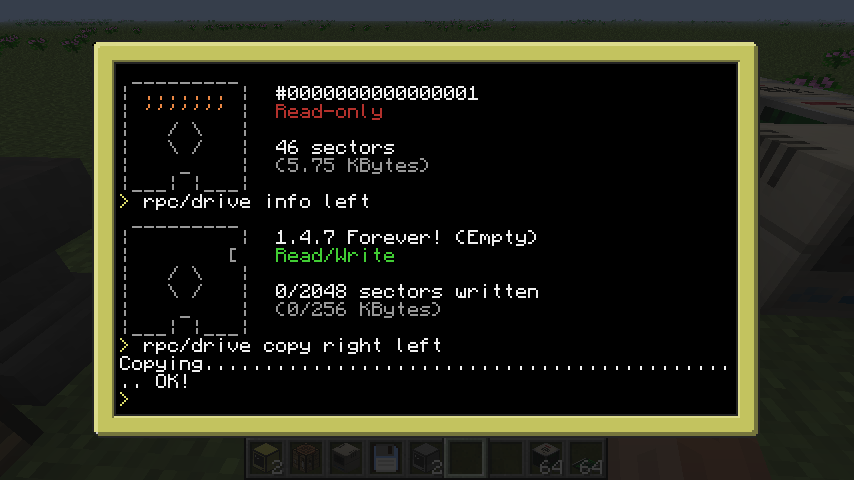
In addition, the mod comes with a built-in (automatically installed) utility called rpc/drive, which allows performing basic read, write and copy operations on RP2 floppies.
ComputerCraft API Documentation
RP2 Disk Drives are registered as peripherals of type rp_drive. It is important to note that Floppy Disks from that mod are operated on in terms of 128-byte sectors; the rp_drive peripheral provides an internal 128-byte buffer, from which sectors are read from and written to.
Indexes and sector counts are provided 1-indexed, as is the case across Lua.
| Name | Arguments | Description |
|---|---|---|
| isPresent | - | Returns true if a floppy disk is present. |
| hasData | - | Returns true if a floppy disk contains data. |
| isReadable | - | Returns true if the inserted floppy disk can be read from. |
| isWritable | - | Returns true if the inserted floppy disk can be read from. |
| getSerialNumber | => string | Returns the floppy disk's internal identifier (its "serial number") in the form of a string. |
| getLabel | => string | Gets the floppy disk's displayable label. |
| setLabel | newLabel (string) | Sets the floppy disk's displayable label. |
| getBytesPerSector | => number | Returns the number of bytes in a sector; typically 128. |
| getSectorCount | => number | Returns the number of sectors currently written to the inserted floppy. |
| getSectorSize | => number | Returns the number of total sectors on the inserted floppy, including ones which have never been written to. |
| readSector | sectorIndex (number) | Read a sector from the disk to the internal buffer. |
| writeSector | sectorIndex (number) | Write a sector from the internal buffer to the disk. |
| erase | - | Erase the floppy disk's contents. |
| initialize | - | Initialize an empty floppy disk; this gives it a new serial number. Note that writing a sector to an empty floppy disk initializes it automatically. |
| getBufferByte | index (number) | Read a byte from the internal buffer. |
| setBufferByte | index (number), value (number) | Write a byte to the internal buffer. |
Project description from CurseForge.
Pick your setup
rpcDrive by Minecraft version and loader
Choose the version and loader you play, then open the matching release.
Check the dependencies, then try the file in a copied instance before changing a world you care about.
Recent files
rpcDrive versions and loaders
rpcDrive 0.1.0
rpcDrive-0.1.0.jar
11 Jun 2023
Client Source doesn’t say Server Source doesn’t say Dependencies No extras listed Listed on Release listing
Check the 1.4.7 · Forge setup Forge1.4.7 release
Looking for an older file? The official CurseForge project page is in Resources.
 mod
Modrinth · Minecraft
Environmental Tech
About Environmental Tech is a mod containing a vast selection of very powerful Multiblock machines.
 mod
Modrinth · Minecraft
Simple Generators
Simple Generators contains a vast selection of single block generators.
 mod
Modrinth · Minecraft
Modular Machinery: Community Refoxed
Modular Machinery Community on newer Minecraft, with additional features and high performance !