Minecraft version
Back to mods 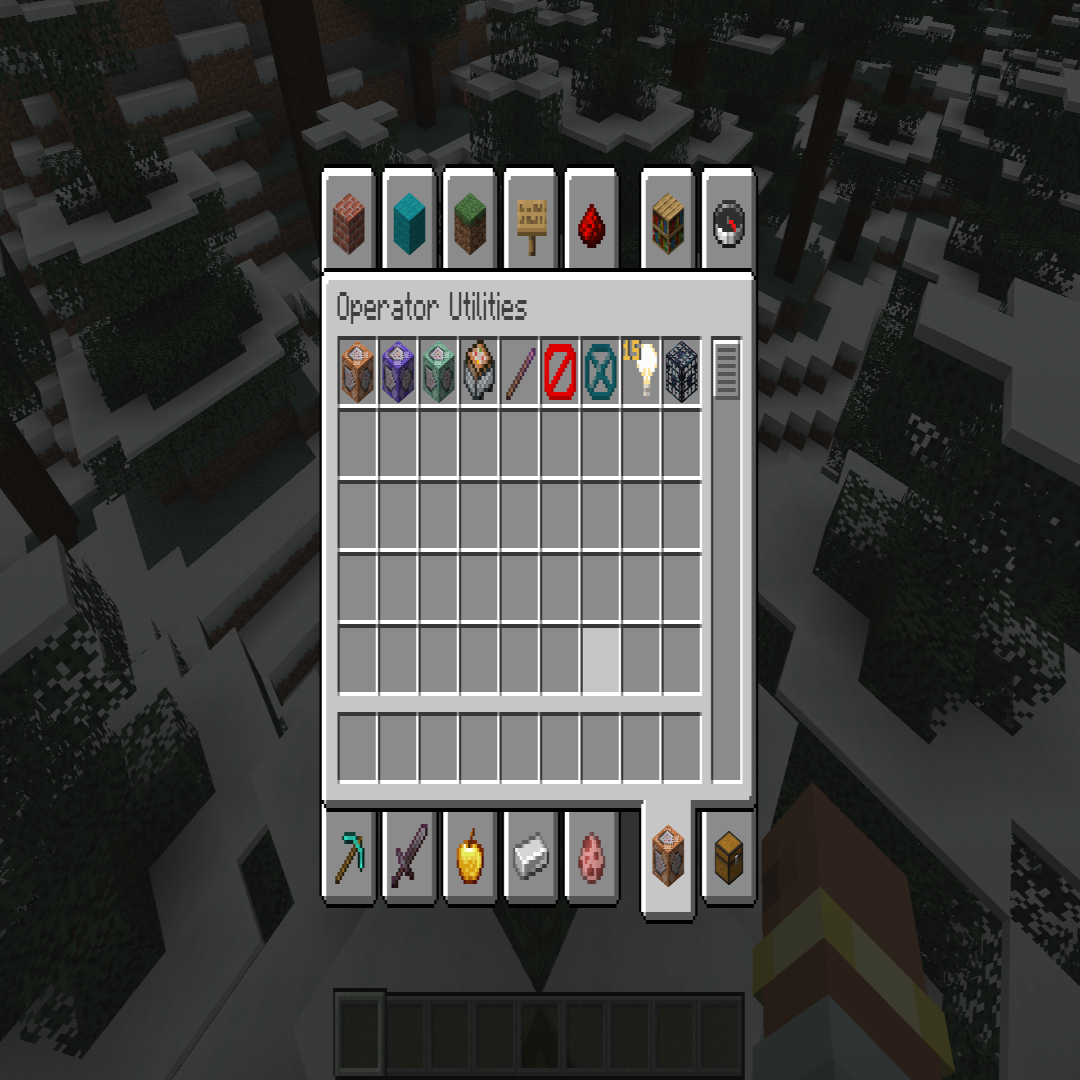
CurseForge · Minecraft mod
Creative Mode Utilities
This mod enhances the Creative Mode experience by introducing a variety of command block-related items, allowing players to easily access and utilize them without relying on the /give command.
Choose a version Pick your version below, then grab the matching file.
Quick answer
Which Creative Mode Utilities release should I use?
Latest stable file creativemodetabplus-1.0-SnapShot.jar
Game version 1.19.4-Snapshot, 1.19.4
Loader Forge
Creative Mode Utilities creativemodetabplus-1.0-SnapShot.jar targets 1.19.4-Snapshot, 1.19.4 with Forge. The project page does not say whether this file belongs on the client, dedicated server, or both. No extra mods listed for this file.
Where it goes
Is Creative Mode Utilities required on the client, server, or both?
The project page does not say whether this file belongs on the client, dedicated server, or both.
Client Source doesn’t say
Dedicated server Source doesn’t say
Loader for this release Forge
Required install it here Optional supported, not mandatory Not supported do not install here Source doesn’t say do not assume
The source does not explicitly classify this release as client-only or server-only.
What else does Creative Mode Utilities creativemodetabplus-1.0-SnapShot.jar need?
creativemodetabplus-1.0-SnapShot.jar. Change the file and its required mods may change too.
This file does not list any required mods. Do not add a library just because a different file uses it.
This file does not list any required or optional mods.
Before you install it
Add Creative Mode Utilities without breaking your instance.
Built for Creative Mode Utilities creativemodetabplus-1.0-SnapShot.jar. Pick another file and the loader, install side or required mods may change.
- 01
Stick to this file
Use creativemodetabplus-1.0-SnapShot.jar. It targets 1.19.4-Snapshot, 1.19.4 with Forge; another release may have different loader, side or dependency requirements.
- 02
Bring the mods it needs
This file does not list any required mods. Do not add a library just because a different file uses it.
- 03
Put it on the correct side
The project page does not say whether this file belongs on the client, dedicated server, or both.
- 04
Pick the file you checked
Use the “Get this file” button beside creativemodetabplus-1.0-SnapShot.jar. It opens that exact file at the source.
About this project
What does Creative Mode Utilities add?
This mod aims to elevate the Creative Mode gameplay by introducing a new Creative Mode tab that offers a selection of command block-related items. With these additions, players can enhance their creative building, world customization, and automation projects without the need for manual command input.
The mod includes several key items that empower players to harness the power of command blocks in a user-friendly manner. These items include the Command Block, which allows players to execute complex commands with ease; the Repeating Command Block, capable of repeatedly running commands at specified intervals; and the Chain Command Block, enabling the creation of intricate command chains.
Additionally, the mod introduces the Command Block Minecart, enabling the mobility of command blocks within the game world, and the Debug Stick, a powerful tool for modifying and testing command block behaviors effortlessly.
To further enrich the Creative Mode experience, the mod incorporates the Light Block, providing players with a versatile lighting option for their creations, and the Barrier Block, allowing for the creation of impassable barriers in-game. Furthermore, the Structure Void Block provides a useful tool for modifying or removing specific elements within structures, while the Spawner item empowers players to customize mob spawning mechanics effortlessly.
By offering a dedicated Creative Mode tab with these command block-related items, this mod simplifies the process of accessing and utilizing command blocks. Players no longer need to rely solely on the /give command, saving time and effort while enabling the realization of complex ideas within the game.
In summary, this mod enhances the Creative Mode experience by providing a convenient and intuitive way to access and utilize command blocks and related items. It empowers players to unleash their creativity, experiment with advanced commands, and automate various aspects of their Minecraft worlds without the need for manual command inputs.
Project description from CurseForge.
Pick your setup
Creative Mode Utilities by Minecraft version and loader
Choose the version and loader you play, then open the matching release.
Minecraft version
1.19.4
1 loader buildCheck the dependencies, then try the file in a copied instance before changing a world you care about.
Recent files
Creative Mode Utilities versions and loaders
creativemodetabplus-1.0-SnapShot.jar
21 Jun 2023
Client Source doesn’t say Server Source doesn’t say Dependencies No extras listed Listed on Release listing
Check the 1.19.4-Snapshot · Forge setup 1.19.4-Snapshot1.19.4Forge release
Looking for an older file? The official CurseForge project page is in Resources.
 mod
CurseForge · Minecraft
Range's Gamble
Adds a few gambling games, even a system to make horse track races.
 mod
CurseForge · Minecraft
Range's Misc
Adds Revival, Block painting system, Carry, Mail box, and New Flowers crops for dye. New block shapes to build with.
 mod
CurseForge + Modrinth · Minecraft
Roads and Roofs TFC
An addon for TerraFirmaCraft featuring new road and roof blocks.