Fabric API Needed by Bodies! Bodies! Bodies Bodies 1.0.1
requiredMatching file found Matched file: [1.20.1] Fabric API 0.92.12+1.20.1
CurseForge · Minecraft mod
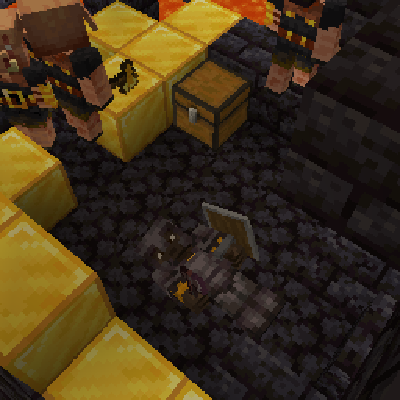
No more items despawning, if you die, your dead body will lay on the cold hard ground waiting for you.
Quick answer
Bodies! Bodies! Bodies Bodies 1.0.1 targets 1.20.1 with Fabric. The project page does not say whether this file belongs on the client, dedicated server, or both. All 1 required mods have matching files.
Where it goes
The project page does not say whether this file belongs on the client, dedicated server, or both.
The source does not explicitly classify this release as client-only or server-only.
Bodies Bodies 1.0.1. Change the file and its required mods may change too.
Install Fabric API first. We found matching files for this game-version and loader setup.
We only count dependency files that match this setup. A file for another loader does not fill the gap.
Before you install it
Built for Bodies! Bodies! Bodies Bodies 1.0.1. Pick another file and the loader, install side or required mods may change.
Use Bodies Bodies 1.0.1. It targets 1.20.1 with Fabric; another release may have different loader, side or dependency requirements.
Install Fabric API first. We found matching files for this game-version and loader setup.
The project page does not say whether this file belongs on the client, dedicated server, or both.
Use the “Get this file” button beside Bodies Bodies 1.0.1. It opens that exact file at the source.
About this project
This mod requires Fabric API, and is compatible with Trinkets.
JOIN OUR DISCORD!
SUPPORT ME ON MY PATREON!

NEED A SERVER?
When you die, your body will lay on the floor storing your items waiting for you to collect them

By default, only you can access your loot during the hour after your death. This can be tweaked using the config file.
You can use Sneak + Right Click to instantly collect all your items or just Right Click to open the dead body's inventory.

If you have Trinkets installed, you can click the "Trinkets" button to see the Trinkets you had equipped. Sneaking + Right Clicking will also place your Trinkets in the correct slot.
Opped players can see a player's recent death history using the command "/deathhistory [<player>]"

In case of issues, everytime a player dies, a backup of their full data is made and stored. An opped player can use the command "/restorebackup <deathId>". The deathId is printed on the log after a player dies.
Old entries are moved to a different data file, which can be found within the world's save folder. You can see them using NBT Editor if needed.
Note that if you find a consistent way of reproducing an issue which would require an opped player to restore their data, please report the issue on GitHub!
Project description from CurseForge.
Pick your setup
Choose the version and loader you play, then open the matching release.
Check the dependencies, then try the file in a copied instance before changing a world you care about.
Recent files
BodiesBodies-1.0.1.jar
7 Aug 2023
BodiesBodies-1.0.0.jar
21 Jul 2023
Looking for an older file? The official CurseForge project page is in Resources.
 mod
A Minecraft mod that adds customizable timestamps to chat!
 mod
This mod adds new dimensions, bosses, gear, guns, and more.
 mod
Consolidate all Patchouli books.