Minecraft version
Back to mods 
CurseForge · Minecraft mod
Utility Meters
Different meters for minecraft
Choose a version Pick your version below, then grab the matching file.
Quick answer
Which Utility Meters release should I use?
Latest stable file utilitymeters-1.2.jar
Game version 1.20.1
Loader Forge
Utility Meters utilitymeters-1.2.jar targets 1.20.1 with Forge. The project page does not say whether this file belongs on the client, dedicated server, or both. No extra mods listed for this file.
Where it goes
Is Utility Meters required on the client, server, or both?
The project page does not say whether this file belongs on the client, dedicated server, or both.
Client Source doesn’t say
Dedicated server Source doesn’t say
Loader for this release Forge
Required install it here Optional supported, not mandatory Not supported do not install here Source doesn’t say do not assume
The source does not explicitly classify this release as client-only or server-only.
What else does Utility Meters utilitymeters-1.2.jar need?
utilitymeters-1.2.jar. Change the file and its required mods may change too.
This file does not list any required mods. Do not add a library just because a different file uses it.
This file does not list any required or optional mods.
Before you install it
Add Utility Meters without breaking your instance.
Built for Utility Meters utilitymeters-1.2.jar. Pick another file and the loader, install side or required mods may change.
- 01
Stick to this file
Use utilitymeters-1.2.jar. It targets 1.20.1 with Forge; another release may have different loader, side or dependency requirements.
- 02
Bring the mods it needs
This file does not list any required mods. Do not add a library just because a different file uses it.
- 03
Put it on the correct side
The project page does not say whether this file belongs on the client, dedicated server, or both.
- 04
Pick the file you checked
Use the “Get this file” button beside utilitymeters-1.2.jar. It opens that exact file at the source.
About this project
What does Utility Meters add?

This Mod Description was previously sponsored by ChatGPT
###Utility Meters is a simple mod that (for now) adds an RF Meter block.
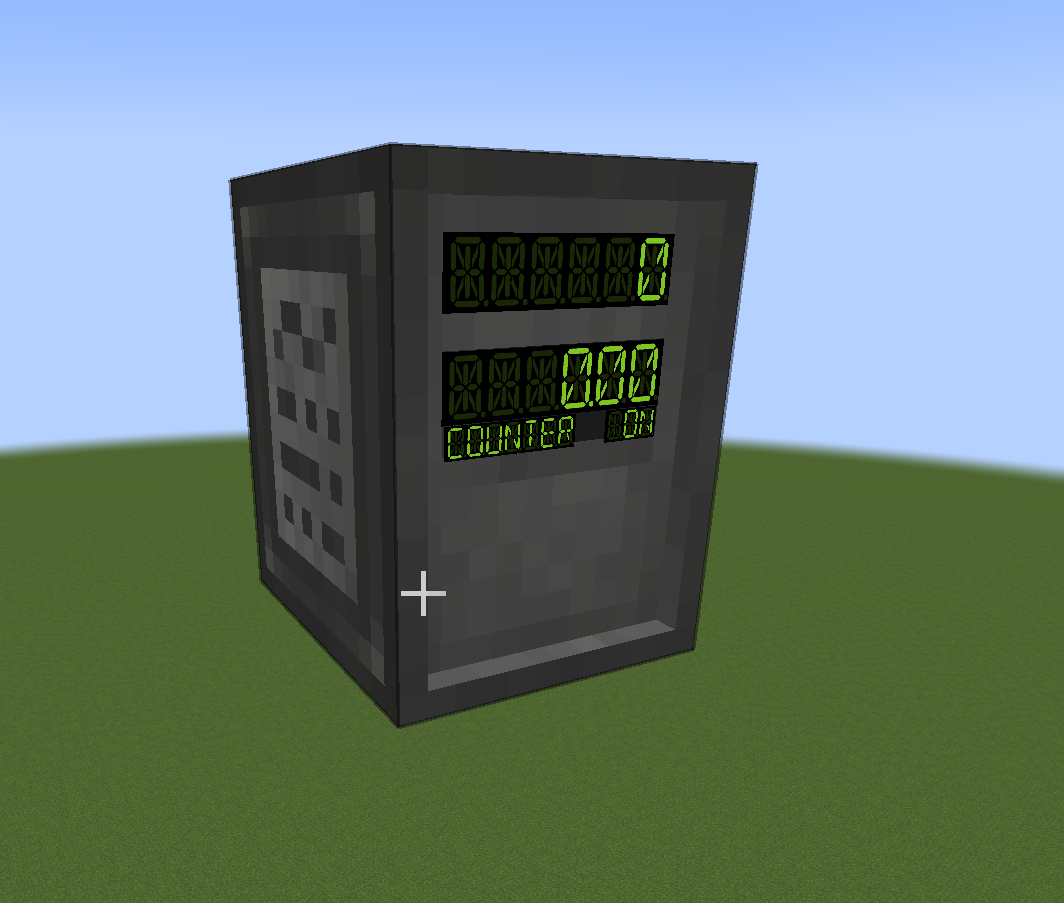

The RF Meter is designed to be spliced into an existing RF (Forge Energy compatible) transmission line and display current throughput and total transfer.
When placed, the block by default receives RF through the top and outputs through the bottom. The flow can be reversed by Shift-Right-Clicking with an empty hand. RF transmission can be stopped with a redstone signal to the back face.
Right-clicking the RF Meter with an empty hand opens a simple GUI that shows the same information as the block, toggle the energy flow on and off, and allows changing the block's displays' color.

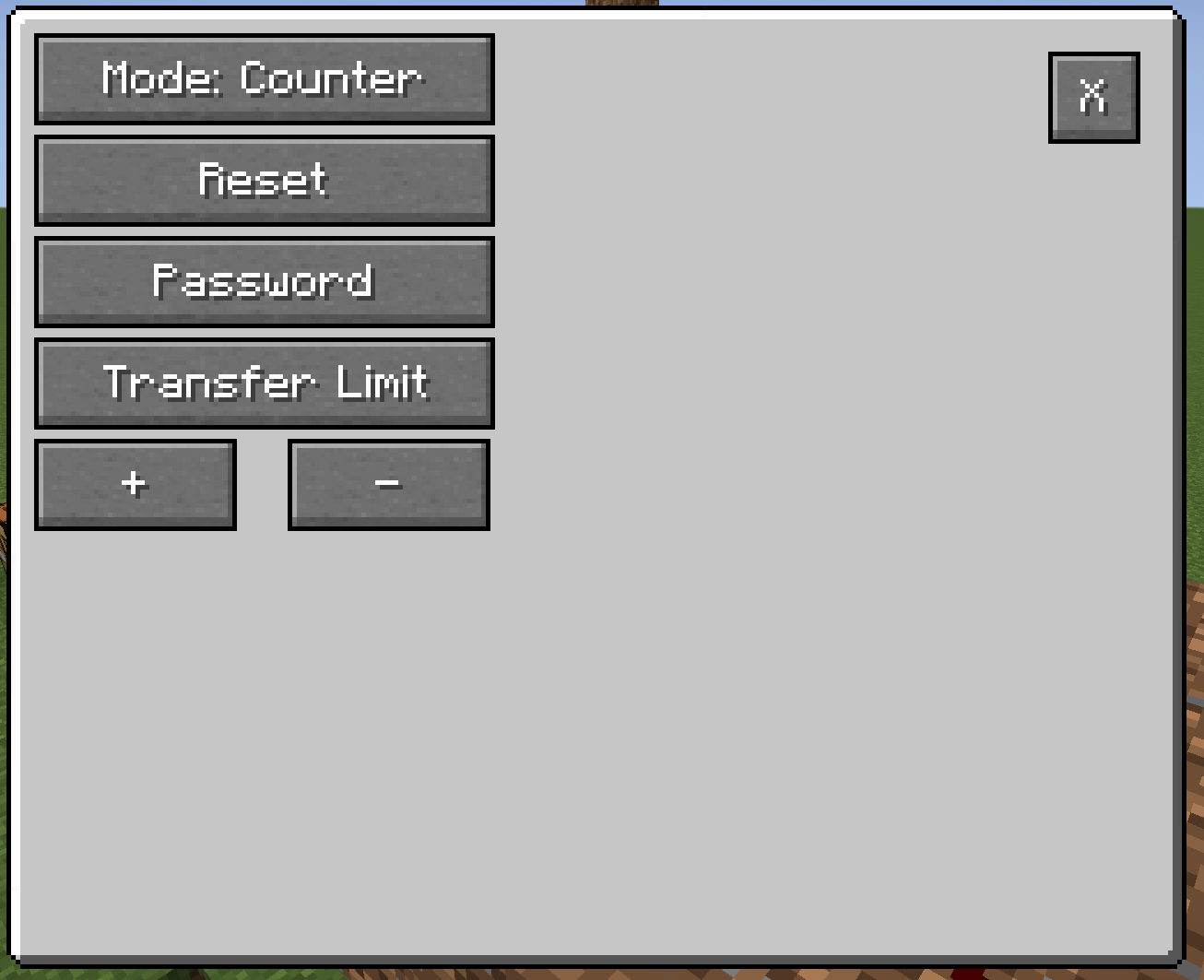
The Settings button hides an extra menu that allows for more granular control of the RF Meter's functions, like:
-Limiting RF/tick transfer rate with 1RF/t precision
--Range: 1 to 9,223,372,036,854,775,80
-Switching between Counter and Prepaid mode:
--Counter Mode - just counts current throughput and total transfer
--Prepaid Mode - allows automatic cutoff of energy flow after a set amount is transferred.
-Locking the settings with a password.
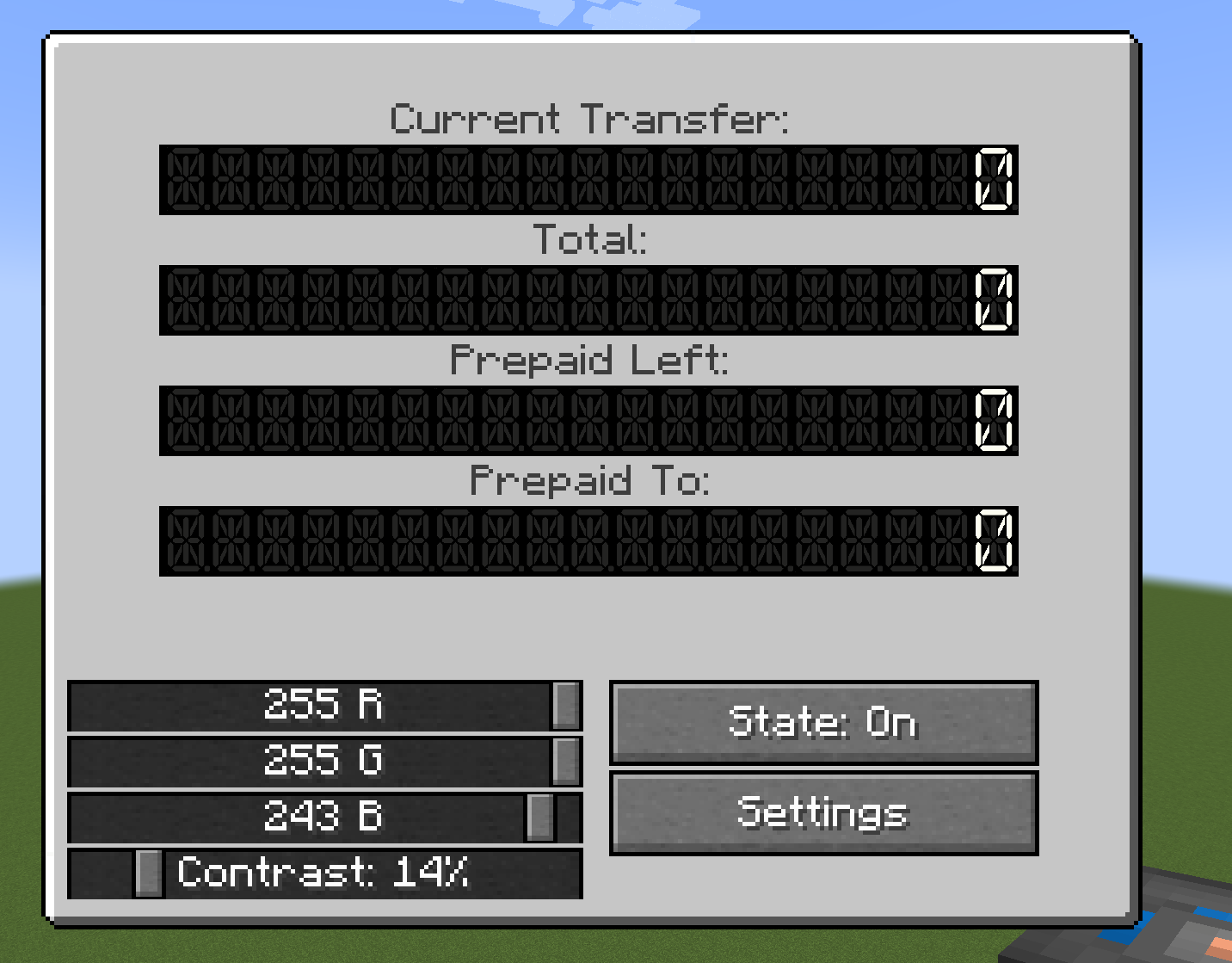
In Prepaid Mode, the RF Meter GUI gets two more displays: Prepaid Left and Prepaid To. Prepaid left counts down to 0 based on Prepaid To minus Total. If Prepaid Left equals 0, the RF Meter disables energy flow.

- Identical functionality Meter for Fluids
- possibly also for Gasses(Mekanism)
Project description from CurseForge.
Pick your setup
Utility Meters by Minecraft version and loader
Choose the version and loader you play, then open the matching release.
Minecraft version
1.19.2
1 loader buildCheck the dependencies, then try the file in a copied instance before changing a world you care about.
Recent files
Utility Meters versions and loaders
utilitymeters-1.2.jar
21 Dec 2023
Client Source doesn’t say Server Source doesn’t say Dependencies No extras listed Listed on Release listing
Check the 1.20.1 · Forge setup 1.20.1Forge release
utilitymeters-1.1.jar
30 Jul 2023
Client Source doesn’t say Server Source doesn’t say Dependencies No extras listed Listed on Release listing
Check the 1.19.2 · Forge setup 1.19.2Forge release
utilitymeters-1.0.jar
30 Jul 2023
Client Source doesn’t say Server Source doesn’t say Dependencies No extras listed Listed on Release listing
Check the 1.19.2 · Forge setup 1.19.2Forge alpha
Looking for an older file? The official CurseForge project page is in Resources.
 mod
mod CurseForge + Modrinth · Minecraft
TNTimer
Countdown timer on top of screen to know exactly when that TNT is going to explode without need to see the TNT client-side. Renders a timer over primed TNT (starting from v2.0)
 mod
mod CurseForge · Minecraft
Tool Mod
a mod that adds Useful tools and new weapons
 mod
mod CurseForge · Minecraft
SmoothCam
Smooth camera movement for Minecraft with adjustable smoothing.