Curios API Optional for Apothic Attributes Apothic-Attributes 1.21.1-2.10.1
optionalMatching file found Matched file: curios-neoforge-9.5.1+1.21.1.jar

CurseForge · Minecraft mod
A library that adds the Attributes GUI, alongside a suite of new attributes to work with
This page is having a moment, so a few details may be a little behind.
Quick answer
Apothic Attributes Apothic-Attributes 1.21.1-2.10.1 targets 1.21.1 with NeoForge. The project page does not say whether this file belongs on the client, dedicated server, or both. All 1 required mods have matching files.
Where it goes
The project page does not say whether this file belongs on the client, dedicated server, or both.
The source does not explicitly classify this release as client-only or server-only.
Apothic-Attributes 1.21.1-2.10.1. Change the file and its required mods may change too.
Install Placebo first. We found matching files for this game-version and loader setup.
We only count dependency files that match this setup. A file for another loader does not fill the gap.
Before you install it
Built for Apothic Attributes Apothic-Attributes 1.21.1-2.10.1. Pick another file and the loader, install side or required mods may change.
Use Apothic-Attributes 1.21.1-2.10.1. It targets 1.21.1 with NeoForge; another release may have different loader, side or dependency requirements.
Install Placebo first. We found matching files for this game-version and loader setup.
The project page does not say whether this file belongs on the client, dedicated server, or both.
Use the “Get this file” button beside Apothic-Attributes 1.21.1-2.10.1. It opens that exact file at the source.
About this project
Apothic Attributes is a library mod that provides a variety of attributes and attribute-related utilities, which makes interacting with, debugging, and using attributes much easier. The current list of Attributes is available here. Most of the features are developer-facing, but there are a few user-facing components:
Apothic Attributes provides an Attributes GUI, accessible via the sword button in your inventory. This GUI shows all attributes that are attached to your player. You can filter the displayed attributes to only show modified attributes, and hovering an attribute will show a description and detailed information.
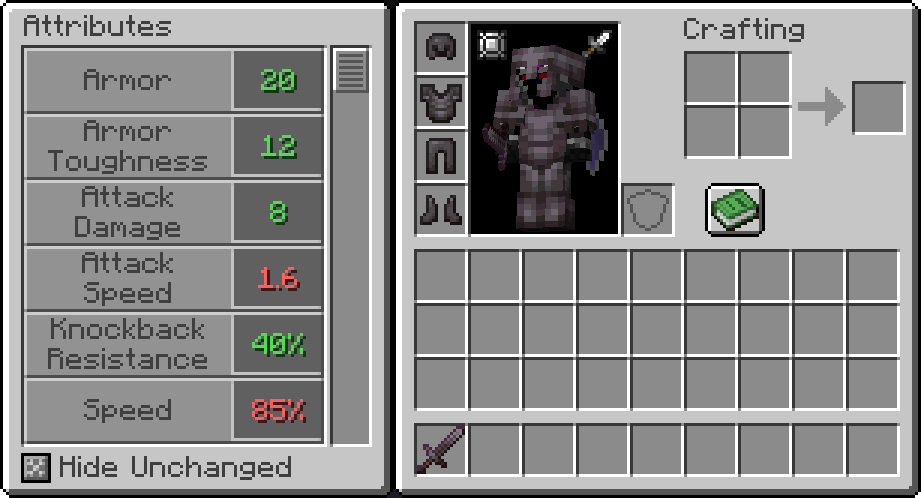
To support the addition of Armor Pierce, Armor Shred, Protection Pierce, and Protection Shred, Apothic Attributes changes the way that damage reduction calculations are done, for both Armor and Protection.
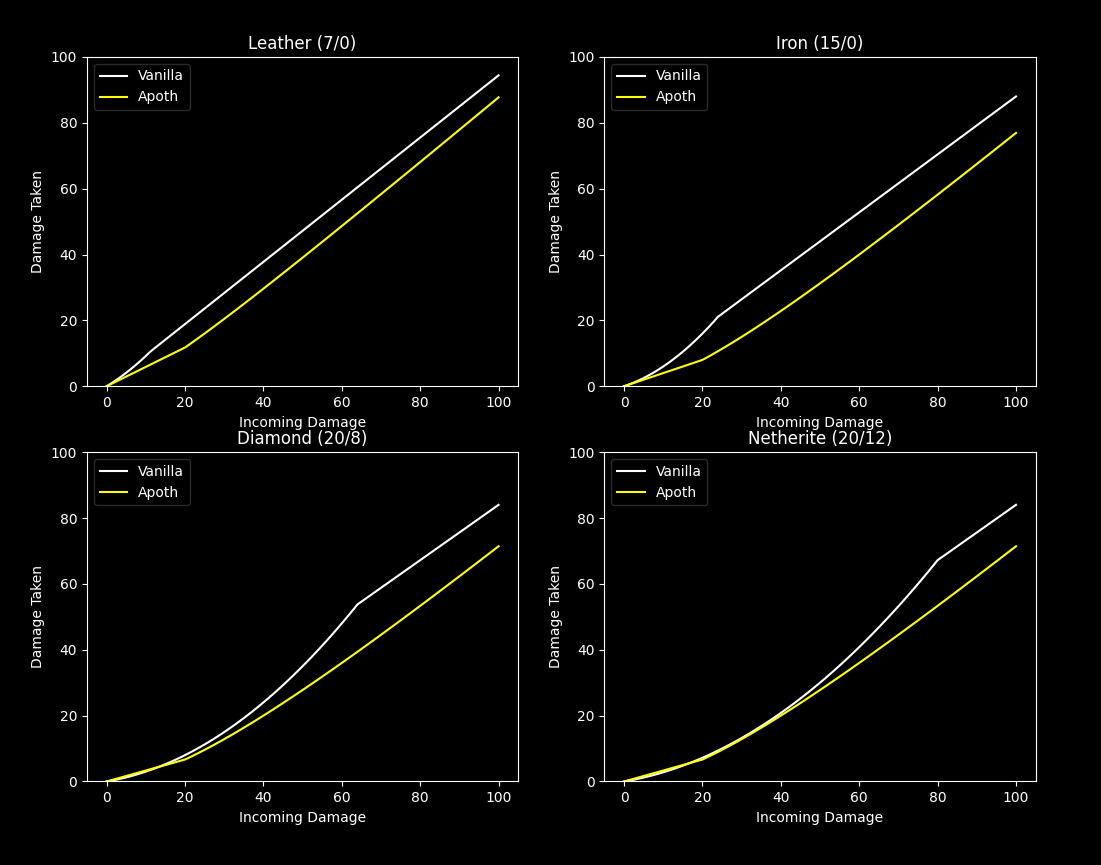
In vanilla, armor reduces damage based on your armor toughness value and the incoming damage value. With Apothic Attributes, only armor reduces incoming damage, and armor toughness reduces the effectiveness of enemy Armor Shred and Armor Pierce. For specifics on damage formulas, see here.
The changes in damage taken as a result of this can be seen in the following chart, where "New Apoth" is the formula currently used by Apothic Attributes. This chart does not take protection calculations into account. The changes to protection are described here.
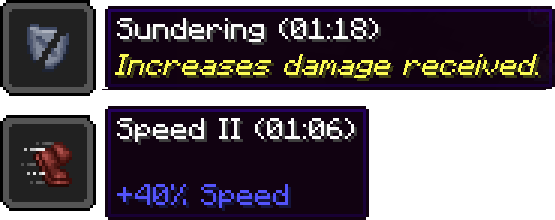
Another player-facing feature is the changes to potion tooltips. Descriptions will be added to potion items that are not simple attribute modifiers, and these descriptions (as well as the attribute modifiers) will be shown when hovering your active effects in the inventory.
Apothic Attributes allows attributes to format their own tooltips. The most notable example of attributes with custom formatting are Percent-Based Attributes, which always display their values in percentage form, regardless of their modifier type. The vanilla attributes Speed and Knockback Resistance are displayed in Percent-Based mode.
Part of this feature is the additional tooltip information. When advanced tooltips (f3+h) are enabled, additional information about the modifier type and the underlying value will be shown.
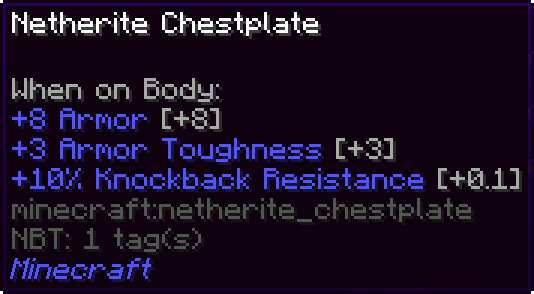
Addition modifiers will show text similar to [+100]
Multiply Base modifiers will show text similar to [+20x]
Multiply Total modifiers will show text similar to [x10]
Note that Multiply Total values have their underlying value offset by +1, even in the advanced tooltip display. This is due to how they are applied (a multiply total modifier causes the final value to be multiplied by 1+value).
Apothic Attributes depends on Placebo, and is available via maven:
maven {
  // Shadows_of_Fire's Maven
  url "https://maven.shadowsoffire.dev/releases"
}

dependencies {
  implementation fg.deobf("dev.shadowsoffire:Placebo:${mcVersion}-${placeboVersion}")
  implementation fg.deobf("dev.shadowsoffire:ApothicAttributes:${mcVersion}-${attributesLibVersion}")
}
The API package (https://github.com/Shadows-of-Fire/Apothic-Attributes/tree/1.20/src/main/java/dev/shadowsoffire/attributeslib/api) of Apothic Attributes contains everything you should need to interface with from the mod.

Project description from CurseForge.
Pick your setup
Choose the version and loader you play, then open the matching release.
Check the dependencies, then try the file in a copied instance before changing a world you care about.
Recent files
ApothicAttributes-1.21.1-2.10.1.jar
24 Jul 2026
ApothicAttributes-1.21.1-2.10.1.jar
24 Jul 2026
ApothicAttributes-1.21.1-2.10.0.jar
20 Jul 2026
ApothicAttributes-1.21.1-2.9.1.jar
19 Jun 2026
ApothicAttributes-26.1.2-3.0.1.jar
17 Jun 2026
1 Jun 2026
30 May 2026
11 Jan 2026
10 Jul 2025
10 May 2025
16 Apr 2025
14 Mar 2025
Looking for an older file? The official CurseForge project page is in Resources.