Forge Config API Port Optional for Icon Exporter 1.21.1-1.4.2
optionalMatching file found Matched file: v21.1.6-1.21.1-Fabric

Modrinth · Minecraft mod
Exports item and block icons to files
Quick answer
Icon Exporter 1.21.1-1.4.2 targets 1.21.1 with Fabric, Quilt. Installation on the client is optional. Installation on the dedicated server is optional. All 1 required mods have matching files.
Where it goes
Installation on the client is optional. Installation on the dedicated server is optional.
The source marks this as usable on both the client and server.
1.21.1-1.4.2. Change the file and its required mods may change too.
Install Cyclops Core first. We found matching files for this game-version and loader setup. 2 come through another mod in the chain.
2 extra mods were pulled in by other dependencies. Indented rows show who needs each one. We only count dependency files that match this setup. A file for another loader does not fill the gap.
Before you install it
Built for Icon Exporter 1.21.1-1.4.2. Pick another file and the loader, install side or required mods may change.
Use 1.21.1-1.4.2. It targets 1.21.1 with Fabric, Quilt; another release may have different loader, side or dependency requirements.
Install Cyclops Core first. We found matching files for this game-version and loader setup. 2 come through another mod in the chain.
Installation on the client is optional. Installation on the dedicated server is optional.
Use the “Get this file” button beside 1.21.1-1.4.2. It opens that exact file at the source.
About this project
This mod exports all item and block icons to PNG files.
This is a client-side mod, and should only be used a single time if you want to create an export of all icons in the game.
Notable features:
How to use:
/iconexporter export command. (Optionally, the image size can be passed, defaults to 64)icon-exports-x64 in your Minecraft directory. (Next to your screenshots directory.)
File structure: <modid>__<itemid>__<metadata>[__<NBT>].png
For example:
integrateddynamics__cable__0.pngminecraft__dropper__0.pngminecraft__lingering_potion__0__{Potion__"minecraft__strong_leaping"}.png
Optionally, NBT tags can be hashed (MD5) in file names when the fileNameHashTag config option is enabled.
This is useful when you have items with large NBT tags that result in very long file names.
If enabled, an auxiliary txt file will be created with the same base name containing the full tag contents.
For example:
minecraft__potion__0__d4272645c61d50de18ce399e7093de8f.pngminecraft__potion__0__d4272645c61d50de18ce399e7093de8f.txt
Progress is shown while rendering icons:
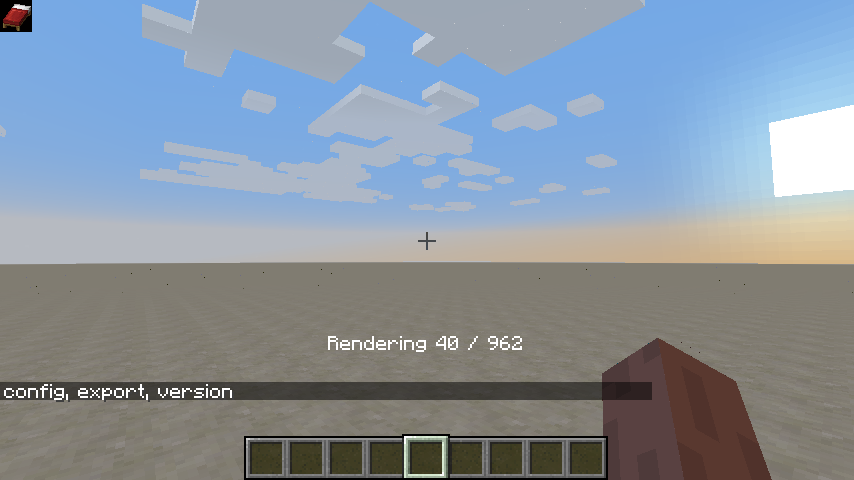
Project description from Modrinth.
Pick your setup
Choose the version and loader you play, then open the matching release.
Check the dependencies, then try the file in a copied instance before changing a world you care about.
Recent files
iconexporter-1.21.1-fabric-1.4.2.jar
30 Aug 2026
iconexporter-1.21.1-neoforge-1.4.2.jar
30 Aug 2026
iconexporter-1.21.1-forge-1.4.2.jar
30 Aug 2026
iconexporter-26.2-neoforge-1.4.2-214.jar
22 Aug 2026
iconexporter-26.2-forge-1.4.2-214.jar
22 Aug 2026
iconexporter-26.2-fabric-1.4.2-214.jar
22 Aug 2026
iconexporter-26.1.2-neoforge-1.4.2-213.jar
22 Aug 2026
iconexporter-26.1.2-forge-1.4.2-213.jar
22 Aug 2026
iconexporter-26.1.2-fabric-1.4.2-213.jar
22 Aug 2026
iconexporter-26.2-neoforge-1.4.2-212.jar
20 Jul 2026
iconexporter-26.2-forge-1.4.2-212.jar
20 Jul 2026
iconexporter-26.2-fabric-1.4.2-212.jar
20 Jul 2026
Looking for an older file? The official Modrinth project page is in Resources.
 mod
modA performant rendering optimization Mod for Minecraft. Evolving from a optimized VulkanMod fork for 26.1.2 into an independent mod for 26.2.
 mod
modSpill blood for power. Altars that consume life, sigils that bend the world, custom demons in an endless dungeon, sentient armor that drinks souls, a shield that pays your damage in essentia. Datapack-driven from the ground up.
 mod
modA mod about curses and the like.
