Minecraft version
Back to mods 
CurseForge · Minecraft mod
NekoUI
change and add more ui
Choose a version Pick your version below, then grab the matching file.
Quick answer
Which NekoUI release should I use?
Latest stable file nekoui-26.3-2.1.0-26100600-all.jar
Game version 26.3
Loader Forge
nekoui-26.3-2.1.0-26100600-all.jar targets 26.3 with Forge. The project page does not say whether this file belongs on the client, dedicated server, or both. No extra mods listed for this file.
Where it goes
Is NekoUI required on the client, server, or both?
The project page does not say whether this file belongs on the client, dedicated server, or both.
Client Source doesn’t say
Dedicated server Source doesn’t say
Loader for this release Forge
Required install it here Optional supported, not mandatory Not supported do not install here Source doesn’t say do not assume
The source does not explicitly classify this release as client-only or server-only.
What else does nekoui-26.3-2.1.0-26100600-all.jar need?
nekoui-26.3-2.1.0-26100600-all.jar. Change the file and its required mods may change too.
This file does not list any required mods. Do not add a library just because a different file uses it.
This file does not list any required or optional mods.
Before you install it
Add NekoUI without breaking your instance.
Built for nekoui-26.3-2.1.0-26100600-all.jar. Pick another file and the loader, install side or required mods may change.
- 01
Stick to this file
Use nekoui-26.3-2.1.0-26100600-all.jar. It targets 26.3 with Forge; another release may have different loader, side or dependency requirements.
- 02
Bring the mods it needs
This file does not list any required mods. Do not add a library just because a different file uses it.
- 03
Put it on the correct side
The project page does not say whether this file belongs on the client, dedicated server, or both.
- 04
Pick the file you checked
Use the “Get this file” button beside nekoui-26.3-2.1.0-26100600-all.jar. It opens that exact file at the source.
About this project
What does NekoUI add?
Neko UI
Introduction
Neko UI enhances your gaming experience by modifying the original HUD and adding a range of practical interfaces.
Important Notes
- Cores Mod Users: If you have the
Coresmod installed, please download the file without the "all" suffix to avoid conflicts. - JS Code Support: If you need to use JavaScript code to customize the interface, please additionally download and install the
GraalJSmod.
Usage Guide
General Usage
Neko UI offers extensive customization options. If you're not satisfied with the default interface, you can modify the configuration files to customize the HUD display to your liking.
If you encounter any issues during customization, please refer to the WIKI documentation or contact me using the contact information below.
JS Code Example
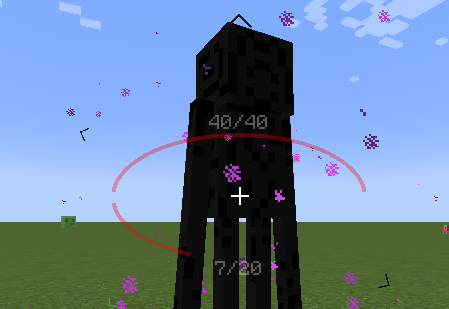
With JavaScript code, you can draw custom UI elements on the screen, such as two elliptical health bars.
Example: Center Health Bar
Interface Preview
Here are some interface previews of Neko UI, showcasing its features and customization options.
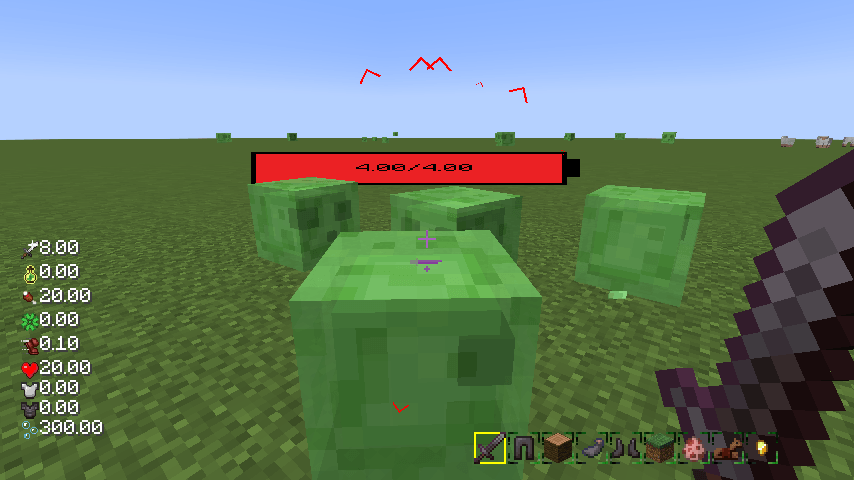
Custom HUD: The health bar, hunger bar, experience bar, and hotbar have been redesigned and can be enabled or disabled individually.
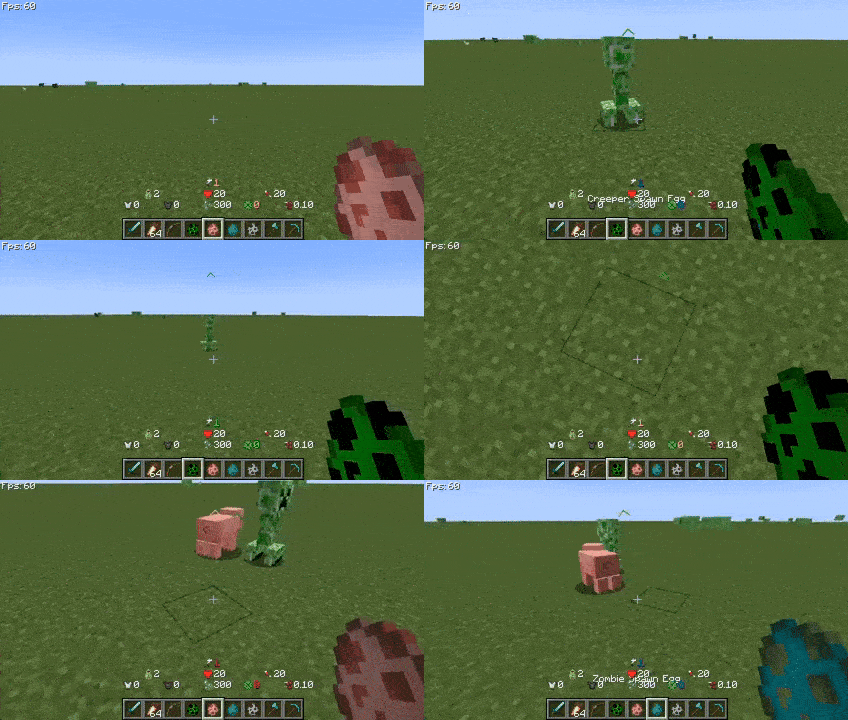
Creature Direction Indicator: Real-time display of creatures relative to your position, with dynamic scaling of icons based on distance for easy tracking.
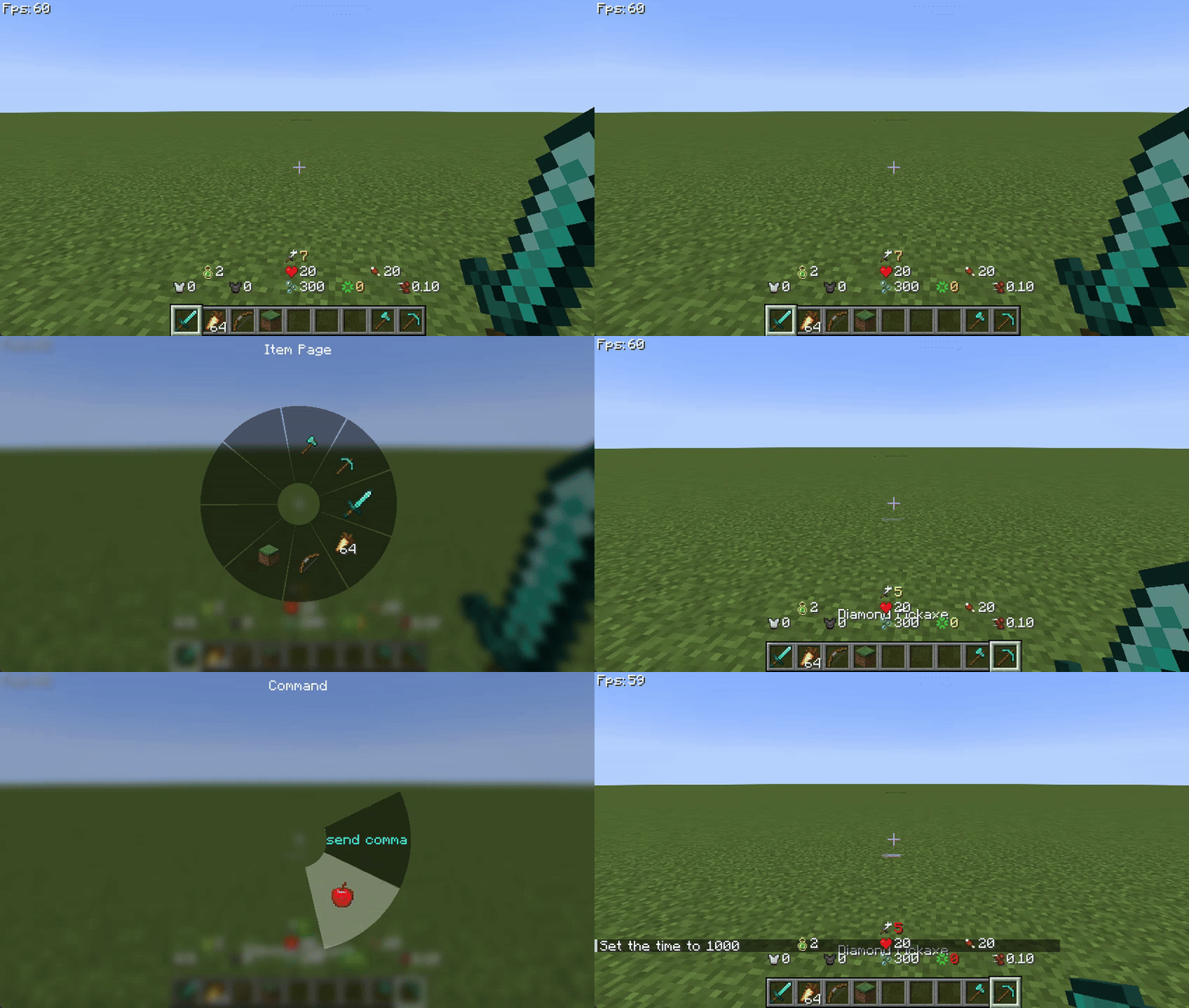
Quick Menu: Hold down the
TABkey to open the quick menu, switch interfaces with the left and right mouse buttons, slide to the desired option, and releaseTABto trigger.
More Information
If you have any questions, suggestions, or feedback, please feel free to contact me through the following methods.
Happy gaming!
Contact Information
Project description from CurseForge.
Pick your setup
NekoUI by Minecraft version and loader
Choose the version and loader you play, then open the matching release.
Minecraft version
26.2
2 loader buildsMinecraft version
26.1.2
2 loader buildsMinecraft version
26.1.1
2 loader buildsMinecraft version
1.21.11
2 loader buildsMinecraft version
1.21.10
2 loader buildsMinecraft version
1.21.9
1 loader buildMinecraft version
1.21.8
2 loader buildsMinecraft version
1.21.7
1 loader buildMinecraft version
1.21.5
1 loader buildMinecraft version
1.21.4
1 loader buildMinecraft version
1.21.1
2 loader buildsShowing the newest 12 of 17 game versions. Older files are in the list below.
Check the dependencies, then try the file in a copied instance before changing a world you care about.
Recent files
NekoUI versions and loaders
nekoui-26.3-2.1.0-26100600-all.jar
6 Oct 2026
Client Source doesn’t say Server Source doesn’t say Dependencies No extras listed Listed on Release listing
Check the 26.3 · Forge setup Forge26.3 release
nekoui-26.3-2.1.0-26100100-Neo-all.jar
3 Oct 2026
Client Source doesn’t say Server Source doesn’t say Dependencies No extras listed Listed on Release listing
Check the 26.3 · NeoForge setup NeoForge26.3 release
nekoui-26.2-2.1.0-26083000-Neo-all.jar
30 Aug 2026
Client Source doesn’t say Server Source doesn’t say Dependencies No extras listed Listed on Release listing
Check the 26.2 · NeoForge setup NeoForge26.2 release
nekoui-26.1.1-2.1.0-26082800-Neo-all.jar
28 Aug 2026
Client Source doesn’t say Server Source doesn’t say Dependencies No extras listed Listed on Release listing
Check the 26.1.1 · NeoForge setup NeoForge26.1.1 release
nekoui-1.20.1-2.0.0-26072400-all.jar
24 Jul 2026
Client Source doesn’t say Server Source doesn’t say Dependencies No extras listed Listed on Release listing
Check the 1.20.1 · Forge setup 1.20.1Forge release
nekoui-26.2-2.0.1-26071900-all.jar
19 Jul 2026
Client Source doesn’t say Server Source doesn’t say Dependencies No extras listed Listed on Release listing
Check the 26.2 · Forge setup Forge26.2 release
nekoui-26.2-2.1.0-26061800-Neo-all.jar
18 Jun 2026
Client Source doesn’t say Server Source doesn’t say Dependencies No extras listed Listed on Release listing
Check the 26.2 · NeoForge setup NeoForge26.2 release
nekoui-26.1.1-2.1.0-26061200-Neo-all.jar
12 Jun 2026
Client Source doesn’t say Server Source doesn’t say Dependencies No extras listed Listed on Release listing
Check the 26.1.2 · NeoForge setup NeoForge26.1.126.1.2 release
nekoui-26.1.1-2.0.2-26041600-Neo-all.jar
16 Apr 2026
Client Source doesn’t say Server Source doesn’t say Dependencies No extras listed Listed on Release listing
Check the 26.1.2 · NeoForge setup NeoForge26.1.126.1.2 release
nekoui-26.1.1-2.0.2-26041500-Neo-all.jar
15 Apr 2026
Client Source doesn’t say Server Source doesn’t say Dependencies No extras listed Listed on Release listing
Check the 26.1.2 · NeoForge setup NeoForge26.1.126.1.2 release
nekoui-26.1.1-2.0.1-26041300-all.jar
13 Apr 2026
Client Source doesn’t say Server Source doesn’t say Dependencies No extras listed Listed on Release listing
Check the 26.1.2 · Forge setup Forge26.1.126.1.2 release
nekoui-26.1.2-2.0.2-26041100-Neo-all.jar
11 Apr 2026
Client Source doesn’t say Server Source doesn’t say Dependencies No extras listed Listed on Release listing
Check the 26.1.2 · NeoForge setup NeoForge26.1.2 release
Looking for an older file? The official CurseForge project page is in Resources.
 mod
mod CurseForge + Modrinth · Minecraft
Cobblemon Villager overhaul - [ADDON]
This mod makes you now use cobbledollars instead of emeralds
 mod
mod CurseForge + Modrinth · Minecraft
More Banner Features
Banners on Horses, Boats, Happy Ghasts, as Capes, Hats, more layers and more!
 mod
mod CurseForge + Modrinth · Minecraft
Biology Dictionary
Discover, highlight, inspect, modify - your vanilla & modded mob encyclopedia