Minecraft version
Back to mods 
CurseForge · Minecraft mod
Mega Randomizer
Customizable Minecraft randomizer for block, mob, and player drops, and even mob spawn randomization!
Choose a version Pick your version below, then grab the matching file.
Quick answer
Which Mega Randomizer release matches 1.7.10 Forge?
Best match for your filters megarandomizer-org.stevefal-v1.2-1.7.10.jar
Game version 1.7.10
Loader Forge
Mega Randomizer megarandomizer-org.stevefal-v1.2-1.7.10.jar targets 1.7.10 with Forge. The project page does not say whether this file belongs on the client, dedicated server, or both. No extra mods listed for this file.
Where it goes
Is Mega Randomizer required on the client, server, or both?
The project page does not say whether this file belongs on the client, dedicated server, or both.
Client Source doesn’t say
Dedicated server Source doesn’t say
Loader for this release Forge
Required install it here Optional supported, not mandatory Not supported do not install here Source doesn’t say do not assume
The source does not explicitly classify this release as client-only or server-only.
What else does Mega Randomizer megarandomizer-org.stevefal-v1.2-1.7.10.jar need?
megarandomizer-org.stevefal-v1.2-1.7.10.jar on 1.7.10 Forge. Every mod below is checked against that same setup.
This file does not list any required mods. Do not add a library just because a different file uses it.
This file does not list any required or optional mods.
Before you install it
Add Mega Randomizer without breaking your instance.
Built for Mega Randomizer megarandomizer-org.stevefal-v1.2-1.7.10.jar on 1.7.10 Forge. Pick another file and the loader, install side or required mods may change.
- 01
Stick to this file
Use megarandomizer-org.stevefal-v1.2-1.7.10.jar. It targets 1.7.10 with Forge; another release may have different loader, side or dependency requirements.
- 02
Bring the mods it needs
This file does not list any required mods. Do not add a library just because a different file uses it.
- 03
Put it on the correct side
The project page does not say whether this file belongs on the client, dedicated server, or both.
- 04
Pick the file you checked
Use the “Get this file” button beside megarandomizer-org.stevefal-v1.2-1.7.10.jar. It opens that exact file at the source.
About this project
What does Mega Randomizer add?

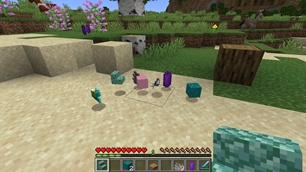
Welcome to Mega Randomizer, the Minecraft randomizer that you can customize.
- You can choose whether to randomize drops from blocks, mobs, players, or all three!
- Mob spawns are now also randomized!
- Even more randomization features are planned for future updates.
- Toggle "volatile" mode for randomizing drops every break/kill instead of per-world seed.
- Each randomization feature can be turned on or off using the in-game menu, or with /gamerule commands.
- You can also choose to include or exclude non-survival mode items as available randomized drops. **Only in version 1.20.1 and up
Join our official Discord for support, suggestions, and community!
- Using the gamerule
doVolatileDrops, drops from mobs and blocks can now be randomized with every break or kill, rather than consistent drops based on the world seed. - Mob spawns are now randomized!!
- Bosses can be included in spawn randomization with
/gamerule excludeBosses false - "Bosses" in this context includes:
- Elder Guardian
- Ender Dragon
- Giant
- Warden
- Wither
- Bosses can be included in spawn randomization with
** Sep 12, 2026 Updates:
- There is now a 'Tracker' screen to help you keep track of drop randomizations.
- It also shows what randomized mobs have replaced the vanilla-spawned ones!
- You can access the Tracker screen from the in-game Pause menu, or by simply pressing the
Gkey while in-game.- The Tracker screen maps vanilla drops to their randomized replacements:
<vanilla drop> ➡ <randomized drop>- For example: If you break a Grass Block, the Tracker screen will show
Dirt ➡ <randomized drop> - Please keep in mind that this means randomized drops are tracked in the Tracker screen based on the drop they have replaced, not the "source" they dropped from.
- This intentional: Tracking drops by their "source" would have made for a much messier, harder-to-read Tracker screen, since some things drop multiple items, have different drops based on tools/enchantments used, or sometimes drop nothing, etc.
- For example: If you break a Grass Block, the Tracker screen will show
- Items show up in the tracker screen as they are discovered, so you will start with an (almost) empty tracker, and as you discover more drops and spawns, they will be added to the Tracker.
- When any of the "exclude" game rules are changed, the tracker will be reset for either drops or mobs because the entire drop or mob pool will have changed, meaning the previous Tracker information would have been out-of-date.
- The Tracker screen maps vanilla drops to their randomized replacements:
- The
/reshufflecommand has been removed. Drop and spawn pools are now updated automatically when one of the 'exclude' gamerules is changed.
Basic Usage
The Mega Tracker screen can be accessed by pressing the G key while in-game, or from the in-game Pause menu.
The Mega Randomizer options menu screen can be accessed from the in-game Pause menu.
Alternatively, randomization features can be customized using the following commands:
- For block drops randomization:
/gamerule doBlockRandomDrops <true/false> - For mob drops randomization:
/gamerule doEntityRandomDrops <true/false> - For player drops randomization:
/gamerule doPlayerRandomDrops <true/false> - For mob spawn randomization:
/gamerule doRandomizeSpawns <true/false> - For "volatile randomization" of drops:
/gamerule doVolatileDrops <true/false> - To exclude/include spawn eggs:
/gamerule excludeSpawnEggs <true/false> - To exclude/include mob heads:
/gamerule excludeHeads <true/false> - To exclude/include creative-mode-only items:
/gamerule excludeCreativeItems <true/false> - To exclude/include bosses in mob spawn randomization:
/gamerule excludeBosses <true/false> - **Note that the old
/reshufflecommand has been removed, as it is now unnecessary; changes made to the drop/spawn pools using 'exclude' commands now take effect immediately.
For example, to include mob heads, you would run:
/gamerule excludeHeads false
If you like Mega Randomizer, consider buying me a cup of coffee! Your generosity helps keep this project going.

Project description from CurseForge.
Pick your setup
Mega Randomizer by Minecraft version and loader
Choose the version and loader you play, then open the matching release.
Minecraft version
1.21.1
1 loader buildMinecraft version
1.20.1
1 loader buildMinecraft version
1.16.5
1 loader buildMinecraft version
1.12.2
1 loader buildMinecraft version
1.7.10
1 loader buildCheck the dependencies, then try the file in a copied instance before changing a world you care about.
Recent files
Mega Randomizer versions and loaders
megarandomizer-org.stevefal-v1.2-1.7.10.jar
megarandomizer1_7_10-1.2-1.7.10.jar
24 Jul 2026
Client Source doesn’t say Server Source doesn’t say Dependencies No extras listed Listed on Release listing
Check the 1.7.10 · Forge setup Forge1.7.10 release
Looking for an older file? The official CurseForge project page is in Resources.