Minecraft version
Back to mods 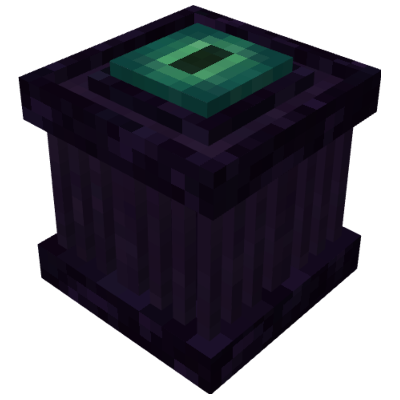
CurseForge · Minecraft mod
Endercage
A tool for capturing and carrying mobs.
Choose a version Pick your version below, then grab the matching file.
Quick answer
Which Endercage release should I use?
Latest stable file V2
Game version 1.20.1
Loader Fabric
Endercage V2 targets 1.20.1 with Fabric. The project page does not say whether this file belongs on the client, dedicated server, or both. No extra mods listed for this file.
Where it goes
Is Endercage required on the client, server, or both?
The project page does not say whether this file belongs on the client, dedicated server, or both.
Client Source doesn’t say
Dedicated server Source doesn’t say
Loader for this release Fabric
Required install it here Optional supported, not mandatory Not supported do not install here Source doesn’t say do not assume
The source does not explicitly classify this release as client-only or server-only.
What else does Endercage V2 need?
V2. Change the file and its required mods may change too.
This file does not list any required mods. Do not add a library just because a different file uses it.
This file does not list any required or optional mods.
Before you install it
Add Endercage without breaking your instance.
Built for Endercage V2. Pick another file and the loader, install side or required mods may change.
- 01
Stick to this file
Use V2. It targets 1.20.1 with Fabric; another release may have different loader, side or dependency requirements.
- 02
Bring the mods it needs
This file does not list any required mods. Do not add a library just because a different file uses it.
- 03
Put it on the correct side
The project page does not say whether this file belongs on the client, dedicated server, or both.
- 04
Pick the file you checked
Use the “Get this file” button beside V2. It opens that exact file at the source.
About this project
What does Endercage add?
The endercage is a tool/block for capturing and easily transporting mobs. Other than that it also has some other functionalities including the ability to play sounds from contained entities and displaying the entity as decoration.
Features:
= General functionality:
-> Capture entities by rightclicking them with the cage.
-> Transfer entities between a placed cage and a cage in your hand by rightclicking them with it.
-> Entities inside the cage will play their ambient sound once in a while. You can mute a cage by rightclicking it with a feather and unmute it by rightclicking it with a noteblock.
= Redstone functionality:
-> If a cage is powered it will:
-->> Release the contained entity / capture the entity above if the block above is air.
-->> Steal from/give the contained entity to a cage above.
-> Noteblocks above cages will always play the ambient of the entity below, even if the cage is muted.
-> Comparators will output a redstone signal of 15 if the cage is filled and 0 if not.
= Misc:
-> If a filled endercage is placed in a itemframe it will just show the entitiy. If the itemframe is facing up the entity will stand normally.
There are some settings to enable/disable containment of hostiles (disabled by default), disable redstone functionality, mute them altogether and ban certain entities from being captured at all.
Note: If a entity renders as a question mark it errored while trying to render and its model got replaced with the "?" to prevent a crash. If released it will look normal.
Project description from CurseForge.
Pick your setup
Endercage by Minecraft version and loader
Choose the version and loader you play, then open the matching release.
Check the dependencies, then try the file in a copied instance before changing a world you care about.
Recent files
Endercage versions and loaders
V2
endercage-1.1.jar
19 Sept 2023
Client Source doesn’t say Server Source doesn’t say Dependencies No extras listed Listed on Release listing
Check the 1.20.1 · Fabric setup Fabric1.20.1 release
V1
endercage-1.0.jar
2 Sept 2023
Client Source doesn’t say Server Source doesn’t say Dependencies No extras listed Listed on Release listing
Check the 1.20.1 · Fabric setup Fabric1.20.1 beta
Looking for an older file? The official CurseForge project page is in Resources.
 mod
CurseForge + Modrinth · Minecraft
Modern Morph
A modern port of iChun's iconic Morph mod
 mod
CurseForge · Minecraft
Sophisticated Hot Deposit Block
A carved owl block that deposits your matching items into nearby storage with one right-click. A controller-friendly add-on for Sophisticated Item Actions.
 mod
CurseForge · Minecraft
Equestria: Mythical Creatures Legacy
An unofficial Forge 1.20.1 legacy port of MLP Mythical Creatures, restoring its creatures, bosses and chaotic combat.