Minecraft version
Back to mods 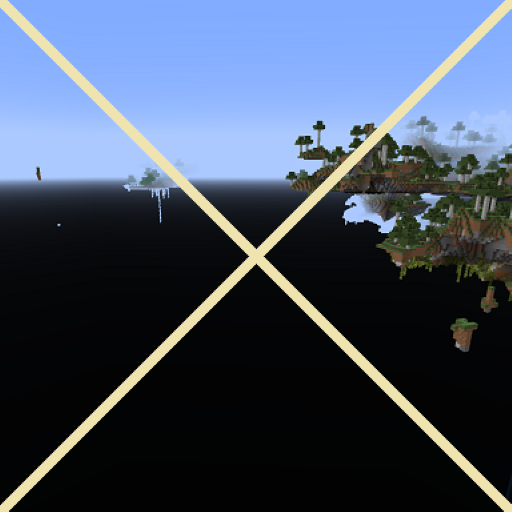
CurseForge · Minecraft mod
Clear Void
Remove the pitch black bottom half of the skybox at low Y levels. For skyblock players. Intended for floating island worlds.
Choose a version Pick your version below, then grab the matching file.
Quick answer
Which Clear Void release should I use?
Latest stable file clearvoid-mc1.21.2-1.3.1.jar
Game version 1.21.5, 1.21.8, 1.21.9
Loader Fabric, NeoForge, Quilt
Clear Void clearvoid-mc1.21.2-1.3.1.jar targets 1.21.5, 1.21.8, 1.21.9 with Fabric, NeoForge, Quilt. The project page does not say whether this file belongs on the client, dedicated server, or both. No extra mods listed for this file.
Where it goes
Is Clear Void required on the client, server, or both?
The project page does not say whether this file belongs on the client, dedicated server, or both.
Client Source doesn’t say
Dedicated server Source doesn’t say
Loader for this release Fabric, NeoForge, Quilt
Required install it here Optional supported, not mandatory Not supported do not install here Source doesn’t say do not assume
The source does not explicitly classify this release as client-only or server-only.
What else does Clear Void clearvoid-mc1.21.2-1.3.1.jar need?
clearvoid-mc1.21.2-1.3.1.jar. Change the file and its required mods may change too.
This file does not list any required mods. Do not add a library just because a different file uses it.
This file does not list any required or optional mods.
Before you install it
Add Clear Void without breaking your instance.
Built for Clear Void clearvoid-mc1.21.2-1.3.1.jar. Pick another file and the loader, install side or required mods may change.
- 01
Stick to this file
Use clearvoid-mc1.21.2-1.3.1.jar. It targets 1.21.5, 1.21.8, 1.21.9 with Fabric, NeoForge, Quilt; another release may have different loader, side or dependency requirements.
- 02
Bring the mods it needs
This file does not list any required mods. Do not add a library just because a different file uses it.
- 03
Put it on the correct side
The project page does not say whether this file belongs on the client, dedicated server, or both.
- 04
Pick the file you checked
Use the “Get this file” button beside clearvoid-mc1.21.2-1.3.1.jar. It opens that exact file at the source.
About this project
What does Clear Void add?
Clear Void
Download: CurseForge or Modrinth
Sponsor if you like this project.
This is a simple mod that removes the pitch black bottom half of the skybox. You will probably need this if you are playing in some sort of floating island world.
Effect
In vanilla Minecraft, when playing floating-islands worlds, you'll find that the bottom half of the skybox (the void) suddenly turning black when you go through Y=58. This is annoying in floating island worlds.

With the mod, the void will no longer suddenly turn black. Instead, it will gardually become dark when you go through Y levels below Y=-32.
Actually it will, but at 64 blocks below the min build height, so you will not encounter it unless you are dying in the void.
Reporting bugs
Report bugs at Github Issue Tracker. Avoid using private messages since I might not check them.
Project description from CurseForge.
Pick your setup
Clear Void by Minecraft version and loader
Choose the version and loader you play, then open the matching release.
Minecraft version
1.21.9
3 loader buildsMinecraft version
1.21.8
3 loader buildsMinecraft version
1.21.7
3 loader buildsMinecraft version
1.21.6
3 loader buildsMinecraft version
1.21.5
3 loader buildsMinecraft version
1.21.4
3 loader buildsMinecraft version
1.21.3
3 loader buildsMinecraft version
1.21.2
3 loader buildsMinecraft version
1.21.1
3 loader buildsMinecraft version
1.21
2 loader buildsMinecraft version
1.20.6
2 loader buildsShowing the newest 12 of 25 game versions. Older files are in the list below.
Check the dependencies, then try the file in a copied instance before changing a world you care about.
Recent files
Clear Void versions and loaders
clearvoid-mc1.21.2-1.3.1.jar
2 Nov 2025
Client Source doesn’t say Server Source doesn’t say Dependencies No extras listed Listed on Release listing
Check the 1.21.10 · Fabric setup 1.21.5Fabric1.21.81.21.9 release
clearvoid-mc1.21.1-1.3.1.jar
2 Nov 2025
Client Source doesn’t say Server Source doesn’t say Dependencies No extras listed Listed on Release listing
Check the 1.21.1 · Fabric setup FabricNeoForge1.21.1Quilt release
clearvoid-forge-1.3.0.jar
3 Sept 2023
Client Source doesn’t say Server Source doesn’t say Dependencies No extras listed Listed on Release listing
Check the 1.21 · Forge setup 1.19.31.20.21.211.18.1 release
clearvoid-fabric-1.3.0.jar
3 Sept 2023
Client Source doesn’t say Server Source doesn’t say Dependencies No extras listed Listed on Release listing
Check the 1.21 · Fabric setup 1.19.31.20.21.211.18.1 release
Looking for an older file? The official CurseForge project page is in Resources.
 mod
CurseForge + Modrinth · Minecraft
Brightness Aura
Darkness? Never heard of it
 mod
CurseForge + Modrinth · Minecraft
Remnants | RPG Stats, Skills & Progression
Soulslike leveling for Minecraft: stage attribute points, preview every stat before and after, and confirm your build in one press.
 mod
CurseForge · Minecraft
combat mode_Elemental(战斗模式)
A parry-and-bullet-time action combat overhaul with 7-element reactions, bottle resonance and monster stun gauges — all configurable.